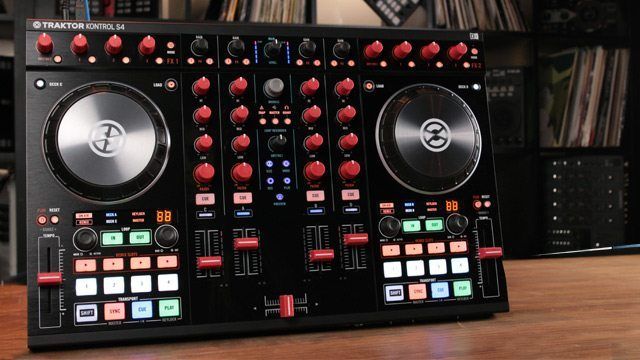
In the three years since the original Kontrol S4 dropped, Native Instruments added Remix Decks, Flux Mode, and the Traktor DJ app to the Traktor lexicon. The Kontrol S4 MK2 and S2 MK2 refresh the series to keep up with the software’s progression. Is all that growth worth a shrinkage to your bank account? Judge these beautiful new controllers for yourself.
(editor’s note: the units pictured in this review have Chroma Caps on them – not the default knobs. All Kontrol S4 MK2s + Kontrol S2 MK2s in the DJTT Store are sold with Chroma Caps.)
Reviewed: Native Instruments Traktor Kontrol S4 MK2 and S2 MK2
Price: S4: $699 (MSRP) S2: $399
Communication: MIDI over USB, with high-resolution jog wheels
Ships with: Traktor Pro 2, power supply, USB cable, iOS 30-pin cable, keyboard shortcut chart.
Weight: S4: 7.5 lb. (3.4 kg); S2: 5.7 lb. (2.6 kg)
Dimensions: S4: 19.7 x 13.3 x 2.8 inches, S2: 17.2 x 12.1 x 2.6 inches
The Good: Dedicated Flux Mode buttons. New multi-colored backlit pads for Remix Deck control. Plug-and-play support for iOS Traktor DJ. Same great 24-bit/96 khz audio interface and build quality as before.
The Bad: Some noise on the audio output when using USB bus power. Not working with iOS 7 yet at the time of publication.
The Bottom Line: The Kontrol S4 and S2 were already excellent options for Traktor users. The new features catch the hardware up to where the software has been going. They may not attract massive throngs of new converts, but they undoubtedly make two really nice controllers even better, and for the same price as before.
MK2 VS. MK1
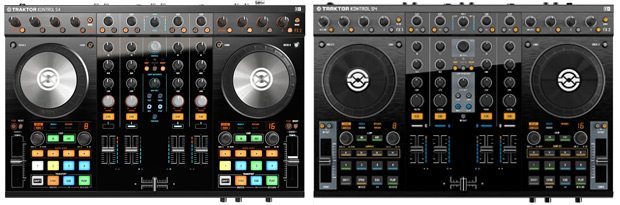
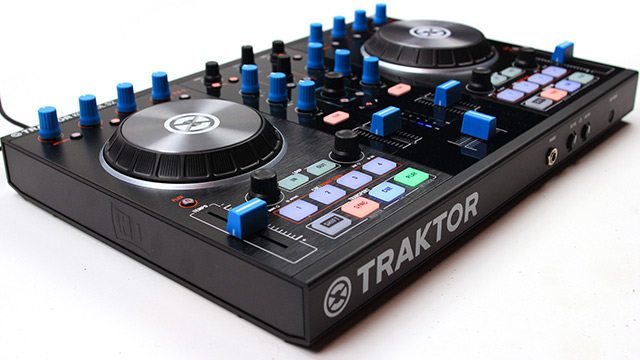
The S4 MK2 and S2 MK2 have been slightly refreshed, with the same great build quality with aircraft-grade aluminum face plates and the same audio interface features with NI’s renown 24-bit/96 khz sound quality and high output levels. There’s a little more spit-and-polish to the design: shinier jog wheels, updated surface finishes, etc. The size dimensions and weight are nearly identical to the older versions, and the layout of controls looks just about the same, as well, with a few important distinctions.
Want to catch up on the original units? Read our reviews of the Kontrol S4 and Kontrol S2.
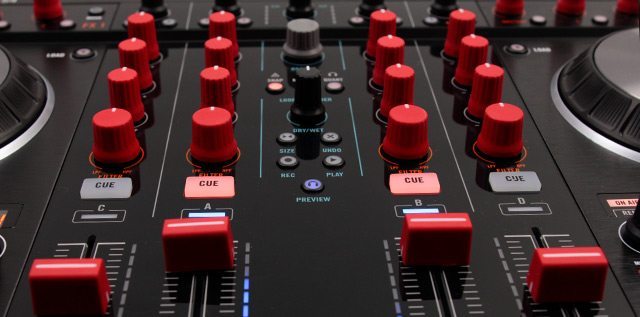
The first thing you notice that’s different about the S4 MK2 and S2 MK2 are the fully backlit RGB LED buttons. They not only look more beautiful than the old partially lit buttons, but they also stand out visually much better, whether in the dark or in daylight conditions. The restyled buttons give better visual feedback for the color-coded Remix Deck samples that they can launch.
While the original Kontrol S units didn’t have direct access to the Remix Decks, the S4 MK2and S2 MK2 were built for it. That’s what the slight refresh of these units was about: providing better access to some of the most important recent Traktor features. That’s also why the new units come with USB-to-iOS-30-pin cables and work with Traktor DJ on iOS of the box.
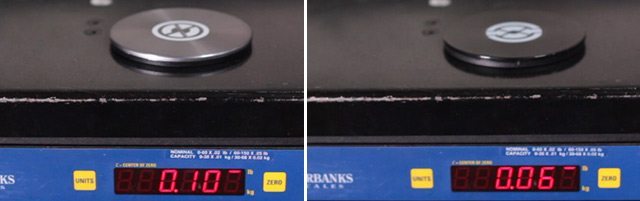
The S4 and S2 MK2 both sport redesigned jogwheels that are now topped with aluminum instead of plastic – they’re just heavier enough (see image above) to allow their use to feel signifiantly more solid than the MK1 platters ever did. Traktor is clearly responding to some of the praise around the jogwheels Pioneer’s DDJ-SX and making their own jogs feel more significant.
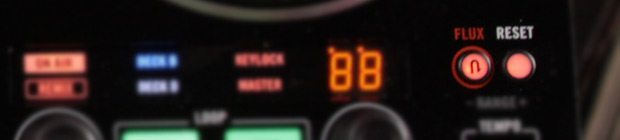
Finally, both new controllers have crucial Flux Mode buttons above the pitch faders of both decks. These Flux Mode buttons replace the Reset button from the S2 Mk 1 and the S4 MK2 replaces the old Offset ± buttons with Flux Mode and Reset buttons. Flux Mode is a recent Traktor addition that lets you fiddle with performance features like loops and hotcues while the song continues playback in the background. When your fingers come off the controls, the song picks up at the spot it would be at if playing continuously. The dedicated button on the new Kontrol S units makes it so easy to jump into Flux Mode and start playing away on spontaneous loops with the Loop Size/Set push encoder.
S4 MK2 VS. S2 MK2
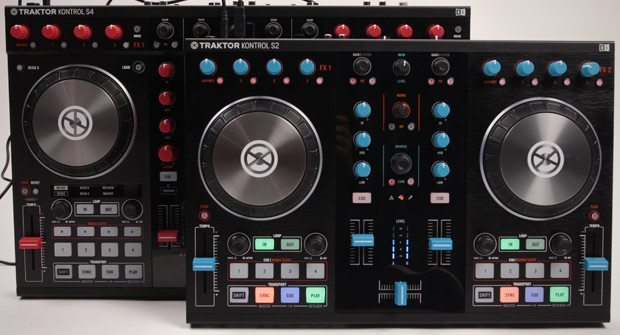
As before, the S4 MK2 sets that flagship standard for NI’s Traktor Kontrol series. It’s a full-fledged 4-deck controller, while the S2 MK2 controls 2 decks along with some limited access to the Remix Decks C and D.
Above and beyond the S2 Mk2, the S4 Mk2 has two additional channel strips; dedicated center-detented Filter knobs for all four channel strips; vital Snap, Quantize, and Master buttons; a very handy Mode button in both FX decks for toggling between Single and Group effects; a dedicated Loop Recorder section; and four extra Remix Slot buttons for launching clips from a Remix Deck.
All that extra stuff adds up to some extra size and bulk, but not all that much. The S4 Mk2 adds a few centimeters to the length and depth of the S2 Mk2 and weighs 1.8 pounds more. The S4 Mk2 can be a bit of handful both to carry and possibly to make room for in a DJ booth. However, all of its extra hands-on control can make a world of difference. The S2 Mk2 is a worthy compromise for anyone with size or budgetary concerns, or who simply won’t use all the bells and whistles of the S4 Mk2.
REMIX DECK ACCESS
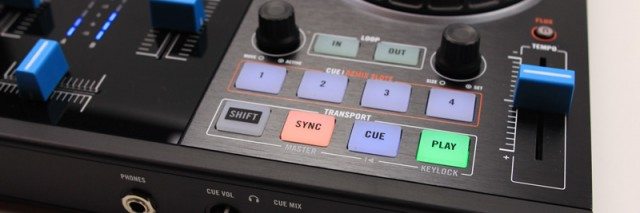
The new controller versions basically swap in Remix Deck controls where the old versions had Sample Slot controls. The 1-4 pads on the S2 Mk2’s two decks can double as Remix Deck controls when you have Traktor Deck’s C and D set as Remix Decks. To switch the pads to Remix mode, you turn on the A and/or B buttons in the center Remix section. From there, you can either trigger any of the upper sample slots in the Remix Deck with pads 1-4, or if any of those slots are empty, use the buttons to capture samples from a live deck or load samples from the Library. The knob in the S2 Mk2’s Remix section controls the volume of both Remix Decks.
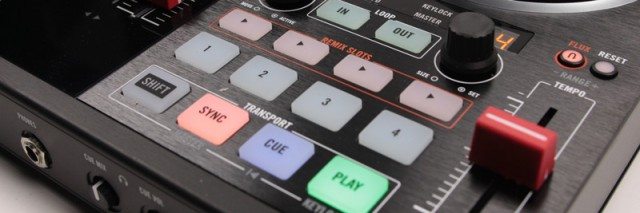
On the S4 Mk2, the four dedicated Remix Slot buttons let you trigger samples from the top slots of Remix Deck directly from a track deck. However, you have excellent alternatives in the Traktor Kontrol S4 preferences to use the Remix Slot buttons as either Hotcue 5-8, Direct Loop or Beatjump buttons, all of which can be enormously useful.
No matter what behavior you choose for the Remix Slot buttons when on a Track Deck, when on a Remix Deck they will behave the same, which is to trigger and re-trigger the top four slots of a Remix Deck. Also while controlling a Remix Deck, the S4 Mk2’s 1-4 pad buttons work to mute/unmute the four Remix Deck slots, and the bottom row of transport control buttons work globally on all four Remix slots. Just like with the S2 Mk2, you can use the S4 Mk2’s Remix Slot buttons to capture samples or load samples to empty slots.
WITH TRAKTOR DJ
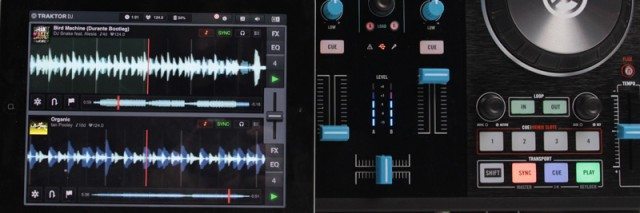
Native Instruments seems to be really taking the migration of DJing to iOS devices pretty seriously. Even if it launched its Traktor DJ app at first as a track preparation tool that also that you could also mix tracks with, making both the S4 Mk2 and S2 Mk2 compatible with iOS hardware and Traktor DJ should indicate some level of demand for real-world DJing with Traktor DJ, or at the very least it indicates that NI aims to create such a demand.
Though it may seem overkill at first to use the S4 or even S2 on an iPad app, it’s not so crazy once you try it. On one of the more powerful iOS devices with a lot space for music and processing power for the effects, loops, EQing, and cueing that you’ll throw at it, the Kontrol S units make a compelling case for Traktor DJ as a live tool. From the controllers you can:
- browse and load tracks
- set and launch cue points and loops
- EQ tracks
- mix in three effects per deck
- use the dedicated Filter knob and Quantize button on the S4 Mk2.
- control Freeze mode cuepoints
The iPads we tried it on using the included 30-pin cable recognized the controller right away and launched Traktor DJ for it, after which the controller provided a great audio output and separate headphone cueing with no problems. For newer iOS devices, an Apple adapter is required to go from the 30-pin connector to a Lightning connector.
Even though these controllers aren’t cleared for use with iOS 7 yet, we tried the S4 Mk 2 on an iPad running iOS 7 just out of curiosity. Everything was going great for a few minutes, until some particularly furious cue point tapping crashed the app. Keep an eye on DJ Tech Tools’ news for an update on when NI has these suckers ready for use with iOS 7.
A LITTLE MORE OF A GOOD THING
Like the Maschine Mk 2 and Kontrol X1 Mk 2 before them, the new generation of Kontrol S2/4s present a tough choice to current users. The new Remix Deck features, Flux Mode button, and Traktor DJ compatibility all present new value, and it might suck using your old unit knowing that there are Flux Mode buttons out there mocking you. But that still may not be enough for users to upgrade.
However, if you’ve been considering an S4 or S2, it’s all gravy for you. The controllers just got significantly better for the same price. Part of the that price includes the full Traktor Pro 2 software as well. Again, that’s more incentive for those just getting into Traktor, and less of a perk for current users already on Traktor Pro 2.
Markkus Rovito is the DJTT Tech Editor. Leave your thoughts, and find out what Markkus is reviewing or send questions to him in the comments or on Twitter.
The Kontrol S4 MK2 and Kontrol S2 MK2 are both available now in the DJTT store.