DJ TechTools
  • Blog
    • DJ Gear
      • DIY Projects
      • Gear Reviews
      • New Products
      • Controllerism
    • Techniques + Tips
      • Beginner DJ
      • Advanced DJ
      • Producer
      • Finger Drummer
    • News + Culture
      • Editorials + Opinions
      • Artist Interviews
      • Performances + Routines
      • How I Play
    • DJ Software Tutorials
      • Serato Tips
        • Traktor Tips
      • CDJ Tips
      • Ableton Live Tips
  • Store
    • Run by real DJs, not a corporation
    • DJ Controllers
      • Midi Fighter Twister
      • Midi Fighter Spectra
      • Midi Fighter 64
      • View All
    • Accessories
      • Chroma USB Drive for DJs
      • Chroma Caps
      • Chroma Cables Audio
      • Chroma Cables USB-A
      • Chroma Cables: USB-C
      • DJTT Gift Card
      • Midi Fighter T-Shirt
      • Keyboard Covers
      • Earplugs by V-Moda
    • Production Gear
    • Soundcards & Mixers
  • Community
    • Popular Forums
      • General Discussion
      • Buy & Sell
      • Reviews
      • Mixes
      • Music Production
      • Show Your Setup
      • Off Topic
    • Handy Links
      • New Posts
      • Private Messages
      • Register
      • Search
    • Midi Maps
      • Traktor
      • Ableton
      • Serato DJ
      • Midi Fighter 3D
      • Midi Fighter Twister
      • Midi Fighter Spectra
  • Midi Fighter
  • Chroma
No Result
View All Result
DJ TechTools
  • Blog
    • DJ Gear
      • DIY Projects
      • Gear Reviews
      • New Products
      • Controllerism
    • Techniques + Tips
      • Beginner DJ
      • Advanced DJ
      • Producer
      • Finger Drummer
    • News + Culture
      • Editorials + Opinions
      • Artist Interviews
      • Performances + Routines
      • How I Play
    • DJ Software Tutorials
      • Serato Tips
        • Traktor Tips
      • CDJ Tips
      • Ableton Live Tips
  • Store
    • Run by real DJs, not a corporation
    • DJ Controllers
      • Midi Fighter Twister
      • Midi Fighter Spectra
      • Midi Fighter 64
      • View All
    • Accessories
      • Chroma USB Drive for DJs
      • Chroma Caps
      • Chroma Cables Audio
      • Chroma Cables USB-A
      • Chroma Cables: USB-C
      • DJTT Gift Card
      • Midi Fighter T-Shirt
      • Keyboard Covers
      • Earplugs by V-Moda
    • Production Gear
    • Soundcards & Mixers
  • Community
    • Popular Forums
      • General Discussion
      • Buy & Sell
      • Reviews
      • Mixes
      • Music Production
      • Show Your Setup
      • Off Topic
    • Handy Links
      • New Posts
      • Private Messages
      • Register
      • Search
    • Midi Maps
      • Traktor
      • Ableton
      • Serato DJ
      • Midi Fighter 3D
      • Midi Fighter Twister
      • Midi Fighter Spectra
  • Midi Fighter
  • Chroma
No Result
View All Result
DJ TechTools

Mad Zach Sound Pack Techniques: Remix Decks and Ableton Push Sequencing

Mad Zach by Mad Zach
November 14, 2013
in DJTT Gear, Production Tips
Reading Time: 4 mins read
0
Mad Zach Sound Pack Techniques: Remix Decks and Ableton Push Sequencing
86
VIEWS
Post on FacebookTweet thisUpvote on Reddit

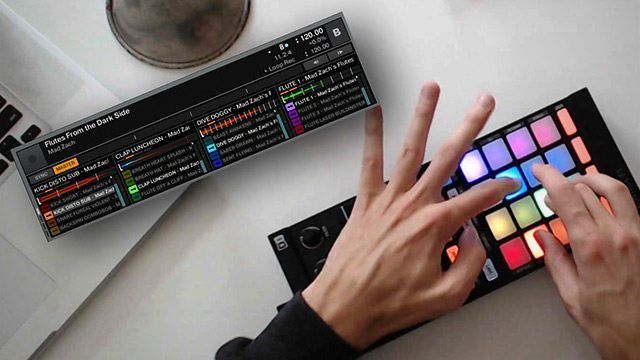
Mad Zach has just released a new compilation volume of his renowned sound packs – and this time, they are fully compatible with Traktor’s Remix Decks. In today’s video, Zach shares some creative ways to play with sound packs, including how to finger drum with a Kontrol F1, sequence a sound pack with Ableton Push, and more for all styles of DJing and live performance.


THE NEW MAD ZACH SOUND PACKS

If you’re not already familiar, Zach’s sound packs are dynamic collections of sounds that includes drums, synths, one-shots, atmospheres, risers – all designed to be played in live using any midi controller with buttons. With just a few buttons and your 2 hands, anyone can have fun playing a full song – totally freestyle!

In this volume, not only are there 6 of previously unreleased packs (including one epic 32-sample, two player pack), but Traktor Remix Deck functionality has been added for all of them.

Grab the new compilation here in the DJTT Webstore!

Mad Zach covers lots of things in the video so here is a summary of  the major points:

USING A KONTROL F1/S4 + REMIX DECKS

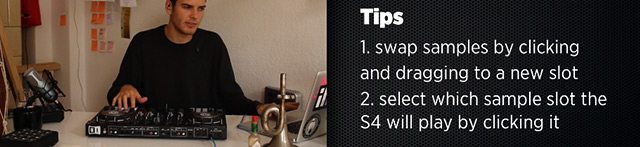
In order to achieve the new style demonstrated in the video, it takes simple modification on how Traktor users normally view the decks. Normally you can only play the vertical columns shown above at the same time 4-voice polyphony, instead of an Ableton drum rack or Maschine’s 16-voice polyphony in which any sample can be triggered.

Mad Zach’s packs are recommended with a simple 90 degree rotation of the Kontrol F1 (or other Remix Deck mapped controller) to the left. This allows you to play the sets as they are intended with certain voices like hats and kicks playing at the same time.

“Finger drumming on these controllers is fun and rewarding – although the buttons are not as ideal – the functionality of F1 (such as mouseless browsing, filters, and volume) makes up for it. It’s a bit more limited because the columns are choke groups and on the S4 you only get 4 sounds per slot.” – Mad Zach
mad-zach

In the video, Mad Zach plays a beat with his right hand and rocks the FX with his left, again using the Remix Decks. Try it out for yourself (there’s a free sound pack at the end of this article).

C-C-C-COMBO BREAKER
customizing-mad-zach-pack

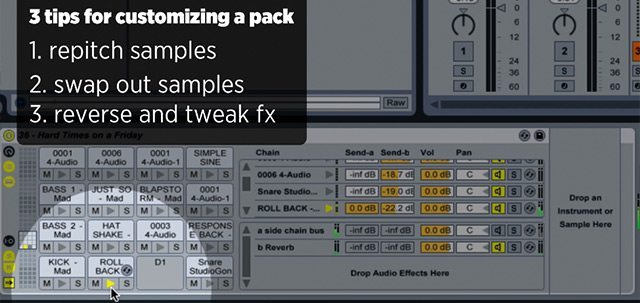
Having a massive collection of sound packs is one thing – but for those who want to create their own custom sound, try combining different sounds and moving samples around within packs. This is especially fun with a Launchpad or other controllers with 64 buttons which allow for four packs to be played at the same time.

ABLETON PUSH TECHNIQUES
push-midifighter

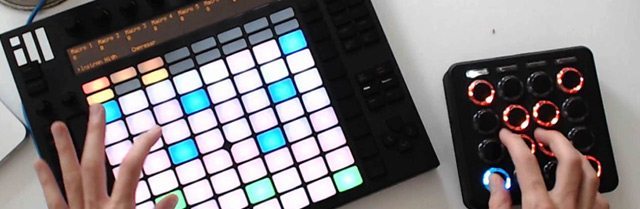
In the video, Zach uses the Ableton Push controller alongside a Midi Fighter to play a bassline and the beat at the same time. Instrumentation is handled on the Ableton Push (usually a melody/bassline) while the Midi Fighter plays a beat from the sound pack. Mad Zach gave us the essential tips for this technique:

  • Pick a dope scale – like Minor Gypsy!
  • Root your thumb on the blue buttons (root notes of the scale) while “riffing” around with your fingers
  • Sidechain your bassline to the sound pack!

“Two-handed routines are the best!  Start by getting down the beat with one hand only, then slowly introduce your other hand with one or two note melodies and work up from there.” – MZ
step-sequencer-push

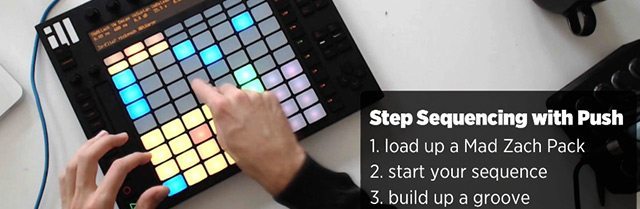
Additionally, you can use the Push’s step sequencer to build up a groove using nothing but a sound pack. Then tweak parameters on top of it, like release, pitch, reverb, delay, etc. Sound packs can be modified, swapped in and out while keeping the same recorded patterns.

FREE SOUND PACK DOWNLOAD

“Wait, so I have to buy something to try any of this?” Nope. Zach has put a lot of work into making these packs useful for DJs, controllerists, and producers – but we still believe everyone should get a chance to play. For that reason some of Zach’s sound packs come out first on the DJTT mailing list and are free to download for two weeks – then every few months we compile them – alongside a bunch of unreleased MZ heat – into a controllerist “album” of sorts. Sales from this compilation go directly to support Zach and help keep the DJ TechTools community going. To give you a taste of what you’ll get in the new volume – we’ve thrown one up for immediate free download.

  • Free pack “Flutes From The Dark Side” (Facebook Like) 
  • Mad Zach Soundpacks Volume 3 in the DJTT store
Tags: Ableton Pushfinger drummingKontrol F1live performance techniquesmad zachMidi Fighterremix deckssequencingsoundpackssoundpacks volume 3Traktor Tips
Share1Tweet1Share
Previous Post

Free Ableton Plugin: Monster Timestretch from Point Blank

Next Post

Faderfox DJ44 Solidcontrol Portable Controller

Related Posts

Use your Midi Fighter Twister as an Audio-Reactive Visualizer
Ableton Live Tips

Use your Midi Fighter Twister as an Audio-Reactive Visualizer

June 23, 2025
Control an entire studio with Midi Fighter Spectra (like Mad Zach)
Finger Drumming

Control an entire studio with Midi Fighter Spectra (like Mad Zach)

May 9, 2025
Mad Zach playing soundpacks on a Midi Fighter Spectra
Finger Drumming

Mad Zach Returns: Playing soundpacks in 2025

March 25, 2025
Load More
Next Post
Faderfox DJ44 Solidcontrol Portable Controller

Faderfox DJ44 Solidcontrol Portable Controller

Want to reach DJTT's audience here?

Shoot an email to advertising@djtechtools.com

DJTT ads
DJTT newsletter
Midi Fighter
Chat with us
  • ABOUT DJTT
  • CONTACT
  • PRIVACY
  • MIDI FIGHTER HELP
  • ABOUT DJTT
  • JOBS
  • CONTACT US
  • ADVERTISE
  • PRIVACY POLICY
  • ACCESSIBILITY STATEMENT

© 2024 DJ Techtools all rights reserved by DJ TechTools on all content unless otherwise noted.

No Result
View All Result
  • Blog
    • DJ Gear
      • DIY Projects
      • Gear Reviews
      • New Products
      • Controllerism
    • Techniques + Tips
      • Beginner DJ
      • Advanced DJ
      • Producer
      • Finger Drummer
    • News + Culture
      • Editorials + Opinions
      • Artist Interviews
      • Performances + Routines
      • How I Play
    • DJ Software Tutorials
      • Serato Tips
      • CDJ Tips
      • Ableton Live Tips
  • Store
    • Run by real DJs, not a corporation
    • DJ Controllers
      • Midi Fighter Twister
      • Midi Fighter Spectra
      • Midi Fighter 64
      • View All
    • Accessories
      • Chroma USB Drive for DJs
      • Chroma Caps
      • Chroma Cables Audio
      • Chroma Cables USB-A
      • Chroma Cables: USB-C
      • DJTT Gift Card
      • Midi Fighter T-Shirt
      • Keyboard Covers
      • Earplugs by V-Moda
    • Production Gear
    • Soundcards & Mixers
  • Community
    • Popular Forums
      • General Discussion
      • Buy & Sell
      • Reviews
      • Mixes
      • Music Production
      • Show Your Setup
      • Off Topic
    • Handy Links
      • New Posts
      • Private Messages
      • Register
      • Search
    • Midi Maps
      • Traktor
      • Ableton
      • Serato DJ
      • Midi Fighter 3D
      • Midi Fighter Twister
      • Midi Fighter Spectra
  • Midi Fighter
  • Chroma

© 2024 DJ Techtools all rights reserved by DJ TechTools on all content unless otherwise noted.

This website uses cookies. By continuing to use this website you are giving consent to cookies being used. Visit our Privacy and Cookie Policy.