DJ TechTools
  • Blog
    • DJ Gear
      • DIY Projects
      • Gear Reviews
      • New Products
      • Controllerism
    • Techniques + Tips
      • Beginner DJ
      • Advanced DJ
      • Producer
      • Finger Drummer
    • News + Culture
      • Editorials + Opinions
      • Artist Interviews
      • Performances + Routines
      • How I Play
    • DJ Software Tutorials
      • Serato Tips
        • Traktor Tips
      • CDJ Tips
      • Ableton Live Tips
  • Store
    • Run by real DJs, not a corporation
    • DJ Controllers
      • Midi Fighter Twister
      • Midi Fighter Spectra
      • Midi Fighter 64
      • View All
    • Accessories
      • Chroma USB Drive for DJs
      • Chroma Caps
      • Chroma Cables Audio
      • Chroma Cables USB-A
      • Chroma Cables: USB-C
      • DJTT Gift Card
      • Midi Fighter T-Shirt
      • Keyboard Covers
      • Earplugs by V-Moda
    • Production Gear
    • Soundcards & Mixers
  • Community
    • Popular Forums
      • General Discussion
      • Buy & Sell
      • Reviews
      • Mixes
      • Music Production
      • Show Your Setup
      • Off Topic
    • Handy Links
      • New Posts
      • Private Messages
      • Register
      • Search
    • Midi Maps
      • Traktor
      • Ableton
      • Serato DJ
      • Midi Fighter 3D
      • Midi Fighter Twister
      • Midi Fighter Spectra
  • Midi Fighter
  • Chroma
No Result
View All Result
DJ TechTools
  • Blog
    • DJ Gear
      • DIY Projects
      • Gear Reviews
      • New Products
      • Controllerism
    • Techniques + Tips
      • Beginner DJ
      • Advanced DJ
      • Producer
      • Finger Drummer
    • News + Culture
      • Editorials + Opinions
      • Artist Interviews
      • Performances + Routines
      • How I Play
    • DJ Software Tutorials
      • Serato Tips
        • Traktor Tips
      • CDJ Tips
      • Ableton Live Tips
  • Store
    • Run by real DJs, not a corporation
    • DJ Controllers
      • Midi Fighter Twister
      • Midi Fighter Spectra
      • Midi Fighter 64
      • View All
    • Accessories
      • Chroma USB Drive for DJs
      • Chroma Caps
      • Chroma Cables Audio
      • Chroma Cables USB-A
      • Chroma Cables: USB-C
      • DJTT Gift Card
      • Midi Fighter T-Shirt
      • Keyboard Covers
      • Earplugs by V-Moda
    • Production Gear
    • Soundcards & Mixers
  • Community
    • Popular Forums
      • General Discussion
      • Buy & Sell
      • Reviews
      • Mixes
      • Music Production
      • Show Your Setup
      • Off Topic
    • Handy Links
      • New Posts
      • Private Messages
      • Register
      • Search
    • Midi Maps
      • Traktor
      • Ableton
      • Serato DJ
      • Midi Fighter 3D
      • Midi Fighter Twister
      • Midi Fighter Spectra
  • Midi Fighter
  • Chroma
No Result
View All Result
DJ TechTools

Free Ableton Plugin: Monster Timestretch from Point Blank

Dan White by Dan White
November 14, 2013
in Ableton Live Tips, Breaking News, News, Production Tips
Reading Time: 1 min read
0
Free Ableton Plugin: Monster Timestretch from Point Blank
268
VIEWS
Post on FacebookTweet thisUpvote on Reddit

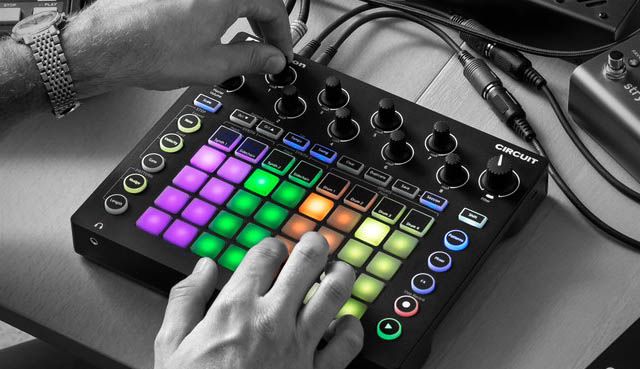
UK-based production school Point Blank has taken aim at improving how producers approach and use audio timestretching in Ableton Live. This week they’ve released a free Max4Live plugin built in-house that lets producers mangle tracks, sample sections of a track at ultra-slow speeds, and even step through a slowed-down sample locked in time with the project’s BPM. Point Blank tutor Daniel Herbet writes:

“The new Max for Live device [..] is based on a technique known as phase vocoding and can time stretch sounds in realtime. It’s similar to the fantastic Paul Stretch and is ideal for creating slowly evolving drone-like textures as well as more futuristic sounds. There are four different modes which allow you to play through and explore the sound in a variety of ways and literally freeze the sound. The plugin is limited to processing the first 30 seconds of an audio file and only works within Ableton as a M4L device and will not play in any other DAW. We recommend you use resampling if you need to record the effect to a new audio file.”

We expect that producers who regularly sample and time-distort tracks will be all over this plugin – see why in the overview of all four modes in this video:

Point Blank is trading the plugin for a Like on Facebook to unlock the download – click here to grab it now.
Tags: free ableton pluginfree max4live pluginsmax4livephase vocodingpoint blankresamplingtimestretching
Share2Tweet1Share
Previous Post

Routine: DJ Enferno F*ckwithmeyouknowigotit Live Remix

Next Post

Mad Zach Sound Pack Techniques: Remix Decks and Ableton Push Sequencing

Related Posts

Novation Circuit Updated Firmware + New Patch Editor
Breaking News

Novation Circuit Updated Firmware + New Patch Editor

December 22, 2015
Midi Fighter Multi-Sample: Button Length = Different Sounds
Ableton Live Tips

Midi Fighter Multi-Sample: Button Length = Different Sounds

November 12, 2015
Ableton Push 2 + Ableton Live 9.5 First Look
Ableton

Ableton Push 2 + Ableton Live 9.5 First Look

November 2, 2015
Load More
Next Post
Mad Zach Sound Pack Techniques: Remix Decks and Ableton Push Sequencing

Mad Zach Sound Pack Techniques: Remix Decks and Ableton Push Sequencing

Want to reach DJTT's audience here?

Shoot an email to advertising@djtechtools.com

DJTT ads
DJTT newsletter
Midi Fighter
Chat with us
  • ABOUT DJTT
  • CONTACT
  • PRIVACY
  • MIDI FIGHTER HELP
  • ABOUT DJTT
  • JOBS
  • CONTACT US
  • ADVERTISE
  • PRIVACY POLICY
  • ACCESSIBILITY STATEMENT

© 2024 DJ Techtools all rights reserved by DJ TechTools on all content unless otherwise noted.

No Result
View All Result
  • Blog
    • DJ Gear
      • DIY Projects
      • Gear Reviews
      • New Products
      • Controllerism
    • Techniques + Tips
      • Beginner DJ
      • Advanced DJ
      • Producer
      • Finger Drummer
    • News + Culture
      • Editorials + Opinions
      • Artist Interviews
      • Performances + Routines
      • How I Play
    • DJ Software Tutorials
      • Serato Tips
      • CDJ Tips
      • Ableton Live Tips
  • Store
    • Run by real DJs, not a corporation
    • DJ Controllers
      • Midi Fighter Twister
      • Midi Fighter Spectra
      • Midi Fighter 64
      • View All
    • Accessories
      • Chroma USB Drive for DJs
      • Chroma Caps
      • Chroma Cables Audio
      • Chroma Cables USB-A
      • Chroma Cables: USB-C
      • DJTT Gift Card
      • Midi Fighter T-Shirt
      • Keyboard Covers
      • Earplugs by V-Moda
    • Production Gear
    • Soundcards & Mixers
  • Community
    • Popular Forums
      • General Discussion
      • Buy & Sell
      • Reviews
      • Mixes
      • Music Production
      • Show Your Setup
      • Off Topic
    • Handy Links
      • New Posts
      • Private Messages
      • Register
      • Search
    • Midi Maps
      • Traktor
      • Ableton
      • Serato DJ
      • Midi Fighter 3D
      • Midi Fighter Twister
      • Midi Fighter Spectra
  • Midi Fighter
  • Chroma

© 2024 DJ Techtools all rights reserved by DJ TechTools on all content unless otherwise noted.

This website uses cookies. By continuing to use this website you are giving consent to cookies being used. Visit our Privacy and Cookie Policy.