DJ TechTools
  • Blog
    • DJ Gear
      • DIY Projects
      • Gear Reviews
      • New Products
      • Controllerism
    • Techniques + Tips
      • Beginner DJ
      • Advanced DJ
      • Producer
      • Finger Drummer
    • News + Culture
      • Editorials + Opinions
      • Artist Interviews
      • Performances + Routines
      • How I Play
    • DJ Software Tutorials
      • Serato Tips
        • Traktor Tips
      • CDJ Tips
      • Ableton Live Tips
  • Store
    • Run by real DJs, not a corporation
    • DJ Controllers
      • Midi Fighter Twister
      • Midi Fighter Spectra
      • Midi Fighter 64
      • View All
    • Accessories
      • Chroma USB Drive for DJs
      • Chroma Caps
      • Chroma Cables Audio
      • Chroma Cables USB-A
      • Chroma Cables: USB-C
      • DJTT Gift Card
      • Midi Fighter T-Shirt
      • Keyboard Covers
      • Earplugs by V-Moda
    • Production Gear
    • Soundcards & Mixers
  • Community
    • Popular Forums
      • General Discussion
      • Buy & Sell
      • Reviews
      • Mixes
      • Music Production
      • Show Your Setup
      • Off Topic
    • Handy Links
      • New Posts
      • Private Messages
      • Register
      • Search
    • Midi Maps
      • Traktor
      • Ableton
      • Serato DJ
      • Midi Fighter 3D
      • Midi Fighter Twister
      • Midi Fighter Spectra
  • Midi Fighter
  • Chroma
No Result
View All Result
DJ TechTools
  • Blog
    • DJ Gear
      • DIY Projects
      • Gear Reviews
      • New Products
      • Controllerism
    • Techniques + Tips
      • Beginner DJ
      • Advanced DJ
      • Producer
      • Finger Drummer
    • News + Culture
      • Editorials + Opinions
      • Artist Interviews
      • Performances + Routines
      • How I Play
    • DJ Software Tutorials
      • Serato Tips
        • Traktor Tips
      • CDJ Tips
      • Ableton Live Tips
  • Store
    • Run by real DJs, not a corporation
    • DJ Controllers
      • Midi Fighter Twister
      • Midi Fighter Spectra
      • Midi Fighter 64
      • View All
    • Accessories
      • Chroma USB Drive for DJs
      • Chroma Caps
      • Chroma Cables Audio
      • Chroma Cables USB-A
      • Chroma Cables: USB-C
      • DJTT Gift Card
      • Midi Fighter T-Shirt
      • Keyboard Covers
      • Earplugs by V-Moda
    • Production Gear
    • Soundcards & Mixers
  • Community
    • Popular Forums
      • General Discussion
      • Buy & Sell
      • Reviews
      • Mixes
      • Music Production
      • Show Your Setup
      • Off Topic
    • Handy Links
      • New Posts
      • Private Messages
      • Register
      • Search
    • Midi Maps
      • Traktor
      • Ableton
      • Serato DJ
      • Midi Fighter 3D
      • Midi Fighter Twister
      • Midi Fighter Spectra
  • Midi Fighter
  • Chroma
No Result
View All Result
DJ TechTools

Pacemaker’s Match Machine Provides Cloud-Based Track Discovery

Dean Zulueta by Dean Zulueta
July 31, 2014
in Breaking News, News, News + Culture
Reading Time: 3 mins read
0
Pacemaker’s Match Machine Provides Cloud-Based Track Discovery
25
VIEWS
Post on FacebookTweet thisUpvote on Reddit

Imagine that you are in the middle of a set and the dance floor is going crazy. People are cheering and having the time of their lives. The promoter is giving you a thumbs up and it seems like nothing will ruin this moment. Then you are about to load up the next track and you can’t find anything to keep the vibe strong. Pacemaker Music AB, a Swedish music technology company,  recognized this problem and offers the Match Machine as a solution in their recent release of Pacemaker DJ app (watch our first hands-on review of the app here). Read more about how Match Machine changes the way a DJ selects tracks below:

What makes Pacemaker different from what it was before?:
For the past few years, we have seen DJ apps time and time again. Some are practical solutions while others are a poorly coded gimmick. Pacemaker is shooting among the stars by offering the Match Machine feature in their latest release. How do you figure out what song will keep the vibe going before the current track finishes if you are running out of tracks? That is where Match Machine steps in.

The Match Machine uses the database of The Echo Nest, recently acquired by Spotify, then adds its own algorithm and analyzes the local library and the entire Spotify and global iTunes catalogue to find tracks that fit into the mix “perfectly.” When loading a new track, the user is given a handful of tracks that fit the BPM and mood of the current set. Pacemaker claims to have a real solution that goes beyond matching just meta-data.

What is interesting about Pacemaker in comparison to other apps?:
There is no doubt that the app is beautifully designed and easy to use. You don’t have to be a professional DJ to figure out how to use the functions. The app comes with a built-in EQ, scratching capability, and pitch wheels. However, if you want any of the effects featured in the video, they are going to cost $1.99 each.

Also, to use the Spotify library and Match Machine, you will need a Spotify premium account. If you don’t have a premium account, Pacemaker will hook you up with a 7-day free trial. The app is currently only available on Apple’s iPad and Blackberry 10 OS. (Is Blackberry the choice phone for the modern DJ?)

Who’s behind Pacemaker?:
The app is actually a modern take on Pacemaker Music AB’s claim to fame technology. The company is known for developing the world’s first portable DJ system, a device launched in 2008 that had the portability of an iPod and the power of a desktop-sized DJ setup. Back in February the company launched Pacemaker, which is said to be, the first DJ app with a positive Spotify integration.
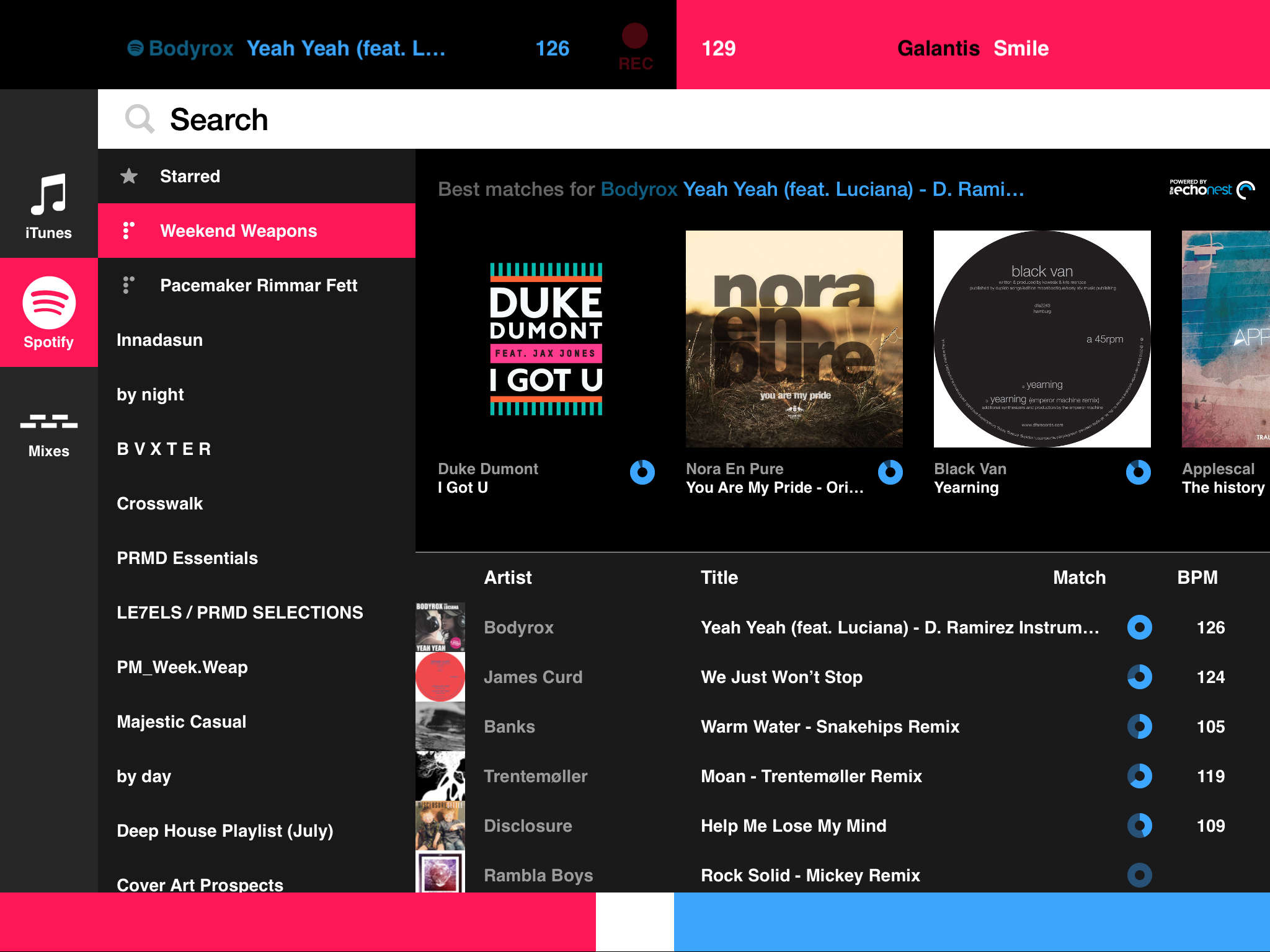
Match Machine by Pacemaker provides cloud based track discovery in mobile DJ app.
“Match Machine is a game changer for DJs to find matching tracks and it’s a step closer towards realizing our mission of democratizing DJing.” says Jonas Norberg, CEO and Co- founder of Pacemaker

It may be to soon to call the Pacemaker app with Match Machine a must have for DJs but the app is definitely worth noting. Technology is beginning to move to the cloud and it is migrating at an exponential rate. We saw the shift from vinyl to CDs and CDs to MP3s. Now, cloud based apps like Pacemaker are starting to broaden a DJs reach beyond one flash drive into essentially the world’s largest record store. Not only does Pacemaker provide millions of tracks to a DJ anywhere with a WiFi connection, the app also taking a professional approach to music analytics with Match Machine.

After playing around with the app briefly, I can say the Match Machine doesn’t fall short finding tracks based on the one I was currently playing. I Got U by Duke Dumont was finishing up and Match Machine found Prayer In C (Robin Schulz Remix) by Lilly Wood and The Prick. It would be interesting to see how well this app could find a track if a DJ were to run out of music in their arsenal or maybe even during a flash drive mishap.

Match Machine could be the solution that flustered DJs are looking for and if you want to check it out for yourself, Pacemaker with Match Machine is available in the iTunes app store now.

Would you find vitality in a feature like Match Machine? What are your thoughts about DJ libraries being in the cloud?
Tags: Iphonematch machinepacemakerspotify
ShareTweetShare
Previous Post

Traktor’s Future: Live Remixing and Kontrol S8?

Next Post

Serato Flip: Record Cue Point & Censor Automation

Related Posts

Rekordox Spotify
Breaking News

Spotify (finally) slides into Rekordbox, Serato, and Algoriddim djay (again) – for better or worse?

September 24, 2025
DJ Pro Tips for Digital Crate Digging on Beatport, Bandcamp, Soundcloud, Spotify, Juno Download, and QoBuz
DJ Music Library Tips

DJ Pro Tips for Digital Crate Digging on Beatport, Bandcamp, Soundcloud, Spotify, Juno Download, and QoBuz

February 24, 2023
Build A Set With Friends: Pacemaker Adds Collaborative Mixes To iOS App
iOS DJ Tips

Build A Set With Friends: Pacemaker Adds Collaborative Mixes To iOS App

August 20, 2018
Load More
Next Post
Serato Flip: Record Cue Point & Censor Automation

Serato Flip: Record Cue Point & Censor Automation

Want to reach DJTT's audience here?

Shoot an email to advertising@djtechtools.com

DJTT ads
DJTT newsletter
Midi Fighter
Chat with us
  • ABOUT DJTT
  • CONTACT
  • PRIVACY
  • MIDI FIGHTER HELP
  • ABOUT DJTT
  • JOBS
  • CONTACT US
  • ADVERTISE
  • PRIVACY POLICY
  • ACCESSIBILITY STATEMENT

© 2024 DJ Techtools all rights reserved by DJ TechTools on all content unless otherwise noted.

No Result
View All Result
  • Blog
    • DJ Gear
      • DIY Projects
      • Gear Reviews
      • New Products
      • Controllerism
    • Techniques + Tips
      • Beginner DJ
      • Advanced DJ
      • Producer
      • Finger Drummer
    • News + Culture
      • Editorials + Opinions
      • Artist Interviews
      • Performances + Routines
      • How I Play
    • DJ Software Tutorials
      • Serato Tips
      • CDJ Tips
      • Ableton Live Tips
  • Store
    • Run by real DJs, not a corporation
    • DJ Controllers
      • Midi Fighter Twister
      • Midi Fighter Spectra
      • Midi Fighter 64
      • View All
    • Accessories
      • Chroma USB Drive for DJs
      • Chroma Caps
      • Chroma Cables Audio
      • Chroma Cables USB-A
      • Chroma Cables: USB-C
      • DJTT Gift Card
      • Midi Fighter T-Shirt
      • Keyboard Covers
      • Earplugs by V-Moda
    • Production Gear
    • Soundcards & Mixers
  • Community
    • Popular Forums
      • General Discussion
      • Buy & Sell
      • Reviews
      • Mixes
      • Music Production
      • Show Your Setup
      • Off Topic
    • Handy Links
      • New Posts
      • Private Messages
      • Register
      • Search
    • Midi Maps
      • Traktor
      • Ableton
      • Serato DJ
      • Midi Fighter 3D
      • Midi Fighter Twister
      • Midi Fighter Spectra
  • Midi Fighter
  • Chroma

© 2024 DJ Techtools all rights reserved by DJ TechTools on all content unless otherwise noted.

This website uses cookies. By continuing to use this website you are giving consent to cookies being used. Visit our Privacy and Cookie Policy.