DJ TechTools
  • Blog
    • DJ Gear
      • DIY Projects
      • Gear Reviews
      • New Products
      • Controllerism
    • Techniques + Tips
      • Beginner DJ
      • Advanced DJ
      • Producer
      • Finger Drummer
    • News + Culture
      • Editorials + Opinions
      • Artist Interviews
      • Performances + Routines
      • How I Play
    • DJ Software Tutorials
      • Serato Tips
        • Traktor Tips
      • CDJ Tips
      • Ableton Live Tips
  • Store
    • Run by real DJs, not a corporation
    • DJ Controllers
      • Midi Fighter Twister
      • Midi Fighter Spectra
      • Midi Fighter 64
      • View All
    • Accessories
      • Chroma USB Drive for DJs
      • Chroma Caps
      • Chroma Cables Audio
      • Chroma Cables USB-A
      • Chroma Cables: USB-C
      • DJTT Gift Card
      • Midi Fighter T-Shirt
      • Keyboard Covers
      • Earplugs by V-Moda
    • Production Gear
    • Soundcards & Mixers
  • Community
    • Popular Forums
      • General Discussion
      • Buy & Sell
      • Reviews
      • Mixes
      • Music Production
      • Show Your Setup
      • Off Topic
    • Handy Links
      • New Posts
      • Private Messages
      • Register
      • Search
    • Midi Maps
      • Traktor
      • Ableton
      • Serato DJ
      • Midi Fighter 3D
      • Midi Fighter Twister
      • Midi Fighter Spectra
  • Midi Fighter
  • Chroma
No Result
View All Result
DJ TechTools
  • Blog
    • DJ Gear
      • DIY Projects
      • Gear Reviews
      • New Products
      • Controllerism
    • Techniques + Tips
      • Beginner DJ
      • Advanced DJ
      • Producer
      • Finger Drummer
    • News + Culture
      • Editorials + Opinions
      • Artist Interviews
      • Performances + Routines
      • How I Play
    • DJ Software Tutorials
      • Serato Tips
        • Traktor Tips
      • CDJ Tips
      • Ableton Live Tips
  • Store
    • Run by real DJs, not a corporation
    • DJ Controllers
      • Midi Fighter Twister
      • Midi Fighter Spectra
      • Midi Fighter 64
      • View All
    • Accessories
      • Chroma USB Drive for DJs
      • Chroma Caps
      • Chroma Cables Audio
      • Chroma Cables USB-A
      • Chroma Cables: USB-C
      • DJTT Gift Card
      • Midi Fighter T-Shirt
      • Keyboard Covers
      • Earplugs by V-Moda
    • Production Gear
    • Soundcards & Mixers
  • Community
    • Popular Forums
      • General Discussion
      • Buy & Sell
      • Reviews
      • Mixes
      • Music Production
      • Show Your Setup
      • Off Topic
    • Handy Links
      • New Posts
      • Private Messages
      • Register
      • Search
    • Midi Maps
      • Traktor
      • Ableton
      • Serato DJ
      • Midi Fighter 3D
      • Midi Fighter Twister
      • Midi Fighter Spectra
  • Midi Fighter
  • Chroma
No Result
View All Result
DJ TechTools

djay Pro Update: Apple Watch + CDJ Integration + VJing

Dean Zulueta by Dean Zulueta
April 23, 2015
in Breaking News, DJ Gear Announcements, News, News + Culture
Reading Time: 3 mins read
0
djay Pro Update: Apple Watch + CDJ Integration + VJing
43
VIEWS
Post on FacebookTweet thisUpvote on Reddit

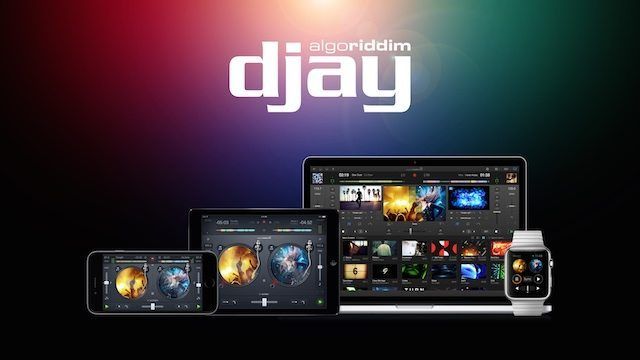
Ever since their first release, Algoriddim has been working hard to improve djay and djay Pro to meet the needs of the digital DJ. In a new update coming to both the mobile and Mac applications, users will have access to plug-and-play CDJ integration, an Apple Watch app that goes beyond notifications (iPhone only), and a one of a kind video DJing space. Algoriddim has worked hard since we last heard from them and DJTT has all the insider information below.

djay Pro Comes Club Ready

The major update Algoriddim released today comes to the djay Pro Mac App. The first major improvement users will find is a seamless integration between Pioneer products and the software. DJs who are used to the djay ecosystem will no longer have to worry about DJing on CDJs in the club. Algoriddim partnered with Pioneer to bring forth plug-and-play integration of djay Pro with the CDJ-2000nexus, CDJ-900nexus, and XDJ-1000.

djay Pro isn’t just using the Pioneer CDJs as controllers. DJs will have access to playlists, song information, and waveforms (including those tracks on Spotify) using the screens. As for hardware control DJs will find slip mode, scratching, pitch bending, looping, cueing, and master tempo controls. The audio will be directed out of the CDJs allowing for users to mix externally using a DJM mixer, most likely.

Video DJing with djay Pro

A lesser known breed of DJs are the VJs who mix audio and video during their sets. Video DJing is an art to master just as much as DJing is, but Algoriddim is making it easier for DJs to mix video during their sets. The update comes with a package of video files that come as stock footage, loops, and visualizations. DJs can play any songs in the mixing window and then by going into the video view the DJ can create visuals to accompany the track.
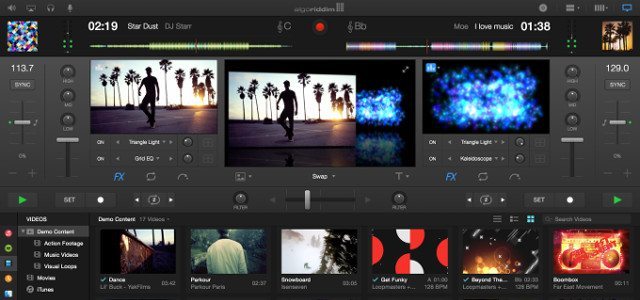
djay Pro Video Mode Screenshot

Karim Morsy, CEO of Algoriddim, gave DJ TechTools a walk-through on video DJing with the software and it is really straight forward. Simply drag video files on to decks like a DJ would with their audio tracks, apply different effects with the click of a button, and even add some text to personalize the video. All the visuals are audio reactive and the DJ can even set the video clips, jump back to the mixer view, and continue to DJ as the visuals play. DJs can also record the audio and videos of their sets in the background.

djay Pro Performance

Aside from the exciting updates of the software, djay Pro has also made some strides in other areas, such as with Spotify and the Library. DJs who utilize the integration of Spotify can now take advantage of the high quality bit rate with up to 320 kb/s. The library also received some developer love which includes improved iTunes and Spotify integration, a cover collection view, complete Finder integration, and a history section which also can be exported as CSV, iTunes, or a Spotify playlist. The libraries of other devices using the djay app can synchronize up to 8 cue points for each track on djay Pro.

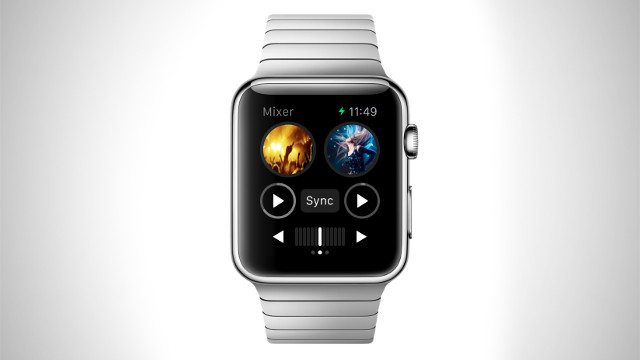
Apple Watch is djay 2 Compatible
Watch 1

Before the Apple Watch is even released, Algoriddim jumped to have djay 2 ready for the hardware. Most apps available for the Apple Watch are for notification purposes which is not the intended use for the djay app. The djay 2 app for the Apple Watch will be a minimalist way to DJ. As seen in the video above, DJs will have access to their library, the mixer, and the effects. Theoretically, a DJ could leave their iPhone in the booth, use the restroom or get a drink, all while having control over the music. Who knew DJ’s could benefit for wearable tech?

djay 2 for iPhone ($2.99) with Apple Watch integration as well as djay 2 for iPad ($9.99) will be available FREE on the App Store for one week only.

The djay Pro update is free for all current users and new users can get it on the Mac App Store for $49.99.
 

Tags: algoriddimandroidapple watchcdjCDj-2000CDJ-900dj appsdj gearDj softwaredjaydjay 2djay Prodjingfree softwarefree updateipadIphonepioneerpioneer gearVideo DJingvjingwearable DJ gearwearable techwearable technologyxdj-1000
ShareTweetShare
Previous Post

Serato Flip: 7 Ways To Create Live DJ Edits

Next Post

ToneDen for iOS: Instantly Send Music To All Your Fans

Related Posts

A screenshot of the 2.91 version of the Midi Fighter Utility software in Dark Mode
Midi Fighter

Midi Fighter Utility 2.91 Is Out; Our Biggest Update in Years

June 1, 2026
A Prime 4+ and a Kontrol S3 intercut against eachother over a black background
Breaking News

InMusic just bought Native Instruments. So what now for Traktor?

May 8, 2026
The DJM-V5 from AlphaTheta: 3 channels, 4-band EQ, V10 sound – no Beat FX or crossfader.
Breaking News

The DJM-V5 from AlphaTheta: 3 channels, 4-band EQ, V10 sound – no Beat FX or crossfader.

January 20, 2026
Load More
Next Post
ToneDen for iOS: Instantly Send Music To All Your Fans

ToneDen for iOS: Instantly Send Music To All Your Fans

Want to reach DJTT's audience here?

Shoot an email to advertising@djtechtools.com

DJTT ads
DJTT newsletter
Midi Fighter
Chat with us
  • ABOUT DJTT
  • CONTACT
  • PRIVACY
  • MIDI FIGHTER HELP
  • ABOUT DJTT
  • JOBS
  • CONTACT US
  • ADVERTISE
  • PRIVACY POLICY
  • ACCESSIBILITY STATEMENT

© 2024 DJ Techtools all rights reserved by DJ TechTools on all content unless otherwise noted.

No Result
View All Result
  • Blog
    • DJ Gear
      • DIY Projects
      • Gear Reviews
      • New Products
      • Controllerism
    • Techniques + Tips
      • Beginner DJ
      • Advanced DJ
      • Producer
      • Finger Drummer
    • News + Culture
      • Editorials + Opinions
      • Artist Interviews
      • Performances + Routines
      • How I Play
    • DJ Software Tutorials
      • Serato Tips
      • CDJ Tips
      • Ableton Live Tips
  • Store
    • Run by real DJs, not a corporation
    • DJ Controllers
      • Midi Fighter Twister
      • Midi Fighter Spectra
      • Midi Fighter 64
      • View All
    • Accessories
      • Chroma USB Drive for DJs
      • Chroma Caps
      • Chroma Cables Audio
      • Chroma Cables USB-A
      • Chroma Cables: USB-C
      • DJTT Gift Card
      • Midi Fighter T-Shirt
      • Keyboard Covers
      • Earplugs by V-Moda
    • Production Gear
    • Soundcards & Mixers
  • Community
    • Popular Forums
      • General Discussion
      • Buy & Sell
      • Reviews
      • Mixes
      • Music Production
      • Show Your Setup
      • Off Topic
    • Handy Links
      • New Posts
      • Private Messages
      • Register
      • Search
    • Midi Maps
      • Traktor
      • Ableton
      • Serato DJ
      • Midi Fighter 3D
      • Midi Fighter Twister
      • Midi Fighter Spectra
  • Midi Fighter
  • Chroma

© 2024 DJ Techtools all rights reserved by DJ TechTools on all content unless otherwise noted.

This website uses cookies. By continuing to use this website you are giving consent to cookies being used. Visit our Privacy and Cookie Policy.