DJ TechTools
  • Blog
    • DJ Gear
      • DIY Projects
      • Gear Reviews
      • New Products
      • Controllerism
    • Techniques + Tips
      • Beginner DJ
      • Advanced DJ
      • Producer
      • Finger Drummer
    • News + Culture
      • Editorials + Opinions
      • Artist Interviews
      • Performances + Routines
      • How I Play
    • DJ Software Tutorials
      • Serato Tips
        • Traktor Tips
      • CDJ Tips
      • Ableton Live Tips
  • Store
    • Run by real DJs, not a corporation
    • DJ Controllers
      • Midi Fighter Twister
      • Midi Fighter Spectra
      • Midi Fighter 64
      • View All
    • Accessories
      • Chroma USB Drive for DJs
      • Chroma Caps
      • Chroma Cables Audio
      • Chroma Cables USB-A
      • Chroma Cables: USB-C
      • DJTT Gift Card
      • Midi Fighter T-Shirt
      • Keyboard Covers
      • Earplugs by V-Moda
    • Production Gear
    • Soundcards & Mixers
  • Community
    • Popular Forums
      • General Discussion
      • Buy & Sell
      • Reviews
      • Mixes
      • Music Production
      • Show Your Setup
      • Off Topic
    • Handy Links
      • New Posts
      • Private Messages
      • Register
      • Search
    • Midi Maps
      • Traktor
      • Ableton
      • Serato DJ
      • Midi Fighter 3D
      • Midi Fighter Twister
      • Midi Fighter Spectra
  • Midi Fighter
  • Chroma
No Result
View All Result
DJ TechTools
  • Blog
    • DJ Gear
      • DIY Projects
      • Gear Reviews
      • New Products
      • Controllerism
    • Techniques + Tips
      • Beginner DJ
      • Advanced DJ
      • Producer
      • Finger Drummer
    • News + Culture
      • Editorials + Opinions
      • Artist Interviews
      • Performances + Routines
      • How I Play
    • DJ Software Tutorials
      • Serato Tips
        • Traktor Tips
      • CDJ Tips
      • Ableton Live Tips
  • Store
    • Run by real DJs, not a corporation
    • DJ Controllers
      • Midi Fighter Twister
      • Midi Fighter Spectra
      • Midi Fighter 64
      • View All
    • Accessories
      • Chroma USB Drive for DJs
      • Chroma Caps
      • Chroma Cables Audio
      • Chroma Cables USB-A
      • Chroma Cables: USB-C
      • DJTT Gift Card
      • Midi Fighter T-Shirt
      • Keyboard Covers
      • Earplugs by V-Moda
    • Production Gear
    • Soundcards & Mixers
  • Community
    • Popular Forums
      • General Discussion
      • Buy & Sell
      • Reviews
      • Mixes
      • Music Production
      • Show Your Setup
      • Off Topic
    • Handy Links
      • New Posts
      • Private Messages
      • Register
      • Search
    • Midi Maps
      • Traktor
      • Ableton
      • Serato DJ
      • Midi Fighter 3D
      • Midi Fighter Twister
      • Midi Fighter Spectra
  • Midi Fighter
  • Chroma
No Result
View All Result
DJ TechTools

Blend Launches Automatic Ableton Projects From Stems

Dean Zulueta by Dean Zulueta
April 27, 2015
in Breaking News
Reading Time: 2 mins read
0
Blend Launches Automatic Ableton Projects From Stems
47
VIEWS
Post on FacebookTweet thisUpvote on Reddit

Producers know very well that feeling when one hears a song and thinks, “I could make a killer remix!” After downloading the stems and before they can begin working on a killer remix, they have to spend a significant amount of time un-warping tracks, leveling out the mix, etc. By the end of the preparation journey, much of that creative spark is gone. Blend, the popular collaboration tool for producers, announced their new auto-creation update which will allow producer to jump right into mixing a track.

Getting Down to Business

Stems are what producers refer to as raw audio tracks from an original track. In the new digital landscape, music producers will typically download full Ableton projects that contain the full track split into multiple raw audio tracks. Most of the time, these projects aren’t thrown straight into an Ableton project. The stems will come in a zipped folder which then has to be unzipped and inserted into an Ableton project.

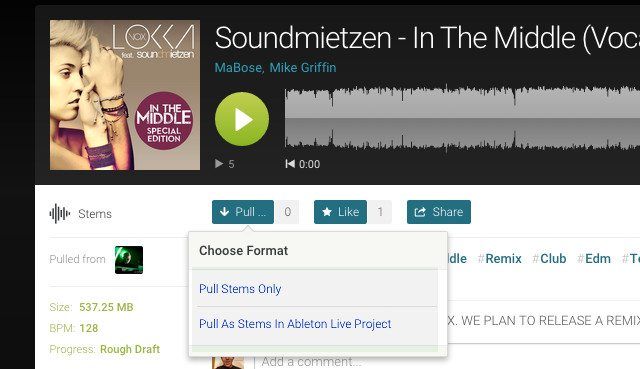
When it comes to producing, this process takes a huge chunk of time to complete. Blend, which is used by many producers for collaborating, released an update which will give producers the option to have the stems put into an Ableton Live project file. All the stems will be in the correct BPM and the whole track will be ready for the producer to get creative. Similarly, Ableton producers can upload stems of their own originals for others to download in the same fashion. Currently this option is only available for Ableton producers, but Blend is working on an update for other DAWs that will be available soon. This update is slight, but helps keep producers spending time on actual productive tasks and not on monotonous repetitive ones.

Check out more productivity hacks that will help you stay focused in the studio.
Tags: Abletonableton liveblendblend.iocollaborationcreativecreativitydawlive 9producerproducingproducing tipsproductivitypulling stemsremixremixingsamplesstemsstudio tipstime managementupdate
ShareTweetShare
Previous Post

Ableton Drumception: Cycling Samples With A Nested Drum Rack

Next Post

Traktor Pro 2.8: Rane MP2015 Officially Scratch Certified

Related Posts

Engine DJ 5.0: on-board stems on the System 1, RGB waveforms for everyone
Breaking News

Engine DJ 5.0: on-board stems on the System 1, RGB waveforms for everyone

May 13, 2026
Akai Launches MPC Live III Standalone With 8-Core Processor, Clip Matrix, Stems, and 3D Pads
Breaking News

Akai Launches MPC Live III Standalone With 8-Core Processor, Clip Matrix, Stems, and 3D Pads

October 2, 2025
Ableton launches Live 12 Suite rent-to-own plan – and it’s not a subscription
Ableton

Ableton launches Live 12 Suite rent-to-own plan – and it’s not a subscription

October 1, 2025
Load More
Next Post
Traktor Pro 2.8: Rane MP2015 Officially Scratch Certified

Traktor Pro 2.8: Rane MP2015 Officially Scratch Certified

Want to reach DJTT's audience here?

Shoot an email to advertising@djtechtools.com

DJTT ads
DJTT newsletter
Midi Fighter
Chat with us
  • ABOUT DJTT
  • CONTACT
  • PRIVACY
  • MIDI FIGHTER HELP
  • ABOUT DJTT
  • JOBS
  • CONTACT US
  • ADVERTISE
  • PRIVACY POLICY
  • ACCESSIBILITY STATEMENT

© 2024 DJ Techtools all rights reserved by DJ TechTools on all content unless otherwise noted.

No Result
View All Result
  • Blog
    • DJ Gear
      • DIY Projects
      • Gear Reviews
      • New Products
      • Controllerism
    • Techniques + Tips
      • Beginner DJ
      • Advanced DJ
      • Producer
      • Finger Drummer
    • News + Culture
      • Editorials + Opinions
      • Artist Interviews
      • Performances + Routines
      • How I Play
    • DJ Software Tutorials
      • Serato Tips
      • CDJ Tips
      • Ableton Live Tips
  • Store
    • Run by real DJs, not a corporation
    • DJ Controllers
      • Midi Fighter Twister
      • Midi Fighter Spectra
      • Midi Fighter 64
      • View All
    • Accessories
      • Chroma USB Drive for DJs
      • Chroma Caps
      • Chroma Cables Audio
      • Chroma Cables USB-A
      • Chroma Cables: USB-C
      • DJTT Gift Card
      • Midi Fighter T-Shirt
      • Keyboard Covers
      • Earplugs by V-Moda
    • Production Gear
    • Soundcards & Mixers
  • Community
    • Popular Forums
      • General Discussion
      • Buy & Sell
      • Reviews
      • Mixes
      • Music Production
      • Show Your Setup
      • Off Topic
    • Handy Links
      • New Posts
      • Private Messages
      • Register
      • Search
    • Midi Maps
      • Traktor
      • Ableton
      • Serato DJ
      • Midi Fighter 3D
      • Midi Fighter Twister
      • Midi Fighter Spectra
  • Midi Fighter
  • Chroma

© 2024 DJ Techtools all rights reserved by DJ TechTools on all content unless otherwise noted.

This website uses cookies. By continuing to use this website you are giving consent to cookies being used. Visit our Privacy and Cookie Policy.