DJ TechTools
  • Blog
    • DJ Gear
      • DIY Projects
      • Gear Reviews
      • New Products
      • Controllerism
    • Techniques + Tips
      • Beginner DJ
      • Advanced DJ
      • Producer
      • Finger Drummer
    • News + Culture
      • Editorials + Opinions
      • Artist Interviews
      • Performances + Routines
      • How I Play
    • DJ Software Tutorials
      • Serato Tips
        • Traktor Tips
      • CDJ Tips
      • Ableton Live Tips
  • Store
    • Run by real DJs, not a corporation
    • DJ Controllers
      • Midi Fighter Twister
      • Midi Fighter Spectra
      • Midi Fighter 64
      • View All
    • Accessories
      • Chroma USB Drive for DJs
      • Chroma Caps
      • Chroma Cables Audio
      • Chroma Cables USB-A
      • Chroma Cables: USB-C
      • DJTT Gift Card
      • Midi Fighter T-Shirt
      • Keyboard Covers
      • Earplugs by V-Moda
    • Production Gear
    • Soundcards & Mixers
  • Community
    • Popular Forums
      • General Discussion
      • Buy & Sell
      • Reviews
      • Mixes
      • Music Production
      • Show Your Setup
      • Off Topic
    • Handy Links
      • New Posts
      • Private Messages
      • Register
      • Search
    • Midi Maps
      • Traktor
      • Ableton
      • Serato DJ
      • Midi Fighter 3D
      • Midi Fighter Twister
      • Midi Fighter Spectra
  • Midi Fighter
  • Chroma
No Result
View All Result
DJ TechTools
  • Blog
    • DJ Gear
      • DIY Projects
      • Gear Reviews
      • New Products
      • Controllerism
    • Techniques + Tips
      • Beginner DJ
      • Advanced DJ
      • Producer
      • Finger Drummer
    • News + Culture
      • Editorials + Opinions
      • Artist Interviews
      • Performances + Routines
      • How I Play
    • DJ Software Tutorials
      • Serato Tips
        • Traktor Tips
      • CDJ Tips
      • Ableton Live Tips
  • Store
    • Run by real DJs, not a corporation
    • DJ Controllers
      • Midi Fighter Twister
      • Midi Fighter Spectra
      • Midi Fighter 64
      • View All
    • Accessories
      • Chroma USB Drive for DJs
      • Chroma Caps
      • Chroma Cables Audio
      • Chroma Cables USB-A
      • Chroma Cables: USB-C
      • DJTT Gift Card
      • Midi Fighter T-Shirt
      • Keyboard Covers
      • Earplugs by V-Moda
    • Production Gear
    • Soundcards & Mixers
  • Community
    • Popular Forums
      • General Discussion
      • Buy & Sell
      • Reviews
      • Mixes
      • Music Production
      • Show Your Setup
      • Off Topic
    • Handy Links
      • New Posts
      • Private Messages
      • Register
      • Search
    • Midi Maps
      • Traktor
      • Ableton
      • Serato DJ
      • Midi Fighter 3D
      • Midi Fighter Twister
      • Midi Fighter Spectra
  • Midi Fighter
  • Chroma
No Result
View All Result
DJ TechTools

Ableton Drumception: Cycling Samples With A Nested Drum Rack

Ryan Dejaegher by Ryan Dejaegher
April 26, 2015
in Ableton, Ableton Videos, Live 9, Videos
Reading Time: 5 mins read
0
Ableton Drumception: Cycling Samples With A Nested Drum Rack
390
VIEWS
Post on FacebookTweet thisUpvote on Reddit

Sometimes there’s just not enough sounds available in a basic Ableton drum rack to allow for the full versatility a live performer might want. In today’s article, guest contributor and soundpack designer (from the DJTT newsletter!) Apoth shares the secrets behind nested drum racks, or what he likes to call DRUMCEPTION!

Click for an animated gif of the "Random" effect cycling through samples.
Click for an animated gif of the “Random” effect cycling through samples.

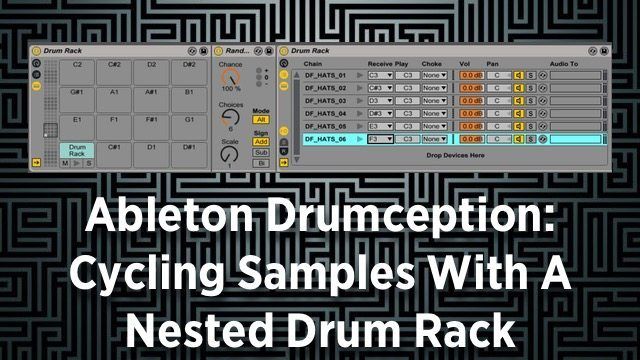
DRUMCEPTION is using the “Random” midi effect with a nested drum rack inside of a drum rack cell. This allows performers to load multiple samples into a single drum rack cell and trigger a new sample every time they trigger that pad/cell. This allows the performer to achieve more playability possible than with a single cell/sample.

Why not just use a pre-recorded sample?

There are a few problems with a pre-recorded sample:

  1. Unable to modify any synth parameters in real time (frustrating!)
  2. Anything with filtering, effects, or detune had to be programmed in.
  3. Samples in the “Simpler” instrument become tempo-locked.

A nested drum rack allows for more flexibility over the sound since it relies on samples and MIDI rather than rendered audio. The possibilities with this are nearly endless.

DRUMCEPTION: Basic Principles
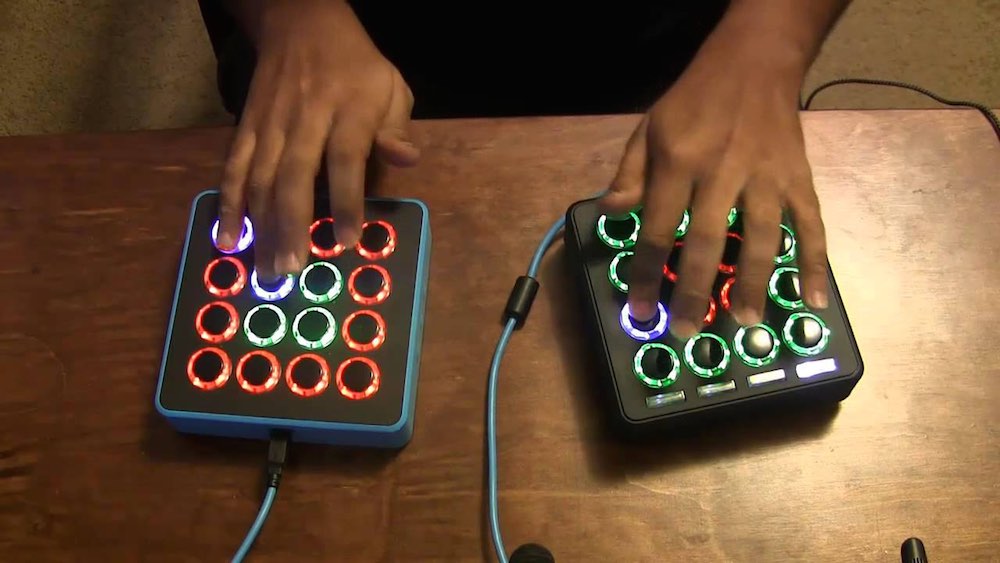
Apoth
Turn 16 buttons into multiple sounds.

The whole idea behind Drumception is that it’s like a bunch of soundpacks compressed into one. The real challenge with drum racks is having a lot of different sonic ideas, and only 16 pads to fit them in. While DJs could use 32 pads, or even 64 pads, sometimes it’s better to keep things simple, accessible, and fun to play with.

So how do we put multiple layers of drum triggers on one pad? Enter the “Random” midi effect. The Random midi effect has a mode setting that switches between Random and Alternating. If it’s at 100%, it always switches to the next MIDI choice. When the Random midi effect is placed before a drum rack chain, it will cycle through samples in the chain.

This technique is used heavily in ill.Gates soundpacks and performances.

How To Setup Drum Racks for DRUMCEPTION

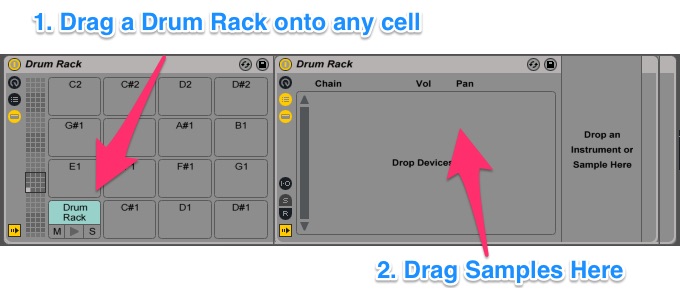
Find source material (or make it) – this can be chord samples, drum samples, vocal one shots etc. Drop a new drum rack onto an existing drum rack cell. Drag your samples onto the drum rack in the order you want them to play (this isn’t entirely necessary but makes things easier in the long run)
Drumception 1

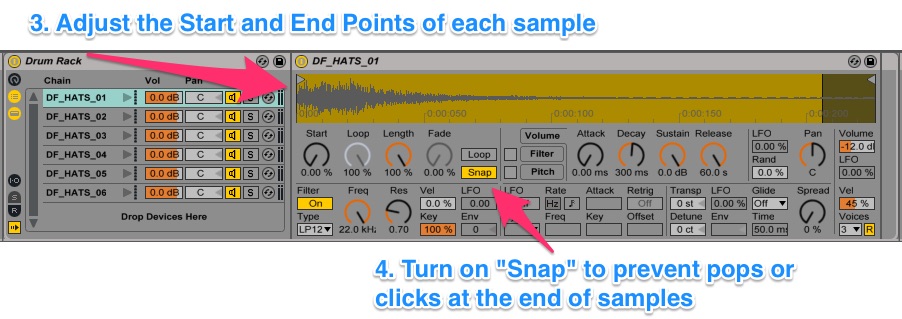
Trim up each one of the samples in the Simpler (check for zero crossings – this will help avoid pops/clicks at the end of samples) and then adjust the ADSR appropriately (sometimes I will add macros for this so I can change all the samples at once).
Drumception 2

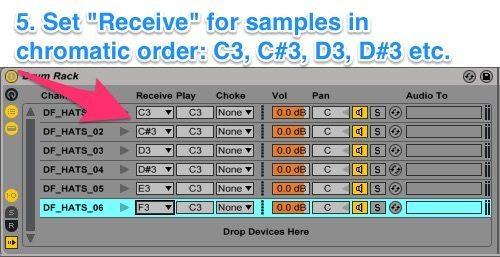
Open the I/O panel of the drum rack, and then set up the chains so that they are in chromatic order (C, C#, D, D#, etc.). You should also take care of any choking (to prevent samples/sounds from overlapping) at this point too.
Drumception 3

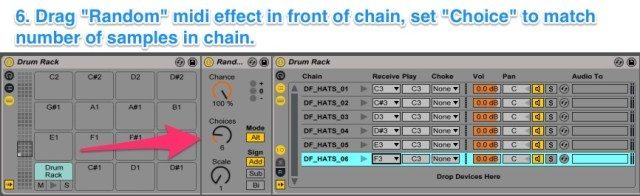
Drop a Random device in front of the drum rack and set it according to how many samples you want it to cycle through. For this application the chance should always be set to 100%. Choices should equal the number of samples in your nested drum rack, and the Mode should be set to ALT (there are other more complicated things you can do with different settings but let’s keep it simple for now!)
Drumception 4

Double check all I/O settings again at this point. Sometimes if you paste chains into the nested drum rack from a different channel, the ‘Received’ note of the pad with the nested rack in it will get changed to ‘All’. Make sure that it’s on the correct note for the pad you want, then check and make sure the received notes in the nested drum rack start with C3. If you’re like me, sometimes you don’t want to change each chain to C3 from the default C1. In this case, drop a Pitch midi effect in front of the nested drum rack (after the Random and any other Midi effect) and set it to -24 semitones. This will make sure that the C3 note the cell receives gets bumped down to C1.
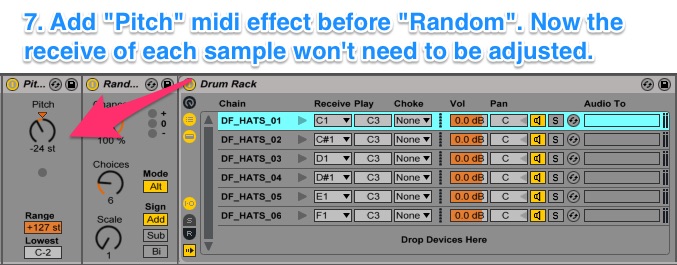
Drumpcetion 5

The Moment Of Truth! Press that button and make sure all the chains in the nested drum rack get played. If you hear unintentional silence on any of the chains, go back and make sure everything is setup correctly – otherwise, enjoy!

Again, this is just one way to use this technique. It can be used in so many other ways to achieve great sounds and help you create dynamic soundpacks for live performance.

A FEW NOTES ABOUT NESTED DRUM RACKS

  1. You cannot copy/cut and paste a normal drum rack (one with the grid displayed) into a cell of another normal drum rack when using this technique. Ableton will crash every time you try. You can only paste the chains from another rack.
  2. Your inputs must match your outputs! A lot of the time when I was working on this concept I would set everything up and then press the button… and hear nothing. Occasionally I would forget to make sure that everything in the MIDI signal chain was sending the correct notes. Basically, the drum rack takes in different notes, and then plays C3 as its output. This is all fine and good if you have the drum-cell filled with a simpler that can accept any note, but if you’re trying to trigger a complex chain of simplers in another drum rack, if the first in the chain isn’t set to receive C3, you’re getting nothing.
  3. Choking: the whole reason that I converted from using an Instrument Rack in this setup, to a nested Drum Rack, was so that I could choke the different chains however I wanted. You don’t really lose THAT much functionality over an instrument rack when you’re dealing with samples, but it does make a difference which you choose. Also, with a Drum Rack, you still get access to internal sends!

Do you have some helpful tips for creating sound packs?

Let us know in the comments below!
Tags: ableton drum racksableton live 9ableton sound packsApoth MusicApoth Soundpacksdrumceptionill gatesnested drum racksrandom midi effectsound packs
Share3Tweet2Share
Previous Post

Qrates: Funding + Vinyl Pressing Service

Next Post

Blend Launches Automatic Ableton Projects From Stems

Related Posts

Choke Soundpacks
Controllerism

Choke Soundpacks Volume 1: Out Now!

January 22, 2018
Ill Gates Book Club: Top 5 Essential Reads For DJs + Producers
Editorials and Opinions

Ill Gates Book Club: Top 5 Essential Reads For DJs + Producers

March 2, 2017
Ill Gates Midi Fighter Tips
Ableton Live Tips

Ill Gates’ Top 5 Tips For Midi Fighter Twister and 3D

January 10, 2017
Load More
Next Post
Blend Launches Automatic Ableton Projects From Stems

Blend Launches Automatic Ableton Projects From Stems

Want to reach DJTT's audience here?

Shoot an email to advertising@djtechtools.com

DJTT ads
DJTT newsletter
Midi Fighter
Chat with us
  • ABOUT DJTT
  • CONTACT
  • PRIVACY
  • MIDI FIGHTER HELP
  • ABOUT DJTT
  • JOBS
  • CONTACT US
  • ADVERTISE
  • PRIVACY POLICY
  • ACCESSIBILITY STATEMENT

© 2024 DJ Techtools all rights reserved by DJ TechTools on all content unless otherwise noted.

No Result
View All Result
  • Blog
    • DJ Gear
      • DIY Projects
      • Gear Reviews
      • New Products
      • Controllerism
    • Techniques + Tips
      • Beginner DJ
      • Advanced DJ
      • Producer
      • Finger Drummer
    • News + Culture
      • Editorials + Opinions
      • Artist Interviews
      • Performances + Routines
      • How I Play
    • DJ Software Tutorials
      • Serato Tips
      • CDJ Tips
      • Ableton Live Tips
  • Store
    • Run by real DJs, not a corporation
    • DJ Controllers
      • Midi Fighter Twister
      • Midi Fighter Spectra
      • Midi Fighter 64
      • View All
    • Accessories
      • Chroma USB Drive for DJs
      • Chroma Caps
      • Chroma Cables Audio
      • Chroma Cables USB-A
      • Chroma Cables: USB-C
      • DJTT Gift Card
      • Midi Fighter T-Shirt
      • Keyboard Covers
      • Earplugs by V-Moda
    • Production Gear
    • Soundcards & Mixers
  • Community
    • Popular Forums
      • General Discussion
      • Buy & Sell
      • Reviews
      • Mixes
      • Music Production
      • Show Your Setup
      • Off Topic
    • Handy Links
      • New Posts
      • Private Messages
      • Register
      • Search
    • Midi Maps
      • Traktor
      • Ableton
      • Serato DJ
      • Midi Fighter 3D
      • Midi Fighter Twister
      • Midi Fighter Spectra
  • Midi Fighter
  • Chroma

© 2024 DJ Techtools all rights reserved by DJ TechTools on all content unless otherwise noted.

This website uses cookies. By continuing to use this website you are giving consent to cookies being used. Visit our Privacy and Cookie Policy.