DJ TechTools
  • Blog
    • DJ Gear
      • DIY Projects
      • Gear Reviews
      • New Products
      • Controllerism
    • Techniques + Tips
      • Beginner DJ
      • Advanced DJ
      • Producer
      • Finger Drummer
    • News + Culture
      • Editorials + Opinions
      • Artist Interviews
      • Performances + Routines
      • How I Play
    • DJ Software Tutorials
      • Serato Tips
        • Traktor Tips
      • CDJ Tips
      • Ableton Live Tips
  • Store
    • Run by real DJs, not a corporation
    • DJ Controllers
      • Midi Fighter Twister
      • Midi Fighter Spectra
      • Midi Fighter 64
      • View All
    • Accessories
      • Chroma USB Drive for DJs
      • Chroma Caps
      • Chroma Cables Audio
      • Chroma Cables USB-A
      • Chroma Cables: USB-C
      • DJTT Gift Card
      • Midi Fighter T-Shirt
      • Keyboard Covers
      • Earplugs by V-Moda
    • Production Gear
    • Soundcards & Mixers
  • Community
    • Popular Forums
      • General Discussion
      • Buy & Sell
      • Reviews
      • Mixes
      • Music Production
      • Show Your Setup
      • Off Topic
    • Handy Links
      • New Posts
      • Private Messages
      • Register
      • Search
    • Midi Maps
      • Traktor
      • Ableton
      • Serato DJ
      • Midi Fighter 3D
      • Midi Fighter Twister
      • Midi Fighter Spectra
  • Midi Fighter
  • Chroma
No Result
View All Result
DJ TechTools
  • Blog
    • DJ Gear
      • DIY Projects
      • Gear Reviews
      • New Products
      • Controllerism
    • Techniques + Tips
      • Beginner DJ
      • Advanced DJ
      • Producer
      • Finger Drummer
    • News + Culture
      • Editorials + Opinions
      • Artist Interviews
      • Performances + Routines
      • How I Play
    • DJ Software Tutorials
      • Serato Tips
        • Traktor Tips
      • CDJ Tips
      • Ableton Live Tips
  • Store
    • Run by real DJs, not a corporation
    • DJ Controllers
      • Midi Fighter Twister
      • Midi Fighter Spectra
      • Midi Fighter 64
      • View All
    • Accessories
      • Chroma USB Drive for DJs
      • Chroma Caps
      • Chroma Cables Audio
      • Chroma Cables USB-A
      • Chroma Cables: USB-C
      • DJTT Gift Card
      • Midi Fighter T-Shirt
      • Keyboard Covers
      • Earplugs by V-Moda
    • Production Gear
    • Soundcards & Mixers
  • Community
    • Popular Forums
      • General Discussion
      • Buy & Sell
      • Reviews
      • Mixes
      • Music Production
      • Show Your Setup
      • Off Topic
    • Handy Links
      • New Posts
      • Private Messages
      • Register
      • Search
    • Midi Maps
      • Traktor
      • Ableton
      • Serato DJ
      • Midi Fighter 3D
      • Midi Fighter Twister
      • Midi Fighter Spectra
  • Midi Fighter
  • Chroma
No Result
View All Result
DJ TechTools

Did iTunes 12.2 Delete Your DJ Playlists? Here’s How To Fix It!

Dan White by Dan White
July 25, 2015
in Breaking News, News
Reading Time: 2 mins read
0
Did iTunes 12.2 Delete Your DJ Playlists? Here’s How To Fix It!
18
VIEWS
Post on FacebookTweet thisUpvote on Reddit

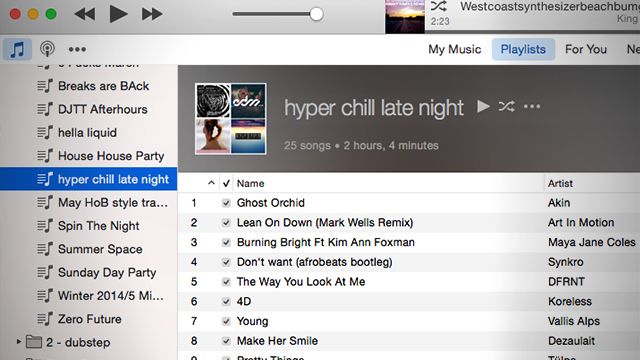
We wrote a few weeks ago about how a recent iTunes update (that incorporated Apple Music) was causing all sorts of trouble – including mismatched songs, missing ID3 tags, wrong artwork, and a number of other incredibly infuriating issues for DJs. This afternoon in the DJTT mailbox was a tip to a solution to one of the biggest problems that happened to some with the 12.2.0 update- playlists being deleted.

I just upgraded to iTunes 12.2.0. and ALL of my playlists and most of my songs are now gone! I have tried to restore my previous iTunes library by Timemachine, but that did not help. I still have all of my music and playlists on my iPhone. What to do??? –  andersfromaabybro on Apple’s Support forums

Shortly after this post, Richard Grant shared his steps to fixing the issue of missing playlists – something that would make the blood of pretty much any DJ boil. Here’s his solution:

First, you should try to turn off iTunes in the Cloud, which I think requires going into Store > Account Info and selecting “Deauthorize This Computer” or something like that. (I can’t check because I’ve got it turned off.)

Now quit iTunes. Look in the folder Music > iTunes > Previous iTunes Libraries. Hopefully, there is at least one document in there with the file extension .itl and a date *prior* to when you updated to to 12.2. If you find such a thing, then do this:

Back in the main iTunes folder, rename the files iTunes Library.itl and iTunes Music Library.xml (just add “corrupted” to the beginning of the file name, or something like that). Now rename the previous version to iTunes Library.itl, drag it into the main iTunes folder, and restart the iTunes app. (The XML file should regenerate automatically.) If all goes well, you should be looking at a version of your iTunes with all your playlists and songs restored. If you are given the option to use iTunes in the Cloud, just say No — this seems to be where these problems are coming from.

If you can’t find such a file, then you can look for one in TimeMachine — just be sure the backup was made prior to upgrading to 12.2. Again, bring this into the iTunes folder, replacing the version that’s been corrupted. I really do hope this works!

Have you continued to have issues with iTunes? Anyone found a GOOD alternative music player and organizer (cross-platform, so Winamp doesn’t count) that DJs would love to use instead of the bloated Apple software?
Tags: 12.2.0apple forumsdeleteddj libraryFixiTunesmissing playlistsupdate
ShareTweetShare
Previous Post

Custom Steampunk CDJs + DJM in Tomorrowland’s DJ Booth

Next Post

What’s Serato’s New Canadian Timecode Aboot, Eh?

Related Posts

MIXO wants to transform DJ Library Management with their new platform
Controllerism

MIXO wants to transform DJ Library Management with their new platform

May 2, 2023
Rekordbox’s new Professional plan: unlimited cloud storage for your library
News + Culture

Rekordbox’s new Professional plan: unlimited cloud storage for your library

August 25, 2021
Traktor Pro 3.3 Public Beta adds XDJ-1000MK2 support
Breaking News

Traktor Pro 3.3.0 is coming with XDJ-1000MK2 support, Kontrol S2/S3 get MIDI mode

February 18, 2020
Load More
Next Post
What’s Serato’s New Canadian Timecode Aboot, Eh?

What's Serato's New Canadian Timecode Aboot, Eh?

Want to reach DJTT's audience here?

Shoot an email to advertising@djtechtools.com

DJTT ads
DJTT newsletter
Midi Fighter
Chat with us
  • ABOUT DJTT
  • CONTACT
  • PRIVACY
  • MIDI FIGHTER HELP
  • ABOUT DJTT
  • JOBS
  • CONTACT US
  • ADVERTISE
  • PRIVACY POLICY
  • ACCESSIBILITY STATEMENT

© 2024 DJ Techtools all rights reserved by DJ TechTools on all content unless otherwise noted.

No Result
View All Result
  • Blog
    • DJ Gear
      • DIY Projects
      • Gear Reviews
      • New Products
      • Controllerism
    • Techniques + Tips
      • Beginner DJ
      • Advanced DJ
      • Producer
      • Finger Drummer
    • News + Culture
      • Editorials + Opinions
      • Artist Interviews
      • Performances + Routines
      • How I Play
    • DJ Software Tutorials
      • Serato Tips
      • CDJ Tips
      • Ableton Live Tips
  • Store
    • Run by real DJs, not a corporation
    • DJ Controllers
      • Midi Fighter Twister
      • Midi Fighter Spectra
      • Midi Fighter 64
      • View All
    • Accessories
      • Chroma USB Drive for DJs
      • Chroma Caps
      • Chroma Cables Audio
      • Chroma Cables USB-A
      • Chroma Cables: USB-C
      • DJTT Gift Card
      • Midi Fighter T-Shirt
      • Keyboard Covers
      • Earplugs by V-Moda
    • Production Gear
    • Soundcards & Mixers
  • Community
    • Popular Forums
      • General Discussion
      • Buy & Sell
      • Reviews
      • Mixes
      • Music Production
      • Show Your Setup
      • Off Topic
    • Handy Links
      • New Posts
      • Private Messages
      • Register
      • Search
    • Midi Maps
      • Traktor
      • Ableton
      • Serato DJ
      • Midi Fighter 3D
      • Midi Fighter Twister
      • Midi Fighter Spectra
  • Midi Fighter
  • Chroma

© 2024 DJ Techtools all rights reserved by DJ TechTools on all content unless otherwise noted.

This website uses cookies. By continuing to use this website you are giving consent to cookies being used. Visit our Privacy and Cookie Policy.