DJ TechTools
  • Blog
    • DJ Gear
      • DIY Projects
      • Gear Reviews
      • New Products
      • Controllerism
    • Techniques + Tips
      • Beginner DJ
      • Advanced DJ
      • Producer
      • Finger Drummer
    • News + Culture
      • Editorials + Opinions
      • Artist Interviews
      • Performances + Routines
      • How I Play
    • DJ Software Tutorials
      • Serato Tips
        • Traktor Tips
      • CDJ Tips
      • Ableton Live Tips
  • Store
    • Run by real DJs, not a corporation
    • DJ Controllers
      • Midi Fighter Twister
      • Midi Fighter Spectra
      • Midi Fighter 64
      • View All
    • Accessories
      • Chroma USB Drive for DJs
      • Chroma Caps
      • Chroma Cables Audio
      • Chroma Cables USB-A
      • Chroma Cables: USB-C
      • DJTT Gift Card
      • Midi Fighter T-Shirt
      • Keyboard Covers
      • Earplugs by V-Moda
    • Production Gear
    • Soundcards & Mixers
  • Community
    • Popular Forums
      • General Discussion
      • Buy & Sell
      • Reviews
      • Mixes
      • Music Production
      • Show Your Setup
      • Off Topic
    • Handy Links
      • New Posts
      • Private Messages
      • Register
      • Search
    • Midi Maps
      • Traktor
      • Ableton
      • Serato DJ
      • Midi Fighter 3D
      • Midi Fighter Twister
      • Midi Fighter Spectra
  • Midi Fighter
  • Chroma
No Result
View All Result
DJ TechTools
  • Blog
    • DJ Gear
      • DIY Projects
      • Gear Reviews
      • New Products
      • Controllerism
    • Techniques + Tips
      • Beginner DJ
      • Advanced DJ
      • Producer
      • Finger Drummer
    • News + Culture
      • Editorials + Opinions
      • Artist Interviews
      • Performances + Routines
      • How I Play
    • DJ Software Tutorials
      • Serato Tips
        • Traktor Tips
      • CDJ Tips
      • Ableton Live Tips
  • Store
    • Run by real DJs, not a corporation
    • DJ Controllers
      • Midi Fighter Twister
      • Midi Fighter Spectra
      • Midi Fighter 64
      • View All
    • Accessories
      • Chroma USB Drive for DJs
      • Chroma Caps
      • Chroma Cables Audio
      • Chroma Cables USB-A
      • Chroma Cables: USB-C
      • DJTT Gift Card
      • Midi Fighter T-Shirt
      • Keyboard Covers
      • Earplugs by V-Moda
    • Production Gear
    • Soundcards & Mixers
  • Community
    • Popular Forums
      • General Discussion
      • Buy & Sell
      • Reviews
      • Mixes
      • Music Production
      • Show Your Setup
      • Off Topic
    • Handy Links
      • New Posts
      • Private Messages
      • Register
      • Search
    • Midi Maps
      • Traktor
      • Ableton
      • Serato DJ
      • Midi Fighter 3D
      • Midi Fighter Twister
      • Midi Fighter Spectra
  • Midi Fighter
  • Chroma
No Result
View All Result
DJ TechTools

Casual DJ Mixing Apps in Pacemaker + Spotify: Should DJs Be Worried?

Dan White by Dan White
December 17, 2015
in iOS DJ Tips
Reading Time: 3 mins read
0
Casual DJ mixing apps
54
VIEWS
Post on FacebookTweet thisUpvote on Reddit

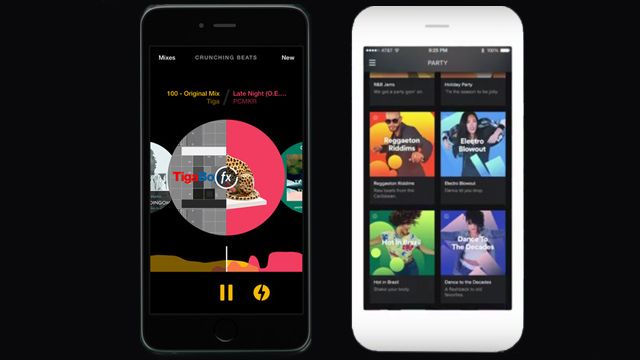
This week two companies have made additional forays into the casual DJ mixing apps market – Spotify and Pacemaker. With a new Party mode, Spotify hopes to automate DJing for a lot of casual music consumers; while Pacemaker’s new update adds “move-in transitions” that allow automated mixing between two tracks. Should DJs feel threatened? Read on for our thoughts.

Pacemaker For iPhone

The brand new version of Pacemaker brings the app to the iPhone, something that last year’s release on iPad (watch our first look review here) lacked. As I pointed out in the article on Auxy’s new release, having a casual music app is way more likely to be used if it’s on a phone as opposed to an iPad, which tends to be a device that you bring when you have a specific use for it.

But to make mixing songs together realistic on an iPhone, Pacemaker has come up with Mix Transitions, a creative solution that allows anyone to make quick transition edits. You select a second song from a list of EchoNest suggested tracks that match key and BPM. Slide the second track a point in the waveform that looks good, and the app will automatically lock BPM and fade out the old track, fade in the new track – but in a cleaner way than we’ve heard from other such automated processes in Traktor, Virtual DJ, etc.

Did we mention there’s Apple Watch support?

When it comes down to it, this is a simple mixing solution – but it is perfect for situations in which you want a better setup than just someone’s Spotify playlist. Speaking of which, the Spotify integration is still there, so you can load in tracks from Spotify and have a better flexibility of selection that you might on Serato (until 1.9 and Pulselocker arrives) or Traktor. The fact that EchoNest song compatibility works on Spotify’s library is pretty huge- you’re able to find compatible tracks that you never would have thought of otherwise. When will Traktor, Rekordbox, and Serato DJ get track recommendation engines?

Should DJs Be Worried? Absolutely not. Pacemaker is a fun mixing app that will do better than casually trying to fade YouTube videos together, and it’s very useful for finding great tracks that work well together, taking requests, and overall just curating a party playlist. I would actually recommend downloading it and keeping it for those moments in which you wish you had a full DJ setup but would settle for any way to make a series of selected tracks sound good together.

The new version of Pacemaker continues to be free on the iTunes App Store store – you just have to pay if you want to unlock in-app effects, loops, beatjumps, and filters.

Spotify Party

Also this week came a new announcement from Spotify that they’re touting as being “party-friendly playlists” that come already “mixed by DJs” but have the built-in ability to transition between three different mood/energy levels. Taglines like “Sound like a DJ” and “Set the mood” are all over their landing page. There’s a quote from Diplo in their blog post:

“When it comes to throwing parties you simply have to have the right playlists – or everyone will leave […] and while researching and picking out music is fun, it also takes a lot of time and effort. With Spotify Party, you’re served with loads of beat-matched music that transitions perfectly, which you can easily adapt to whatever your current vibe is. Best of all, you don’t have to do any of the legwork.”

Spotify Party allows selecting between three different vibes within a specific mix – which means someone still has to read the room and decide what the room needs. That’s traditionally the job of a DJ, right?

Should DJs Be Worried? If successful, this Party mode will very much start a new wave of people who think that a DJ’s job is easily automated. Remember when the iPod first came up and people were claiming that instead of hiring a talented wedding DJ, a playlist on an iPod would do just as well with a rented sound system? Expect more of that. But again, you won’t find this in clubs. You might find it in bars or house parties where DJs could be – but it still won’t have the same versatility, because at the end of the day, these are playlists, not tracks chosen for a specific event.
Tags: casual dj mixing appsIOSipadIphonepacemakerspotify
ShareTweetShare
Previous Post

Holiday Finger Drumming Contest + Free Soundpack

Next Post

Martin Eyerer Interview: How To Record With A Vocalist

Related Posts

Rekordox Spotify
Breaking News

Spotify (finally) slides into Rekordbox, Serato, and Algoriddim djay (again) – for better or worse?

September 24, 2025
DJ Pro Tips for Digital Crate Digging on Beatport, Bandcamp, Soundcloud, Spotify, Juno Download, and QoBuz
DJ Music Library Tips

DJ Pro Tips for Digital Crate Digging on Beatport, Bandcamp, Soundcloud, Spotify, Juno Download, and QoBuz

February 24, 2023
free studio tools for quarantined producers
Production Tips

Tutorials and free tools for quarantined producers to beat the studio blues

March 18, 2020
Load More
Next Post
martin eyerer

Martin Eyerer Interview: How To Record With A Vocalist

Want to reach DJTT's audience here?

Shoot an email to advertising@djtechtools.com

DJTT ads
DJTT newsletter
Midi Fighter
Chat with us
  • ABOUT DJTT
  • CONTACT
  • PRIVACY
  • MIDI FIGHTER HELP
  • ABOUT DJTT
  • JOBS
  • CONTACT US
  • ADVERTISE
  • PRIVACY POLICY
  • ACCESSIBILITY STATEMENT

© 2024 DJ Techtools all rights reserved by DJ TechTools on all content unless otherwise noted.

No Result
View All Result
  • Blog
    • DJ Gear
      • DIY Projects
      • Gear Reviews
      • New Products
      • Controllerism
    • Techniques + Tips
      • Beginner DJ
      • Advanced DJ
      • Producer
      • Finger Drummer
    • News + Culture
      • Editorials + Opinions
      • Artist Interviews
      • Performances + Routines
      • How I Play
    • DJ Software Tutorials
      • Serato Tips
      • CDJ Tips
      • Ableton Live Tips
  • Store
    • Run by real DJs, not a corporation
    • DJ Controllers
      • Midi Fighter Twister
      • Midi Fighter Spectra
      • Midi Fighter 64
      • View All
    • Accessories
      • Chroma USB Drive for DJs
      • Chroma Caps
      • Chroma Cables Audio
      • Chroma Cables USB-A
      • Chroma Cables: USB-C
      • DJTT Gift Card
      • Midi Fighter T-Shirt
      • Keyboard Covers
      • Earplugs by V-Moda
    • Production Gear
    • Soundcards & Mixers
  • Community
    • Popular Forums
      • General Discussion
      • Buy & Sell
      • Reviews
      • Mixes
      • Music Production
      • Show Your Setup
      • Off Topic
    • Handy Links
      • New Posts
      • Private Messages
      • Register
      • Search
    • Midi Maps
      • Traktor
      • Ableton
      • Serato DJ
      • Midi Fighter 3D
      • Midi Fighter Twister
      • Midi Fighter Spectra
  • Midi Fighter
  • Chroma

© 2024 DJ Techtools all rights reserved by DJ TechTools on all content unless otherwise noted.

This website uses cookies. By continuing to use this website you are giving consent to cookies being used. Visit our Privacy and Cookie Policy.