DJ TechTools
  • Blog
    • DJ Gear
      • DIY Projects
      • Gear Reviews
      • New Products
      • Controllerism
    • Techniques + Tips
      • Beginner DJ
      • Advanced DJ
      • Producer
      • Finger Drummer
    • News + Culture
      • Editorials + Opinions
      • Artist Interviews
      • Performances + Routines
      • How I Play
    • DJ Software Tutorials
      • Serato Tips
        • Traktor Tips
      • CDJ Tips
      • Ableton Live Tips
  • Store
    • Run by real DJs, not a corporation
    • DJ Controllers
      • Midi Fighter Twister
      • Midi Fighter Spectra
      • Midi Fighter 64
      • View All
    • Accessories
      • Chroma USB Drive for DJs
      • Chroma Caps
      • Chroma Cables Audio
      • Chroma Cables USB-A
      • Chroma Cables: USB-C
      • DJTT Gift Card
      • Midi Fighter T-Shirt
      • Keyboard Covers
      • Earplugs by V-Moda
    • Production Gear
    • Soundcards & Mixers
  • Community
    • Popular Forums
      • General Discussion
      • Buy & Sell
      • Reviews
      • Mixes
      • Music Production
      • Show Your Setup
      • Off Topic
    • Handy Links
      • New Posts
      • Private Messages
      • Register
      • Search
    • Midi Maps
      • Traktor
      • Ableton
      • Serato DJ
      • Midi Fighter 3D
      • Midi Fighter Twister
      • Midi Fighter Spectra
  • Midi Fighter
  • Chroma
No Result
View All Result
DJ TechTools
  • Blog
    • DJ Gear
      • DIY Projects
      • Gear Reviews
      • New Products
      • Controllerism
    • Techniques + Tips
      • Beginner DJ
      • Advanced DJ
      • Producer
      • Finger Drummer
    • News + Culture
      • Editorials + Opinions
      • Artist Interviews
      • Performances + Routines
      • How I Play
    • DJ Software Tutorials
      • Serato Tips
        • Traktor Tips
      • CDJ Tips
      • Ableton Live Tips
  • Store
    • Run by real DJs, not a corporation
    • DJ Controllers
      • Midi Fighter Twister
      • Midi Fighter Spectra
      • Midi Fighter 64
      • View All
    • Accessories
      • Chroma USB Drive for DJs
      • Chroma Caps
      • Chroma Cables Audio
      • Chroma Cables USB-A
      • Chroma Cables: USB-C
      • DJTT Gift Card
      • Midi Fighter T-Shirt
      • Keyboard Covers
      • Earplugs by V-Moda
    • Production Gear
    • Soundcards & Mixers
  • Community
    • Popular Forums
      • General Discussion
      • Buy & Sell
      • Reviews
      • Mixes
      • Music Production
      • Show Your Setup
      • Off Topic
    • Handy Links
      • New Posts
      • Private Messages
      • Register
      • Search
    • Midi Maps
      • Traktor
      • Ableton
      • Serato DJ
      • Midi Fighter 3D
      • Midi Fighter Twister
      • Midi Fighter Spectra
  • Midi Fighter
  • Chroma
No Result
View All Result
DJ TechTools

Underused DJ Techniques: Beat Jump

Marc Santaromana by Marc Santaromana
September 15, 2016
in Basic DJ Tips, DJ Software Tips
Reading Time: 4 mins read
0
Underused DJ Techniques: Beat Jump
1.3k
VIEWS
Post on FacebookTweet thisUpvote on Reddit

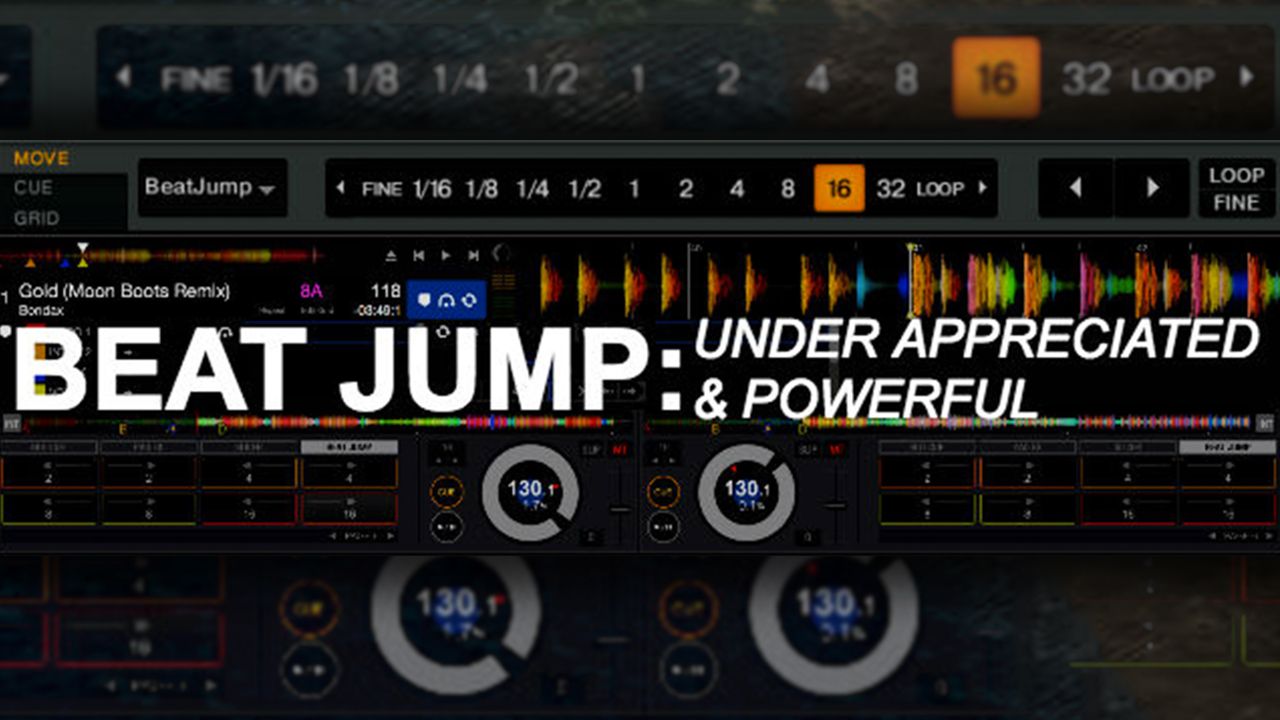
Compared to cue points, looping, and effects, beat jump is one of the more rarely discussed DJ software features. It’s underutilized by a majority of DJs, mainly because many DJs don’t know how to use it effectively. Beat jump is a powerful tool not only during performance, but it can speed up preparation time as well.

What Is Beat Jump?
Beat Jump Top

Imagine throwing on a new track in the middle of your set, but you aren’t sure where to mix it in seamlessly. You have to scrub back and forth through the track to find the right spot, then worry about how far back you need to bring the track to give you enough time to mix in. In the heat of a set, having to go through those steps can take you out of the moment and ruin your groove. Beat jump can simplify this process and make it feel effortless.

Beat jump allows you to skip forward or backward through a track on beat, based on the beat grid. The on beat part is what makes this feature a game changer. With a few clicks of the mouse you can find the part of a track you are looking for and not worry about phrasing.

Currently beat jump or something similar is available in:

  • Traktor Pro
  • Rekordbox DJ
  • Serato DJ
  • Pioneer DJ’s XDJ-1000 (MK1/2) and CDJ-2000NXS2

3 Things To Keep In Mind When Using Beat Jump

Beat Grids

Beat Jump SDJ Grids

Keep in mind when using beat jump make sure the beat grid of the track is correct. Beat jump works around the beat grid, so if the beat grid is off the beat jump will be off as well.

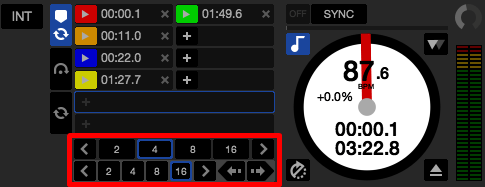
Beat Jump LengthBeat Jump Length Traktor

Most software that has beat jump allows you to select the length in beats that you would like the move through the track. Be sure that you have the correct length select before you start jumping through the track.

Forward Or BackwardBeat Jump Forward Backward RDJ
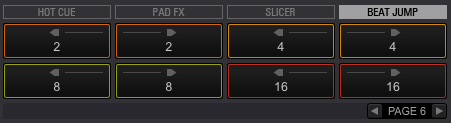
Along with length controls there are controls to jump either forward or backward. Make sure that you are aware of which button you are hitting as they are usually placed pretty close together. This can be less confusing when using a controller with tactile buttons.

3 Great Uses For Beat Jump

Setting Cue Points

Beat Jump cue point set

For DJs who place their cue points based on song structure, beat jump speeds up the track preparation. For example, I like to place a cue point at the beginning of an intro, mid-way through the intro, and at the end of the intro. Beat jump allows me to just click through the track on time instead of having to scrub through the track.

Learning Song Structure On The Fly

Beat Jump song structure

When introducing new songs into your sets there is a period of getting familiar with the track. Some songs might have 32 beat build up, some may only have 24 beats. Using beat jump to get move through the track on beat makes learning each song much faster. 

Saving Mis-Cued Drops
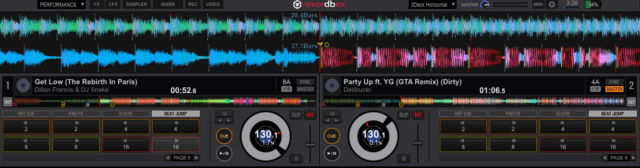
Beat Jump mis-cues

Here’s an example of how beat jump can be the most useful:

  • Mixing out of a song with a 32 beat chorus with the next song cued
  • Hit the cue point on the incoming track, but you realize that the incoming track has a 64 beat intro. This would create some phrasing issues
  • Use beat jump to correct the position of the incoming track – jump forward 32 beats and avoid having to loop one of the tracks

Now Put It To Use!

Adding beat jump to my preparation and performance work flow has been nothing but positive. It’s easily overlooked and definitely under-appreciated. Give beat jump a try, add it to one part of your DJ process. 

Here’s a video walkthrough of how to use beat jump with Rekordbox, Serato, and Traktor, as well as examples of the uses I explained above:
Watch next: Ean’s Tutorial On Loop Move Macros in Traktor

Tags: beat jumpbeat movedj techniques
Share10Tweet6Share
Previous Post

Serato DJ 1.9.3 Beta: Ableton Link Tempo Sync

Next Post

Pioneer DJ Hints At CDJ-2000NXS2 HID Traktor Support, Stems?

Related Posts

DJ Fundamentals: How Phrasing Can Make or Break a DJ Mix
Advanced DJ Tips

DJ Fundamentals: How Phrasing Can Make or Break a DJ Mix

November 11, 2019
Silent Discos: How to DJ in Silence
DJ Techniques / Tips

Silent Discos: How to DJ in Silence

August 29, 2017
Tutorial: Make Space In Your DJ Mix For New Tracks
Basic DJ Tips

Tutorial: Make Space In Your DJ Mix For New Tracks

August 21, 2017
Load More
Next Post
Pioneer DJ Hints At CDJ-2000NXS2 HID Traktor Support, Stems?

Pioneer DJ Hints At CDJ-2000NXS2 HID Traktor Support, Stems?

Want to reach DJTT's audience here?

Shoot an email to advertising@djtechtools.com

DJTT ads
DJTT newsletter
Midi Fighter
Chat with us
  • ABOUT DJTT
  • CONTACT
  • PRIVACY
  • MIDI FIGHTER HELP
  • ABOUT DJTT
  • JOBS
  • CONTACT US
  • ADVERTISE
  • PRIVACY POLICY
  • ACCESSIBILITY STATEMENT

© 2024 DJ Techtools all rights reserved by DJ TechTools on all content unless otherwise noted.

No Result
View All Result
  • Blog
    • DJ Gear
      • DIY Projects
      • Gear Reviews
      • New Products
      • Controllerism
    • Techniques + Tips
      • Beginner DJ
      • Advanced DJ
      • Producer
      • Finger Drummer
    • News + Culture
      • Editorials + Opinions
      • Artist Interviews
      • Performances + Routines
      • How I Play
    • DJ Software Tutorials
      • Serato Tips
      • CDJ Tips
      • Ableton Live Tips
  • Store
    • Run by real DJs, not a corporation
    • DJ Controllers
      • Midi Fighter Twister
      • Midi Fighter Spectra
      • Midi Fighter 64
      • View All
    • Accessories
      • Chroma USB Drive for DJs
      • Chroma Caps
      • Chroma Cables Audio
      • Chroma Cables USB-A
      • Chroma Cables: USB-C
      • DJTT Gift Card
      • Midi Fighter T-Shirt
      • Keyboard Covers
      • Earplugs by V-Moda
    • Production Gear
    • Soundcards & Mixers
  • Community
    • Popular Forums
      • General Discussion
      • Buy & Sell
      • Reviews
      • Mixes
      • Music Production
      • Show Your Setup
      • Off Topic
    • Handy Links
      • New Posts
      • Private Messages
      • Register
      • Search
    • Midi Maps
      • Traktor
      • Ableton
      • Serato DJ
      • Midi Fighter 3D
      • Midi Fighter Twister
      • Midi Fighter Spectra
  • Midi Fighter
  • Chroma

© 2024 DJ Techtools all rights reserved by DJ TechTools on all content unless otherwise noted.

This website uses cookies. By continuing to use this website you are giving consent to cookies being used. Visit our Privacy and Cookie Policy.