DJ TechTools
  • Blog
    • DJ Gear
      • DIY Projects
      • Gear Reviews
      • New Products
      • Controllerism
    • Techniques + Tips
      • Beginner DJ
      • Advanced DJ
      • Producer
      • Finger Drummer
    • News + Culture
      • Editorials + Opinions
      • Artist Interviews
      • Performances + Routines
      • How I Play
    • DJ Software Tutorials
      • Serato Tips
        • Traktor Tips
      • CDJ Tips
      • Ableton Live Tips
  • Store
    • Run by real DJs, not a corporation
    • DJ Controllers
      • Midi Fighter Twister
      • Midi Fighter Spectra
      • Midi Fighter 64
      • View All
    • Accessories
      • Chroma USB Drive for DJs
      • Chroma Caps
      • Chroma Cables Audio
      • Chroma Cables USB-A
      • Chroma Cables: USB-C
      • DJTT Gift Card
      • Midi Fighter T-Shirt
      • Keyboard Covers
      • Earplugs by V-Moda
    • Production Gear
    • Soundcards & Mixers
  • Community
    • Popular Forums
      • General Discussion
      • Buy & Sell
      • Reviews
      • Mixes
      • Music Production
      • Show Your Setup
      • Off Topic
    • Handy Links
      • New Posts
      • Private Messages
      • Register
      • Search
    • Midi Maps
      • Traktor
      • Ableton
      • Serato DJ
      • Midi Fighter 3D
      • Midi Fighter Twister
      • Midi Fighter Spectra
  • Midi Fighter
  • Chroma
No Result
View All Result
DJ TechTools
  • Blog
    • DJ Gear
      • DIY Projects
      • Gear Reviews
      • New Products
      • Controllerism
    • Techniques + Tips
      • Beginner DJ
      • Advanced DJ
      • Producer
      • Finger Drummer
    • News + Culture
      • Editorials + Opinions
      • Artist Interviews
      • Performances + Routines
      • How I Play
    • DJ Software Tutorials
      • Serato Tips
        • Traktor Tips
      • CDJ Tips
      • Ableton Live Tips
  • Store
    • Run by real DJs, not a corporation
    • DJ Controllers
      • Midi Fighter Twister
      • Midi Fighter Spectra
      • Midi Fighter 64
      • View All
    • Accessories
      • Chroma USB Drive for DJs
      • Chroma Caps
      • Chroma Cables Audio
      • Chroma Cables USB-A
      • Chroma Cables: USB-C
      • DJTT Gift Card
      • Midi Fighter T-Shirt
      • Keyboard Covers
      • Earplugs by V-Moda
    • Production Gear
    • Soundcards & Mixers
  • Community
    • Popular Forums
      • General Discussion
      • Buy & Sell
      • Reviews
      • Mixes
      • Music Production
      • Show Your Setup
      • Off Topic
    • Handy Links
      • New Posts
      • Private Messages
      • Register
      • Search
    • Midi Maps
      • Traktor
      • Ableton
      • Serato DJ
      • Midi Fighter 3D
      • Midi Fighter Twister
      • Midi Fighter Spectra
  • Midi Fighter
  • Chroma
No Result
View All Result
DJ TechTools

Traktor Tricks: Double up effects with a loop for a cleaner build.

Chris Cartledge by Chris Cartledge
October 20, 2011
in Advanced DJ Tips, DJ Techniques / Tips, Traktor Tips
Reading Time: 4 mins read
0
Traktor Tricks: Double up effects with a loop for a cleaner build.
202
VIEWS
Post on FacebookTweet thisUpvote on Reddit

The Beatslicer and Beatmasher are some of the most useful effects in Traktor Pro. They can be used subtly to create fills that sound almost like they’re part of the original track, or so boldly that  it disrupts the mix completely beyond recognition, and all the gradations in between. After a while, chopping up a beat can not only get repetitive but also disrupt the dance floor. Many producers will often chop-up a song momentarily and at the same time introduce a rhythmic loop to maintain the groove before snapping back to the original song. Fortunately for you , the same result can be achieved with a clever mapping trick that will produce studio quality fills in DJ software. 

The reason Beatslicer’s so great for fills is because it messes with the rhythm of the track you put through it, but over sustained periods that rhythm might not keep your audience’s dancing feet glued on. The solution? Bring in a new drum loop, supplied by the sample deck, at the same time to compensate.

INSTANT REMIX
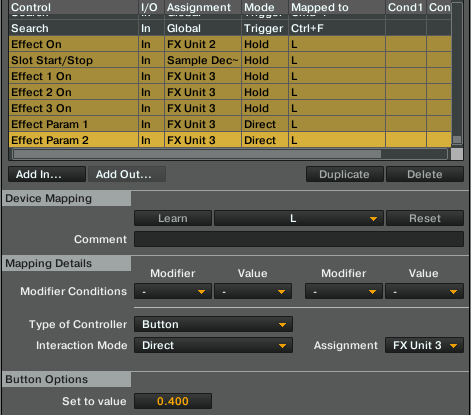
Decide on a button – or ideally a set of a few buttons – that you’re going to use for your ‘instant remix’ controls. Go to the controller manager and set up a New In for the following:

• Effect On on the beat slicer
• Slot Start/Stop on the sample deck

Depending on what you’re going for you might want to engage the instant remix when you’re holding a button and disengage when you let go, in which case you should set the above controls’ Interaction Mode to ‘hold’, or you may want to toggle it on and off: you guessed it, ‘toggle’.

That’s it! Kidding. In a nutshell, though, that’s the concept. There are huge amounts of possibilities with this ‘instant remix’ idea. Listen to these two examples, one of a subtle reworking effect on an already four on the floor track and the other a more pronounced remix of an R&B tune into drum and bass:

house (original track: Muteknight – Heavy Indulgence)

monicadnb (original track: Monica – So Gone)

THE EFFECTS

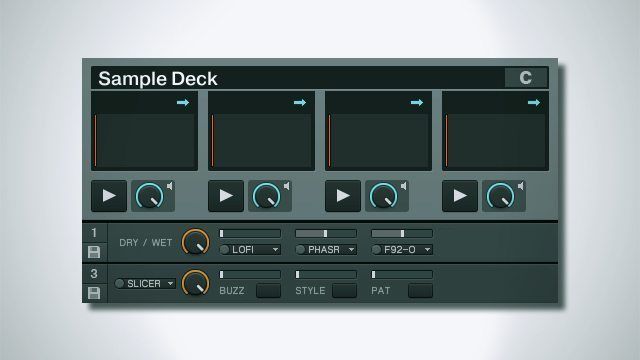
Let’s reaquaint ourselves with the beat slicer controls to see how it shapes the sound:

• Buzz turns each slice into a mini loop, which can add a little extra bounce to the sliced loop at small settings and turn the loop into one big glitch at large settings.
• Style and Pattern change how the loop is shuffled around. Style and Pattern set to 1 create a simple loop, and things get crazier from there.
• The second button is a gater. The gater is an either/or choice with Buzz, though.
• The third button makes beat slicer take a two bar loop instead of one.
• The first button resets all parameters, be careful!

For each of your instant remix buttons, you can set a different style of beatmasher. Simply set the Type of Controller to ‘button’, and the Interaction Mode to ‘direct’, then choose your value in the Button Options section at the bottom. The options are all divisions of 1, so .6 corresponds to style 3 and so on. Do this for each of your controls and you’ll be able to instantly trigger the different styles. Be mindful of the fact that if you want to be able to toggle your instant remix and change it without switching it off that you’ll need to get a bit more in depth with your mapping. The easiest way to make all your buttons turn the instant remix effect on but not off is to set them up as we’ve already discussed, except instead of toggle setting the Interaction Mode to ‘direct’ and setting to 1. Then just map an off button that sets the same settings to 0.

If you’re ready to get really deep, you can start to add other effects to the mix. This is where experimentation really pays off as there’s so much scope for an interesting sound bed when we’ve got our sample player drum loop to keep the rhythm danceable (or at least head noddable), but I had a lot of fun with a group effect consisting of Digital Lofi, Phaser, and Filter-92 LFO to create a dubsteppy rhythm that gets even cooler when modulating the speed of the LFO. Just remember that in Traktor the effects banks work in series, so your beat slicer will have to be before any effects you want it to put it through.

DRUMS
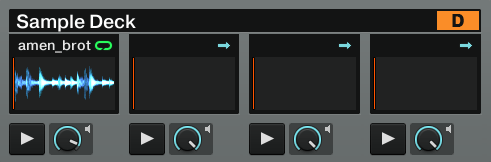
Finally, I hear you asking what you’re supposed to do for drum loops. Well, you may well already have some in your favourite tracks; if a track has a loop of drums unspoiled by any instrumentation then you can simply create a loop out of it in a deck and then drag it into a sample deck. If not, then there are thousands of drum loops available online, both for free and from various sample pack providers. To get you started, though, here are three loops: a housey four on the floor, a dubsteppy skip, and a drum and bass style high tempo break.

house

dnb

dubstep

Now get remixing!

Tags: beatmasherbeatslicerdouble effectstraktor effects
Share2Tweet1Share
Previous Post

Review: Native Instruments Traktor Kontrol S2

Next Post

Looking into SYNC – Power Functions in Traktor Pro 2

Related Posts

Recording On-The-Fly OverDubs Using a Simple Effect Trick
Advanced DJ Tips

Recording On-The-Fly OverDubs Using a Simple Effect Trick

September 28, 2014
Velocity Sensitive Control of FX + Remix Decks in Traktor
DJ Software Tips

Velocity Sensitive Control of FX + Remix Decks in Traktor

January 9, 2014
Creating An Isolator Effect Mapping In Traktor
Advanced DJ Tips

Creating An Isolator Effect Mapping In Traktor

January 7, 2013
Load More
Next Post
Looking into SYNC – Power Functions in Traktor Pro 2

Looking into SYNC - Power Functions in Traktor Pro 2

Want to reach DJTT's audience here?

Shoot an email to advertising@djtechtools.com

DJTT ads
DJTT newsletter
Midi Fighter
Chat with us
  • ABOUT DJTT
  • CONTACT
  • PRIVACY
  • MIDI FIGHTER HELP
  • ABOUT DJTT
  • JOBS
  • CONTACT US
  • ADVERTISE
  • PRIVACY POLICY
  • ACCESSIBILITY STATEMENT

© 2024 DJ Techtools all rights reserved by DJ TechTools on all content unless otherwise noted.

No Result
View All Result
  • Blog
    • DJ Gear
      • DIY Projects
      • Gear Reviews
      • New Products
      • Controllerism
    • Techniques + Tips
      • Beginner DJ
      • Advanced DJ
      • Producer
      • Finger Drummer
    • News + Culture
      • Editorials + Opinions
      • Artist Interviews
      • Performances + Routines
      • How I Play
    • DJ Software Tutorials
      • Serato Tips
      • CDJ Tips
      • Ableton Live Tips
  • Store
    • Run by real DJs, not a corporation
    • DJ Controllers
      • Midi Fighter Twister
      • Midi Fighter Spectra
      • Midi Fighter 64
      • View All
    • Accessories
      • Chroma USB Drive for DJs
      • Chroma Caps
      • Chroma Cables Audio
      • Chroma Cables USB-A
      • Chroma Cables: USB-C
      • DJTT Gift Card
      • Midi Fighter T-Shirt
      • Keyboard Covers
      • Earplugs by V-Moda
    • Production Gear
    • Soundcards & Mixers
  • Community
    • Popular Forums
      • General Discussion
      • Buy & Sell
      • Reviews
      • Mixes
      • Music Production
      • Show Your Setup
      • Off Topic
    • Handy Links
      • New Posts
      • Private Messages
      • Register
      • Search
    • Midi Maps
      • Traktor
      • Ableton
      • Serato DJ
      • Midi Fighter 3D
      • Midi Fighter Twister
      • Midi Fighter Spectra
  • Midi Fighter
  • Chroma

© 2024 DJ Techtools all rights reserved by DJ TechTools on all content unless otherwise noted.

This website uses cookies. By continuing to use this website you are giving consent to cookies being used. Visit our Privacy and Cookie Policy.