DJ TechTools
  • Blog
    • DJ Gear
      • DIY Projects
      • Gear Reviews
      • New Products
      • Controllerism
    • Techniques + Tips
      • Beginner DJ
      • Advanced DJ
      • Producer
      • Finger Drummer
    • News + Culture
      • Editorials + Opinions
      • Artist Interviews
      • Performances + Routines
      • How I Play
    • DJ Software Tutorials
      • Serato Tips
        • Traktor Tips
      • CDJ Tips
      • Ableton Live Tips
  • Store
    • Run by real DJs, not a corporation
    • DJ Controllers
      • Midi Fighter Twister
      • Midi Fighter Spectra
      • Midi Fighter 64
      • View All
    • Accessories
      • Chroma USB Drive for DJs
      • Chroma Caps
      • Chroma Cables Audio
      • Chroma Cables USB-A
      • Chroma Cables: USB-C
      • DJTT Gift Card
      • Midi Fighter T-Shirt
      • Keyboard Covers
      • Earplugs by V-Moda
    • Production Gear
    • Soundcards & Mixers
  • Community
    • Popular Forums
      • General Discussion
      • Buy & Sell
      • Reviews
      • Mixes
      • Music Production
      • Show Your Setup
      • Off Topic
    • Handy Links
      • New Posts
      • Private Messages
      • Register
      • Search
    • Midi Maps
      • Traktor
      • Ableton
      • Serato DJ
      • Midi Fighter 3D
      • Midi Fighter Twister
      • Midi Fighter Spectra
  • Midi Fighter
  • Chroma
No Result
View All Result
DJ TechTools
  • Blog
    • DJ Gear
      • DIY Projects
      • Gear Reviews
      • New Products
      • Controllerism
    • Techniques + Tips
      • Beginner DJ
      • Advanced DJ
      • Producer
      • Finger Drummer
    • News + Culture
      • Editorials + Opinions
      • Artist Interviews
      • Performances + Routines
      • How I Play
    • DJ Software Tutorials
      • Serato Tips
        • Traktor Tips
      • CDJ Tips
      • Ableton Live Tips
  • Store
    • Run by real DJs, not a corporation
    • DJ Controllers
      • Midi Fighter Twister
      • Midi Fighter Spectra
      • Midi Fighter 64
      • View All
    • Accessories
      • Chroma USB Drive for DJs
      • Chroma Caps
      • Chroma Cables Audio
      • Chroma Cables USB-A
      • Chroma Cables: USB-C
      • DJTT Gift Card
      • Midi Fighter T-Shirt
      • Keyboard Covers
      • Earplugs by V-Moda
    • Production Gear
    • Soundcards & Mixers
  • Community
    • Popular Forums
      • General Discussion
      • Buy & Sell
      • Reviews
      • Mixes
      • Music Production
      • Show Your Setup
      • Off Topic
    • Handy Links
      • New Posts
      • Private Messages
      • Register
      • Search
    • Midi Maps
      • Traktor
      • Ableton
      • Serato DJ
      • Midi Fighter 3D
      • Midi Fighter Twister
      • Midi Fighter Spectra
  • Midi Fighter
  • Chroma
No Result
View All Result
DJ TechTools

An Introduction To Mixing with DJ Isolators

Derek Opperman by Derek Opperman
December 11, 2011
in Advanced DJ Tips, DJ Equipment / Accessories, DJ History, DJ Techniques / Tips
Reading Time: 7 mins read
0
An Introduction To Mixing with DJ Isolators
76
SHARES
3.8k
VIEWS
Post on FacebookTweet thisUpvote on Reddit

In a natural followup to last week’s article comparing filters and EQs, it’s time to take a closer look at the powerful audio devices known as isolators. In today’s article, we take a look at what a DJ isolator is, how they came to be, how to mix with them, and who the modern auteurs of isolator mixing are. Read on!

WHAT IS AN ISOLATOR?
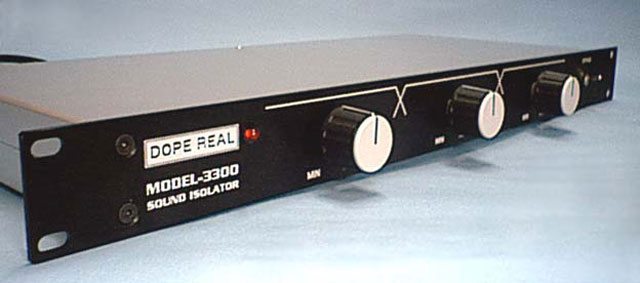
In basic terms, an isolator is a high quality, standalone DJ EQ with large knobs that’s attached to the master out. In contrast to traditional EQs, they are generally not used for the purposes of mixing, but instead to shape the sound and add color to your set. Isolators also feature wider frequency ranges, smoother pots, high quality amplification circuits, and much more gain per band (sometimes double).

In understanding how isolators work, it’s important to look back at the history of DJ technology. Isolators (and DJ EQs) come to us by way of their predecessor, the active crossover. Popularized by Richard Long Associates in the 1970’s, this device was a monumental leap forward. Brought about by new advances in discotheque sound systems, the active crossover allowed the DJ to split their mixer’s signal into bands by sending it through an op-amplification circuit and then through filters. These filters (low-pass, bandpass, and high-pass) route their respective frequencies to separate outputs which are then connected to their associated power amplifier and speaker–lows to woofer, fullrange (and later, mids) to drivers/horns, and highs to tweeters. This is called multi-amplification. Splitting the sound in this way results in greater speaker efficiency and higher fidelity in comparison to previous passive crossover designs that utilized one power amplifier for the entire system.
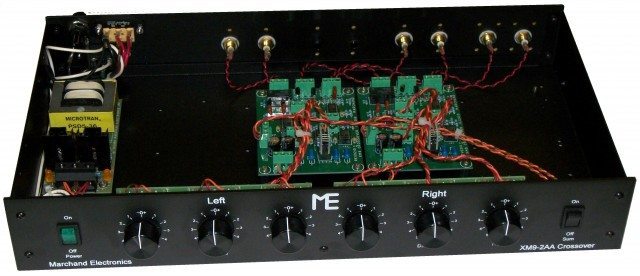
A consequence of this device was that not only did it make things sound better, but it also offered the DJ control over the gain of these frequency ranges via potentiometers. Early disco mixers with an eye towards enhancing their sets were quick to pick up on the fact that they could use their crossovers for dramatic effect. Caught up in the creativity of the moment these DJs learned to cut the signal going to the sub, amplify the signal going to the tweeters, and in general, work the overall sound as it went through the system.

The RLA crossover was an incredibly popular design and could be found in many of New York’s most famous clubs during the heydays of disco and house (Studio 54 and Paradise Garage being two big ones). Yet, despite its onetime popularity, the active crossover as a DJ tool had some drawbacks. Since it allows the DJ direct control over the volume of a given band’s speaker, the active crossover can cause blown speakers and hearing damage in the hands of someone that doesn’t know what they’re doing. Though still used to divide frequencies today, active crossovers are generally not used for dramatic effect (of course, there are some exceptions).

The progression from crossover to isolator is a simple one. The only real difference between the two is that the isolator collects the three bands into a ganged stereo output. This process castrates the crossover by making it effectively worthless for tri-amplification purposes. The DJ then no longer has control over the volume levels of each part of the physical soundsystem but instead is responsible for the relative volume levels of the bands in the overall master mix.

HOW TO DJ WITH AN ISOLATOR
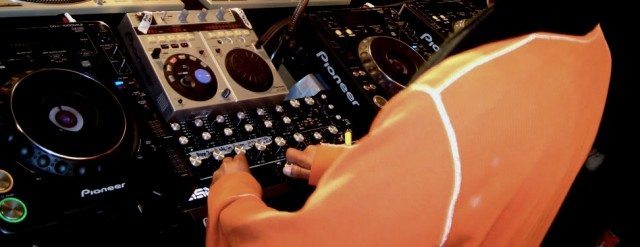
You might imagine that DJing with an isolator is similar to DJing with a DJ EQ. You would be fairly correct in that assumption. Yet, isolators afford more control over the music. When you roll off the bass on an isolator it takes out much more of the bass frequencies. For example, the E&S X3004 gives you control of everything from 10-300 Hz. Contrast this with the Pioneer’s DJM 800 bass EQ (10-100 Hz) and you get an idea of the difference in frequency range between built-in EQ and a dedicated isolator. Here’s a video of someone adjusting the frequencies on their E&S as a demonstration (note: it’s modded to not have as much gain).

Since the crossover days there has arisen an unofficial school of DJ technique that almost rivals turntablism in its complexity. Different than turntablism however is that none of these techniques have official names. Sure, you can cut the bass (who can’t?), but can you add tremolo to the midrange and make it sound good? The art of isolation is an art of unsubtle manipulation of dynamics and the easiest way to become inspired is by learning through example.

Joe Claussell (above) is considered by many to be one of the most prolific (and controversial) isolator users. His fingers never leave the knobs and he manipulates the individual frequencies to create a staccato effect that emphasizes the vocals and dramatic tension of the music. You’ll notice that his touch creates an almost broken effect in the rhythm
Similar, but more laid back, is Theo Parrish who, while he’s still all over the isolator, lets his tracks breath. His style isn’t so much to create new rhythms so much as to play with the tension of the music and emphasize individual sonic elements in the music (such as the electric piano line). Watch the above video and witness what the smoothness of an isolator can do in the hands of someone who has a lot of balls.
On a different tip is Derrick May who utilizes the isolator as an entirely rhythmic tool. He uses his isolator to create a jagged sound sculpture with abrupt moments spent on each band. He’s constantly changing frequencies and this creates layers of depth to his otherwise loopy and one-dimensional track. Again this is another way that isolators can be used, to create dynamic rhythms. If you watch him, you can see that he almost looks like he’s playing the drums.

Final Notes

The past three videos all showed examples of people going nuts on the isolator. While it can be fun to do this from time to time, unless you are one of those top-notch DJs above, you ought to bare in mind the following axiom: “everything in moderation.” Going Joe Claussell on an audience that’s not attuned to it will only result in people wishing you would stop. A part of playing with dynamics and understanding how to use an isolator is to know when to let a track rest and allow the dancers to enjoy the music as it was recorded by the artist. Understand this and perhaps someday you’ll be able to achieve the level of euphoria exhibited in the next video.

POPULAR ISOLATORS

– Gary Stewart Audio ISO X
– Electronique Spectacle E&S X3004
– Dope Real Model 3300
– Thrive Bender
– Systems By Shorty SBS S3X
– Vestax DCR-1500
– Alpha Recording Systems ARS Model3500
– Bozak Iso-X

We want to hear from you: share your experiences and ask questions about DJ isolators in the comments! 
Tags: derrick mayDJ isolatorsdjing with isolatorsisolator mixingjoe clausselltheo parrish
Share30Tweet19Share
Previous Post

A Gift For Our Younger Readers and Some Great Gifts For You.

Next Post

Review: Pioneer DDJ-Ergo

Related Posts

a two channel rotary DJ mixer designed by Ecler with wooden sides and big chunky rotary dials on top
DJ Gear Announcements

Ecler DJ is back, launches WARM2 rotary mixer

July 13, 2022
Technics Will Release New SL-1200 DJ Turntable At CES 2019
Breaking News

Technics Will Release New SL-1200 DJ Turntable At CES 2019

January 1, 2019
Video Review: Rane MP2015 Rotary Mixer
DJ Mixers

Video Review: Rane MP2015 Rotary Mixer

March 10, 2015
Load More
Next Post
Review: Pioneer DDJ-Ergo

Review: Pioneer DDJ-Ergo

Want to reach DJTT's audience here?

Shoot an email to advertising@djtechtools.com

DJTT ads
DJTT newsletter
Midi Fighter
Chat with us
  • ABOUT DJTT
  • CONTACT
  • PRIVACY
  • MIDI FIGHTER HELP
  • ABOUT DJTT
  • JOBS
  • CONTACT US
  • ADVERTISE
  • PRIVACY POLICY
  • ACCESSIBILITY STATEMENT

© 2024 DJ Techtools all rights reserved by DJ TechTools on all content unless otherwise noted.

No Result
View All Result
  • Blog
    • DJ Gear
      • DIY Projects
      • Gear Reviews
      • New Products
      • Controllerism
    • Techniques + Tips
      • Beginner DJ
      • Advanced DJ
      • Producer
      • Finger Drummer
    • News + Culture
      • Editorials + Opinions
      • Artist Interviews
      • Performances + Routines
      • How I Play
    • DJ Software Tutorials
      • Serato Tips
      • CDJ Tips
      • Ableton Live Tips
  • Store
    • Run by real DJs, not a corporation
    • DJ Controllers
      • Midi Fighter Twister
      • Midi Fighter Spectra
      • Midi Fighter 64
      • View All
    • Accessories
      • Chroma USB Drive for DJs
      • Chroma Caps
      • Chroma Cables Audio
      • Chroma Cables USB-A
      • Chroma Cables: USB-C
      • DJTT Gift Card
      • Midi Fighter T-Shirt
      • Keyboard Covers
      • Earplugs by V-Moda
    • Production Gear
    • Soundcards & Mixers
  • Community
    • Popular Forums
      • General Discussion
      • Buy & Sell
      • Reviews
      • Mixes
      • Music Production
      • Show Your Setup
      • Off Topic
    • Handy Links
      • New Posts
      • Private Messages
      • Register
      • Search
    • Midi Maps
      • Traktor
      • Ableton
      • Serato DJ
      • Midi Fighter 3D
      • Midi Fighter Twister
      • Midi Fighter Spectra
  • Midi Fighter
  • Chroma

© 2024 DJ Techtools all rights reserved by DJ TechTools on all content unless otherwise noted.

This website uses cookies. By continuing to use this website you are giving consent to cookies being used. Visit our Privacy and Cookie Policy.