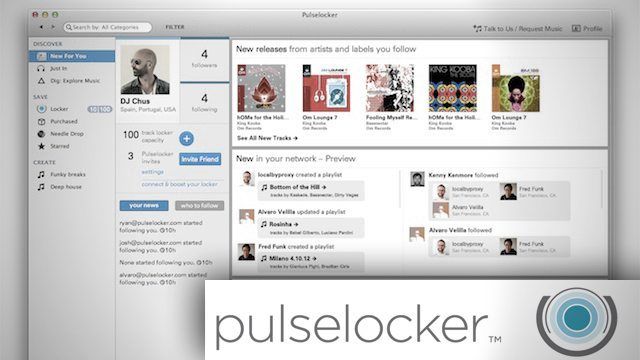
Have you ever bought a song with a vocal you just didn’t like that wasn’t in the preview, or played a special gig where you had to waste money on tracks you knew you were only going to play once? Do you subscribe to services like Spotify that stream music for you with a monthly fee and wished you could play those tracks in your favorite DJ software? These are the problems that Pulselocker hopes to solve – read on for our exclusive first look at the service.
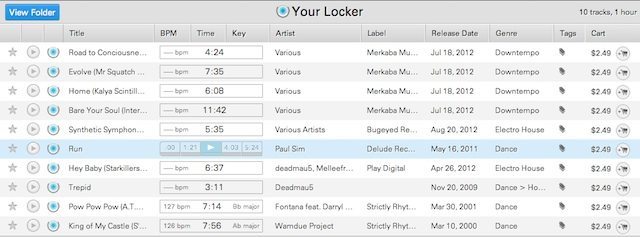
Pulselocker is an application that sits on your computer (Mac OSX only for now) that will let you preview full songs, download 320 kbps AAC/M4A versions of those songs to your computer, and then play them through your favorite DJ software. The application does this by creating a separate drive on your computer that Pulselocker has code-named “directdrive”.
All the songs that you preview are located in that drive, which is made available to your software through the explorer. Pulselocker currently works with Serato ITCH, Intro, and Scratch Live 2.3.3 or higher, as well as Native Instruments Traktor and Atomox Virtual DJ – but other systems are planned on being implemented in the future. EDIT: There has been some compatibility issues with Virtual DJ. They are working on it and plan to have a fix in the next few months.
TRY MIXING BEFORE PAYING FOR TRACKS
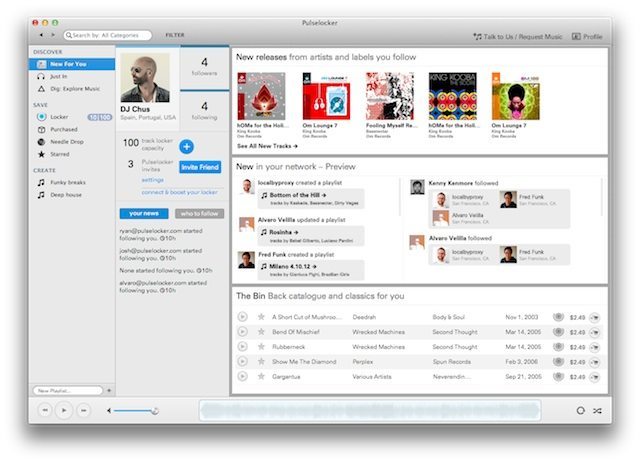
Once the songs are loaded and analyzed you can set loops, cue points, and play those songs like normal – as long as the Pulselocker application is open. If the application isn’t open, the Pulseocker drive does not show up in your software and you’re not able to play the tracks. This works both online and offline so once downloaded, all tracks can be played at will without an Internet connection. Locker sizes will range from 10-1000 tracks depending on the subscription you choose.
If you find that gem of a track and you want to make it yours and in the process, support the artists even further, you are given the option to purchase the track. After purchase you can do what you want with the tracks – DRM-free, as if you bought it from any other source.
In the application, you can add songs to the queue and star certain tracks as a handy reminder. Tracks play with a full waveform at the bottom allowing you to see the structure of the song – something that’s lacking from many online stores. To make finding that next tune even easier Pulselocker users can rate and tag tracks in the catalog to help with accuracy. Users can also share playlists with other users and of course there’s Twitter and Facebook integration. One handy Facebook feature, once logged in, any artist you like on Facebook will show in Pulselocker.
TRIPLE MONETIZATION FOR ARTISTS AND LABELS
With the ability to torrent just about any track out there for free, many DJs and listeners ask why they should buy their music at all. For those of you who know me from the DJTT forums, you’re probably aware I’m a very strong supporter of buying all of my music and supporting the producers that make that music. Based on questions raised in the forums about legality and how the artists will get paid when you’re using Pulselocker, many of the DJTT readers think similarly – so here are some of the answers that Fred Han, director of Marketing and Communications at Pulselocker gave in the forum when questions were raised how exactly artists get paid.
“Pulselocker was founded by DJs and producers and we built the company (and our business model) with the artists’ interests top of mind. While we cannot stop technology’s financial impact on the music ecosystem, we are providing new monetization opportunities to help soften the blow. In addition, we have our own licensing deals, and work with all providers of relevant content, be it majors or indies. At the same time, we pay artists and collecting societies and have all the legitimate rights to offer the services we do.”
“Our subscription model is totally legal and artist-friendly so no need to fear. These arrangements enable us to offer a catalog that spans from funk&rare grooves to reggae, hiphop, dnb, dubstep and house/techno (and subgenres), and is growing everyday.”
“If you play lots of different gigs with varying music styles then you’ll be happy with the currently listed categories. Each of these have more subcategories to pick from to help narrow down choices.”
In an attempt to address some of these concerns, Pulselocker has introduced a three-tier system for paying artists. For plays of the songs outside of the locker (i.e. on-demand streaming), they share at a starting rate. For plays which occur through the locker, they share at a significantly higher rate, and for purchased tracks they split revenues similarly to iTunes or any other download shop. While it may not be the final solution to an ailing system, it definitely seems like a positive new approach to what’s been a pretty stagnant system.
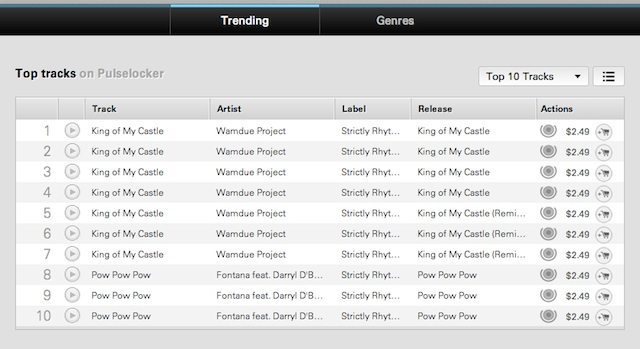
Unlike many of the top sites for DJs buying music, Pulselocker has managed to pull together a diversified catalog of music that is sure to work well for all DJs. Electronic, Hip-Hop,/R&B, Reggae, Funk, Rare Groove, and Jazz all are available in the app for you to try before you buy. I was even able to find some Country and Big Band music!
Pros:
- Low monthly fee
- Full length previews
- Ability to legally try and play before you buy
- Not limited to just EDM – hip hop, R&B, rock, funk, blues, jazz and more are available
- DRM-Free 320 kbps AAC/M4A format
- Tracks show BPM and Key in Pulselocker
Cons:
- OSX only for now. Windows version is planned – possibly early 2013
- Application must be open unless you pay for the track
- Initial private beta had a few bugs, but the tech guys have been responding to feedback quickly
- Not able to modify ID3 tags with non-purchased tracks
- The private beta catalog was initially small, however deals have already been signed with several big independent aggregators to increase that size. They’ve promised to offer nearly 6 million tracks by the end of the year.
iOS and Android-compatible versions are planned for the future. I asked what other kind of things were planned for the future of Pulselocker and the answer was pretty intriguing.
“We’re going to focus on making sure we have the right features and catalog with our beta user group, then we’re going beyond the laptop — phones, tablets, and connecting directly to performance instruments. Stay tuned.”
PRICING, AVAILABILITY, AND FREE INVITATIONS!
 Initial pricing is set at full streaming, social features, and a five track locker for less than $10 US. They’ll be scaling up from there depending on the locker size.
“Pulselocker monthly subscription tiers accommodate DJs and music aficionados of all budgets. Starting at $9.99 for a 10-track locker, tiers range from $14.99 for 50-tracks, $24.99 for 100-tracks, 34.99 for 200-tracks, and $69.99 for 1000-tracks”
To celebrate the launch of the public beta Pulselocker is offering a 60 day-free trial with a 100 track capacity locker for the first 10,000 people who sign up. That being said, DJTT has secured invites for all of our readers that will get you to the head of the queue and in the beta quicker. Getting an invite is simple:
Sign up with your email here and you’ll get your invite ASAP from Pulselocker in just a few days!
Pulselocker is based in San Francisco and is funded by Grammy award-winning artist, Ben Harris of Dirty Vegas.