DJ TechTools
  • Blog
    • DJ Gear
      • DIY Projects
      • Gear Reviews
      • New Products
      • Controllerism
    • Techniques + Tips
      • Beginner DJ
      • Advanced DJ
      • Producer
      • Finger Drummer
    • News + Culture
      • Editorials + Opinions
      • Artist Interviews
      • Performances + Routines
      • How I Play
    • DJ Software Tutorials
      • Serato Tips
        • Traktor Tips
      • CDJ Tips
      • Ableton Live Tips
  • Store
    • Run by real DJs, not a corporation
    • DJ Controllers
      • Midi Fighter Twister
      • Midi Fighter Spectra
      • Midi Fighter 64
      • View All
    • Accessories
      • Chroma USB Drive for DJs
      • Chroma Caps
      • Chroma Cables Audio
      • Chroma Cables USB-A
      • Chroma Cables: USB-C
      • DJTT Gift Card
      • Midi Fighter T-Shirt
      • Keyboard Covers
      • Earplugs by V-Moda
    • Production Gear
    • Soundcards & Mixers
  • Community
    • Popular Forums
      • General Discussion
      • Buy & Sell
      • Reviews
      • Mixes
      • Music Production
      • Show Your Setup
      • Off Topic
    • Handy Links
      • New Posts
      • Private Messages
      • Register
      • Search
    • Midi Maps
      • Traktor
      • Ableton
      • Serato DJ
      • Midi Fighter 3D
      • Midi Fighter Twister
      • Midi Fighter Spectra
  • Midi Fighter
  • Chroma
No Result
View All Result
DJ TechTools
  • Blog
    • DJ Gear
      • DIY Projects
      • Gear Reviews
      • New Products
      • Controllerism
    • Techniques + Tips
      • Beginner DJ
      • Advanced DJ
      • Producer
      • Finger Drummer
    • News + Culture
      • Editorials + Opinions
      • Artist Interviews
      • Performances + Routines
      • How I Play
    • DJ Software Tutorials
      • Serato Tips
        • Traktor Tips
      • CDJ Tips
      • Ableton Live Tips
  • Store
    • Run by real DJs, not a corporation
    • DJ Controllers
      • Midi Fighter Twister
      • Midi Fighter Spectra
      • Midi Fighter 64
      • View All
    • Accessories
      • Chroma USB Drive for DJs
      • Chroma Caps
      • Chroma Cables Audio
      • Chroma Cables USB-A
      • Chroma Cables: USB-C
      • DJTT Gift Card
      • Midi Fighter T-Shirt
      • Keyboard Covers
      • Earplugs by V-Moda
    • Production Gear
    • Soundcards & Mixers
  • Community
    • Popular Forums
      • General Discussion
      • Buy & Sell
      • Reviews
      • Mixes
      • Music Production
      • Show Your Setup
      • Off Topic
    • Handy Links
      • New Posts
      • Private Messages
      • Register
      • Search
    • Midi Maps
      • Traktor
      • Ableton
      • Serato DJ
      • Midi Fighter 3D
      • Midi Fighter Twister
      • Midi Fighter Spectra
  • Midi Fighter
  • Chroma
No Result
View All Result
DJ TechTools

How to Add Basic FX to Finger-Drumming Performances

Ryan Dejaegher by Ryan Dejaegher
May 18, 2014
in Basic DJ Tips, Controllerism, DJ Techniques / Tips, How-To Video Tutorials, Traktor Tips, Traktor Videos, Videos
Reading Time: 3 mins read
0
How to Add Basic FX to Finger-Drumming Performances
287
VIEWS
Post on FacebookTweet thisUpvote on Reddit

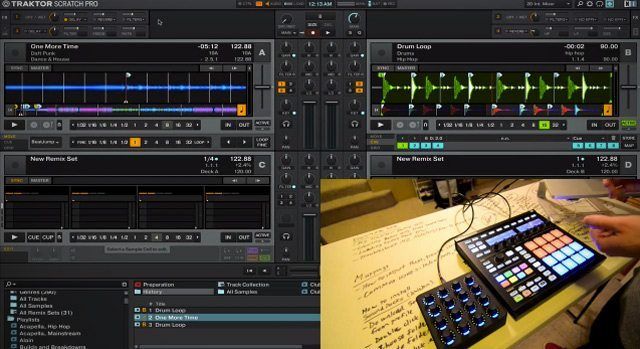
Just getting started with finger-drumming and want to begin adding some basic effects to your set? Today’s tutorial will help you do so while staying in time, and will allow you to make simple patterns more interesting and effective in a club setting.

We’re going to focus on three effects—delay, reverb, and filter 92 LFO—and although we’re using Traktor in this tutorial, two of those effects are pretty standard and should be available in other DJ software as well.

WHAT DO I NEED?

  • DJ software with built in FX (reverb and delay should be available in most)
  • HotCues
  • A pad controller, or a computer keyboard mapped to hotcues
  • Knobs

WHY ADD FX TO YOUR FINGER-DRUMMING PERFORMANCE?

If you’re just learning to finger-drum or you’ve been trying it for a while but it just seems to be lacking something, these FX are a great way to make your routines more interesting and dynamic when used tastefully. Each effect can be used in a variety of situations. Let’s look at their benefits and uses in more detail:

Delay: One of the biggest challenges with finger-drumming is timing, especially without quantize. If your timing isn’t tight, the performance can sound sloppy and it can lose the groove. The solution for most people would be a metronome. This may be practical at home, but not in a loud venue. Delay is perfect for people who are just learning to finger-drum or who are having trouble with their timing. You can adjust the delay rate to your desired value, which will give you an effect trail that you can use to keep yourself in time.

Screen Shot 2014-05-08 at 8.22.28 PM

Reverb: The right amount of reverb can be used to give your finger-drumming “space.” Without reverb, your cue points can end abruptly. An advanced finger-drummer like Jeremy Ellis can easily fill this empty space with subtle patterns and fills. For beginners, reverb can help generate space for simple patterns and short hits. It can also help glue your performance together with other songs.

reverb

Filter 92 LFO: This effect is great and can be used to build up or break down your performance. The LFO will sweep the filter up and down, so it’s an easy way to add variation to your finger-drumming.

lfo

BONUS ROUND!

The Super Combo Dimension Effect: What would happen if these three effects routed themselves together and made sweet love? Would the world accept such a thing? The Super Combo Dimension Effect can be used to conclude a solo finger-drumming performance. The Filter 92 LFO sweeps to and fro, the delay fades into the night, and then the reverb carries them off into deep space. If you crank the reverb, it can take you to Deep Space Nine. You’ve been warned.

combo

BACK TO THE LAB

By no means are these the only FX you should ever use. These are meant to be a quick example to get your wheels turning. So try out the other FX in your DJ software and see if they can be used to add some spice to your performance.

Tags: adding effectsfinger drumminghow to add fx to finger drumming performance
Share2Tweet2Share
Previous Post

UMEK on How to Build the Perfect Sample Pack

Next Post

What A Twitter-SoundCloud Merger Means For Producers and DJs

Related Posts

Control an entire studio with Midi Fighter Spectra (like Mad Zach)
Finger Drumming

Control an entire studio with Midi Fighter Spectra (like Mad Zach)

May 9, 2025
Mad Zach playing soundpacks on a Midi Fighter Spectra
Finger Drumming

Mad Zach Returns: Playing soundpacks in 2025

March 25, 2025
Watch: M4SONIC’s “In The Kitchen” Fingerdrumming Series (on Midi Fighter 3Ds)
Controllerism

Watch: M4SONIC’s “In The Kitchen” Fingerdrumming Series (on Midi Fighter 3Ds)

July 9, 2019
Load More
Next Post
What A Twitter-SoundCloud Merger Means For Producers and DJs

What A Twitter-SoundCloud Merger Means For Producers and DJs

Want to reach DJTT's audience here?

Shoot an email to advertising@djtechtools.com

DJTT ads
DJTT newsletter
Midi Fighter
Chat with us
  • ABOUT DJTT
  • CONTACT
  • PRIVACY
  • MIDI FIGHTER HELP
  • ABOUT DJTT
  • JOBS
  • CONTACT US
  • ADVERTISE
  • PRIVACY POLICY
  • ACCESSIBILITY STATEMENT

© 2024 DJ Techtools all rights reserved by DJ TechTools on all content unless otherwise noted.

No Result
View All Result
  • Blog
    • DJ Gear
      • DIY Projects
      • Gear Reviews
      • New Products
      • Controllerism
    • Techniques + Tips
      • Beginner DJ
      • Advanced DJ
      • Producer
      • Finger Drummer
    • News + Culture
      • Editorials + Opinions
      • Artist Interviews
      • Performances + Routines
      • How I Play
    • DJ Software Tutorials
      • Serato Tips
      • CDJ Tips
      • Ableton Live Tips
  • Store
    • Run by real DJs, not a corporation
    • DJ Controllers
      • Midi Fighter Twister
      • Midi Fighter Spectra
      • Midi Fighter 64
      • View All
    • Accessories
      • Chroma USB Drive for DJs
      • Chroma Caps
      • Chroma Cables Audio
      • Chroma Cables USB-A
      • Chroma Cables: USB-C
      • DJTT Gift Card
      • Midi Fighter T-Shirt
      • Keyboard Covers
      • Earplugs by V-Moda
    • Production Gear
    • Soundcards & Mixers
  • Community
    • Popular Forums
      • General Discussion
      • Buy & Sell
      • Reviews
      • Mixes
      • Music Production
      • Show Your Setup
      • Off Topic
    • Handy Links
      • New Posts
      • Private Messages
      • Register
      • Search
    • Midi Maps
      • Traktor
      • Ableton
      • Serato DJ
      • Midi Fighter 3D
      • Midi Fighter Twister
      • Midi Fighter Spectra
  • Midi Fighter
  • Chroma

© 2024 DJ Techtools all rights reserved by DJ TechTools on all content unless otherwise noted.

This website uses cookies. By continuing to use this website you are giving consent to cookies being used. Visit our Privacy and Cookie Policy.