DJ TechTools
  • Blog
    • DJ Gear
      • DIY Projects
      • Gear Reviews
      • New Products
      • Controllerism
    • Techniques + Tips
      • Beginner DJ
      • Advanced DJ
      • Producer
      • Finger Drummer
    • News + Culture
      • Editorials + Opinions
      • Artist Interviews
      • Performances + Routines
      • How I Play
    • DJ Software Tutorials
      • Serato Tips
        • Traktor Tips
      • CDJ Tips
      • Ableton Live Tips
  • Store
    • Run by real DJs, not a corporation
    • DJ Controllers
      • Midi Fighter Twister
      • Midi Fighter Spectra
      • Midi Fighter 64
      • View All
    • Accessories
      • Chroma USB Drive for DJs
      • Chroma Caps
      • Chroma Cables Audio
      • Chroma Cables USB-A
      • Chroma Cables: USB-C
      • DJTT Gift Card
      • Midi Fighter T-Shirt
      • Keyboard Covers
      • Earplugs by V-Moda
    • Production Gear
    • Soundcards & Mixers
  • Community
    • Popular Forums
      • General Discussion
      • Buy & Sell
      • Reviews
      • Mixes
      • Music Production
      • Show Your Setup
      • Off Topic
    • Handy Links
      • New Posts
      • Private Messages
      • Register
      • Search
    • Midi Maps
      • Traktor
      • Ableton
      • Serato DJ
      • Midi Fighter 3D
      • Midi Fighter Twister
      • Midi Fighter Spectra
  • Midi Fighter
  • Chroma
No Result
View All Result
DJ TechTools
  • Blog
    • DJ Gear
      • DIY Projects
      • Gear Reviews
      • New Products
      • Controllerism
    • Techniques + Tips
      • Beginner DJ
      • Advanced DJ
      • Producer
      • Finger Drummer
    • News + Culture
      • Editorials + Opinions
      • Artist Interviews
      • Performances + Routines
      • How I Play
    • DJ Software Tutorials
      • Serato Tips
        • Traktor Tips
      • CDJ Tips
      • Ableton Live Tips
  • Store
    • Run by real DJs, not a corporation
    • DJ Controllers
      • Midi Fighter Twister
      • Midi Fighter Spectra
      • Midi Fighter 64
      • View All
    • Accessories
      • Chroma USB Drive for DJs
      • Chroma Caps
      • Chroma Cables Audio
      • Chroma Cables USB-A
      • Chroma Cables: USB-C
      • DJTT Gift Card
      • Midi Fighter T-Shirt
      • Keyboard Covers
      • Earplugs by V-Moda
    • Production Gear
    • Soundcards & Mixers
  • Community
    • Popular Forums
      • General Discussion
      • Buy & Sell
      • Reviews
      • Mixes
      • Music Production
      • Show Your Setup
      • Off Topic
    • Handy Links
      • New Posts
      • Private Messages
      • Register
      • Search
    • Midi Maps
      • Traktor
      • Ableton
      • Serato DJ
      • Midi Fighter 3D
      • Midi Fighter Twister
      • Midi Fighter Spectra
  • Midi Fighter
  • Chroma
No Result
View All Result
DJ TechTools

5 Productivity-Boosting Apps For DJs + Producers

Dan White by Dan White
August 10, 2014
in Basic DJ Tips, DJ Techniques / Tips, Production Tips
Reading Time: 5 mins read
0
5 Productivity-Boosting Apps For DJs + Producers
171
VIEWS
Post on FacebookTweet thisUpvote on Reddit

In the digital age, it’s simple for DJs, performers, and producers to access resources and information for improving, learning, sharing or making music. However, this vast world of information can become distracting and as a result, it’s easy to be unmotivated in our respective art forms. You may remember these DJ power utilities posted a while back – in that vein, here are five solid pieces of software that will enhance creativity and productivity in the studio, at home, and out gigging.

 #1: Evernote (Win, OSX, Web, iOS, Android, Windows Phone)
evernote

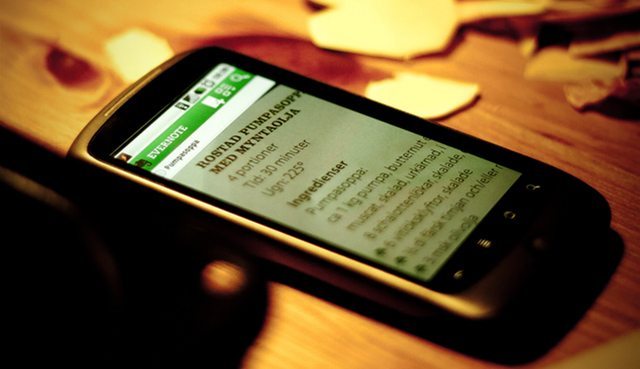
“I come up with music, blog and twitter ideas at the weirdest times. I can tag those random memories with enough detail so that I can find exactly what I’m looking for when I sit down at the computer to blog or organize my music and production ideas.” – DJ Limelight [via Evernote Blog]

If you haven’t heard of Evernote before, you’re waking up on the wrong side of the internet. This powerhouse note taking application (with a user base of over 50 million strong) takes your creative ideas to a new level, allowing structured organisation of any information you can imagine. The concept behind this program is to have different notebooks for different needs, and to create different notes in these notebooks. To top it all off, it syncs seamlessly between all your devices. For people like us who are constantly involved with music, it may be used to keep track of:

  • Songs you overheard and liked
  • Production techniques that caught your eye
  • Notes on things to change in playback
  • Things that worked/didn’t work in your set
  • Big tracks that were working well on the dancefloor

The best part is, you can get all of it for free! If you want a bit of added functionality, you can pay $5.99 a month to become a premium user, which gets you some extra storage, security features, advanced searching features and much more.

#2: Auganizer (OSX Only)
auganizer

“This has changed my life.” – Steve Angello [via Twitter]

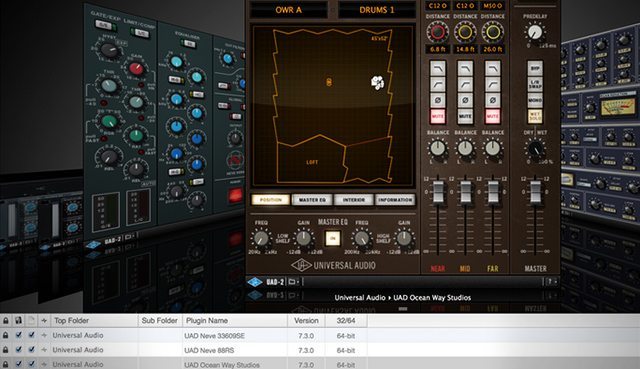
If you couldn’t guess from the name, this quality piece of software allows Mac users to coordinate their Audio Units (AU) anyway that is desired, whether it be your plugin names or categories. It uses a very familiar OSX-esque layout with a Cover Flow display of all your graphical plugin interfaces. In the list section, the plugin’s version, sub folder, 32/64-bit nature and much more customisable information is represented in a familiar Apple layout.

The full version does come at a price of $34.99, but you can try a free demo here, which allows the modification of up to 10 Audio Units. On a positive note, the program additionally boasts support for Logic, Ableton Live, Maschine, Garageband, Mainstage and a variety of other AU-hosting DAW’s.

#3: ToneDen (Web Only)
toneden

”I really do believe in what the guys at ToneDen are doing.” – ill.GATES [via ToneDen Blog]

From a team out of Berkley, CA, comes the new online platform for artist profiling and analytics: ToneDen. This fresh online service solves one of the contemporary artist’s biggest problems: social media organisation. Offering a professional website with the ultimate freedom of design and name customisation, and time-related metrics from 4 of the biggest social media platforms for artists (YouTube, Facebook, Twitter and SoundCloud) you can’t go too wrong here. Artists now have one place that they can track their followers, likes and subscribers in one compact and minimalistic area.

They have also incorporated a new concept of what they like to call the ‘one-sheet’, which in essence is an online press release to show to managers, booking agencies, labels, blogs and other people you will encounter within the music industry. All you need is a SoundCloud account, and you get the basic statistics and full website customisation, or you can splash on their $5/month (or $50/year) plan to get custom domain routing, an automatic one sheet generator and a broader range of social media stats.

#4: Cold Turkey (Win Only)
cold-turkey

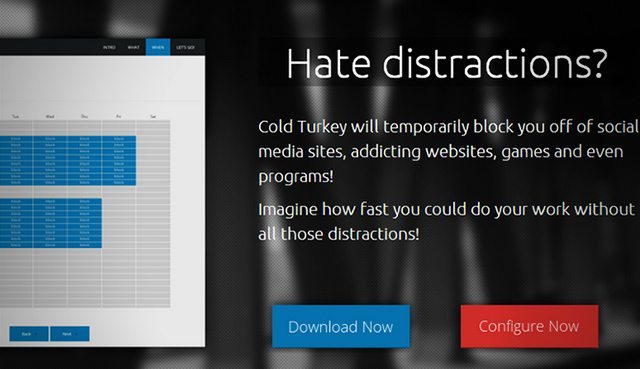
Ever tried to practice for your gig, or get to work on that next tune, but the distractions on your computer get you out of focus? Well if you’re on Windows, then this program may just be your salvation. Cold Turkey is a smart piece of software that promotes productivity by blocking websites and programs of your choice at any time of the day. It works by prompting you to enter a list of websites and installed applications to block, and for what times during the week (in half-hour sessions).

Warning: Once the blocking days are set and the software activated – your computer prevents you from accessing those sites for a minimum of a week, and unless you have a history of computer hacking, it is extremely hard to stop. During the time period you can add more websites and programs to block, as well as more time slots, but not take away. So do you want your daily distraction-free production hour? Cold Turkey has got you covered.

The software is free for download but there is an option to donate and to split the donation between the creator, Felix Belzile and the Against Malaria Foundation.

Oh and if you’re on a Mac, here is an alternative.

#5: Basic Audio Programs (Audacity, AudioHijack)
audacity-audio-hijackpro

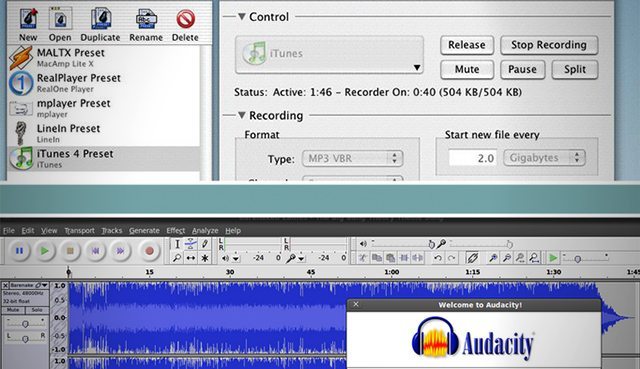
You may remember Mad Zach’s video on how to build unique Ableton Drum Racks by sampling off the internet. The same principle can be applied for general, audible inspiration. Since we are exposed to so much audio on the internet everyday, why not record it, back it up and listen back to it for inspiration later on down the line?

It might be a section of a killer song heard on Spotify, or a tip from a YouTube video tutorial, but once it’s recorded, it’s there for easy access and inspiration, and to sample for your live sets or productions. To set it up for both Mac and PC, watch the video linked above. You can download Audacity here, and Audio Hijack has a demo version that overlays noise over recordings that exceed 10 minutes, but you can purchase the full version for a price tag of $32.

Have you stumbled across any other awesome pieces of software that make your life easy as a Producer, Controllerist or DJ? Or do you have any pro-tips for using any of the services above in unique and helpful ways? Let us know in the comments below!
  • A Producer’s Guide To Overcoming Writer’s Block
  • How To: Sample Any Sound From The Internet and Create a Unique Drum Rack
  • 14 Apps For Live Production and Performing on iOS
Tags: audacityaudiohijackauganizercold turkeyevernotetoneden
Share1Tweet1Share
Previous Post

DJing with a Disability: 2 Inspiring Stories

Next Post

Numark NV’s Screens Demoed With Serato Flip; Denon MC6000MK2 Gets Serato DJ Bundle

Related Posts

Hacking Stems
Native Instruments

Hacking Stems: How To Extract Parts From Stem Files

September 15, 2015
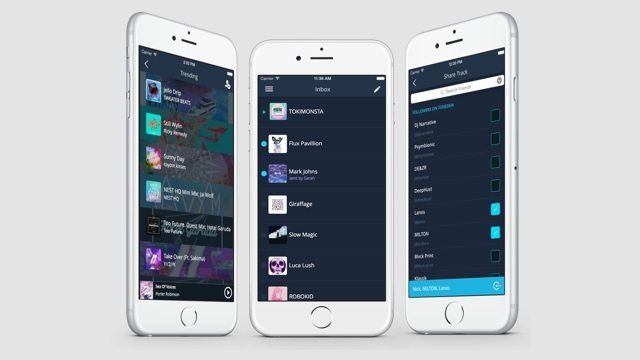
ToneDen for iOS: Instantly Send Music To All Your Fans
Breaking News

ToneDen for iOS: Instantly Send Music To All Your Fans

April 23, 2015
Facebook Bans Like to Download, 5 good Alternatives
DJ Techniques / Tips

Facebook Bans Like to Download, 5 good Alternatives

November 6, 2014
Load More
Next Post
Numark NV’s Screens Demoed With Serato Flip; Denon MC6000MK2 Gets Serato DJ Bundle

Numark NV's Screens Demoed With Serato Flip; Denon MC6000MK2 Gets Serato DJ Bundle

Want to reach DJTT's audience here?

Shoot an email to advertising@djtechtools.com

DJTT ads
DJTT newsletter
Midi Fighter
Chat with us
  • ABOUT DJTT
  • CONTACT
  • PRIVACY
  • MIDI FIGHTER HELP
  • ABOUT DJTT
  • JOBS
  • CONTACT US
  • ADVERTISE
  • PRIVACY POLICY
  • ACCESSIBILITY STATEMENT

© 2024 DJ Techtools all rights reserved by DJ TechTools on all content unless otherwise noted.

No Result
View All Result
  • Blog
    • DJ Gear
      • DIY Projects
      • Gear Reviews
      • New Products
      • Controllerism
    • Techniques + Tips
      • Beginner DJ
      • Advanced DJ
      • Producer
      • Finger Drummer
    • News + Culture
      • Editorials + Opinions
      • Artist Interviews
      • Performances + Routines
      • How I Play
    • DJ Software Tutorials
      • Serato Tips
      • CDJ Tips
      • Ableton Live Tips
  • Store
    • Run by real DJs, not a corporation
    • DJ Controllers
      • Midi Fighter Twister
      • Midi Fighter Spectra
      • Midi Fighter 64
      • View All
    • Accessories
      • Chroma USB Drive for DJs
      • Chroma Caps
      • Chroma Cables Audio
      • Chroma Cables USB-A
      • Chroma Cables: USB-C
      • DJTT Gift Card
      • Midi Fighter T-Shirt
      • Keyboard Covers
      • Earplugs by V-Moda
    • Production Gear
    • Soundcards & Mixers
  • Community
    • Popular Forums
      • General Discussion
      • Buy & Sell
      • Reviews
      • Mixes
      • Music Production
      • Show Your Setup
      • Off Topic
    • Handy Links
      • New Posts
      • Private Messages
      • Register
      • Search
    • Midi Maps
      • Traktor
      • Ableton
      • Serato DJ
      • Midi Fighter 3D
      • Midi Fighter Twister
      • Midi Fighter Spectra
  • Midi Fighter
  • Chroma

© 2024 DJ Techtools all rights reserved by DJ TechTools on all content unless otherwise noted.

This website uses cookies. By continuing to use this website you are giving consent to cookies being used. Visit our Privacy and Cookie Policy.