
DJ TechTools
  • Blog
    • DJ Gear
      • DIY Projects
      • Gear Reviews
      • New Products
      • Controllerism
    • Techniques + Tips
      • Beginner DJ
      • Advanced DJ
      • Producer
      • Finger Drummer
    • News + Culture
      • Editorials + Opinions
      • Artist Interviews
      • Performances + Routines
      • How I Play
    • DJ Software Tutorials
      • Serato Tips
        • Traktor Tips
      • CDJ Tips
      • Ableton Live Tips
  • Store
    • Run by real DJs, not a corporation
    • DJ Controllers
      • Midi Fighter Twister
      • Midi Fighter Spectra
      • Midi Fighter 64
      • View All
    • Accessories
      • Chroma USB Drive for DJs
      • Chroma Caps
      • Chroma Cables Audio
      • Chroma Cables USB-A
      • Chroma Cables: USB-C
      • DJTT Gift Card
      • Midi Fighter T-Shirt
      • Keyboard Covers
      • Earplugs by V-Moda
    • Production Gear
    • Soundcards & Mixers
  • Community
    • Popular Forums
      • General Discussion
      • Buy & Sell
      • Reviews
      • Mixes
      • Music Production
      • Show Your Setup
      • Off Topic
    • Handy Links
      • New Posts
      • Private Messages
      • Register
      • Search
    • Midi Maps
      • Traktor
      • Ableton
      • Serato DJ
      • Midi Fighter 3D
      • Midi Fighter Twister
      • Midi Fighter Spectra
  • Midi Fighter
  • Chroma
No Result
View All Result
DJ TechTools
  • Blog
    • DJ Gear
      • DIY Projects
      • Gear Reviews
      • New Products
      • Controllerism
    • Techniques + Tips
      • Beginner DJ
      • Advanced DJ
      • Producer
      • Finger Drummer
    • News + Culture
      • Editorials + Opinions
      • Artist Interviews
      • Performances + Routines
      • How I Play
    • DJ Software Tutorials
      • Serato Tips
        • Traktor Tips
      • CDJ Tips
      • Ableton Live Tips
  • Store
    • Run by real DJs, not a corporation
    • DJ Controllers
      • Midi Fighter Twister
      • Midi Fighter Spectra
      • Midi Fighter 64
      • View All
    • Accessories
      • Chroma USB Drive for DJs
      • Chroma Caps
      • Chroma Cables Audio
      • Chroma Cables USB-A
      • Chroma Cables: USB-C
      • DJTT Gift Card
      • Midi Fighter T-Shirt
      • Keyboard Covers
      • Earplugs by V-Moda
    • Production Gear
    • Soundcards & Mixers
  • Community
    • Popular Forums
      • General Discussion
      • Buy & Sell
      • Reviews
      • Mixes
      • Music Production
      • Show Your Setup
      • Off Topic
    • Handy Links
      • New Posts
      • Private Messages
      • Register
      • Search
    • Midi Maps
      • Traktor
      • Ableton
      • Serato DJ
      • Midi Fighter 3D
      • Midi Fighter Twister
      • Midi Fighter Spectra
  • Midi Fighter
  • Chroma
No Result
View All Result
DJ TechTools

Mixcloud’s One-Click Soundcloud Import: Move Your DJ Mixes

Dan White by Dan White
May 8, 2015
in Breaking News, News, News + Culture
Reading Time: 2 mins read
0
Mixcloud’s One-Click Soundcloud Import: Move Your DJ Mixes
410
VIEWS
Post on FacebookTweet thisUpvote on Reddit

From the DJTT mailbox this week comes a tip about a brand new feature on Mixcloud – the ability to directly import your mixes from your Soundcloud uploads.

Try the feature here – or keep reading for more details. 

It’s no secret that Soundcloud is taking aim at DJ content, with a recent flurry of high-profile takedown stories that have only grown in number in the last six months. They’re current undergoing business negotiations with major labels, and even last month they partnered with YouTube’s content tracking company, Zefr, to bring a more robust form of Content ID to the platform.

So many DJs used to ask “Mixcloud or Soundcloud?” and debate the merits of each – Soundcloud has a bigger audience, Mixcloud is devoted to mixes and negotiates rights for all uploaded content. But Berlin-based Soundcloud has simply become a risk for many DJs – if you make a popular mix and then one day Soundcloud decides to take it down, you’ve lost an important ranking piece of content.

How Mixcloud’s Soundcloud Import Works
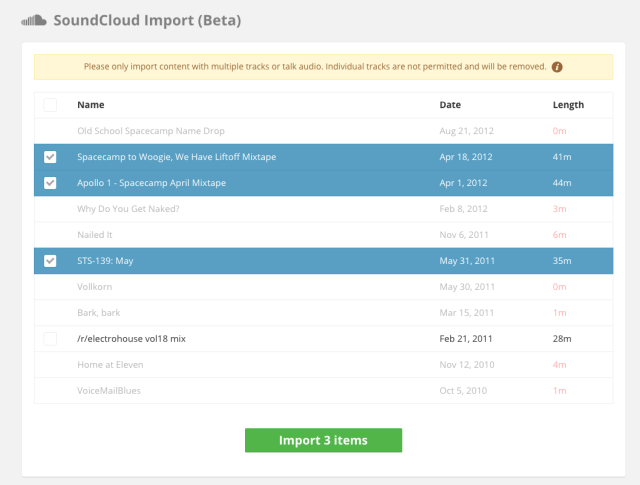
Mixcloud's simple import screen
Mixcloud’s simple import screen

The Soundcloud Import feature is still labels as a Beta, and at the moment it’s a pretty basic feature. After authorizing Mixcloud to access your Soundcloud account, you’re presented with a list of all of your files uploaded on the service, with checkmarks next to any that Mixcloud thinks are a mix. So far the rules seem to be that accepted mixes must be:

  • Over 10 minutes in duration
  • Visible on your tracks list (no hidden tracks are visible)

Once you click import, wait a few minutes (based on how much content you selected) for Mixcloud to copy the content to their servers and your profile. Most of the metadata comes over alongside it- including your tags, the title, description, and artwork for the mix.

Check out six alternatives to Soundcloud in this DJTT article from July 2014

Have a listen to some of the best mixes that every DJ can learn from

Tags: copyrightimportmixcloudmixessoundcloudwhere to upload DJ mixes
Share3Tweet2Share
Previous Post

Artist Gear Setup: James Zabiela

Next Post

Syncing Drum Machines and Synthesizers With a DJ Set

Related Posts

The Soundcloud logo with a unicorn horn on it
Breaking News

Is SoundCloud a “unicorn”? Their investment group owners are seeking a $1 billion sale this year

January 8, 2024
DJ Pro Tips for Digital Crate Digging on Beatport, Bandcamp, Soundcloud, Spotify, Juno Download, and QoBuz
DJ Music Library Tips

DJ Pro Tips for Digital Crate Digging on Beatport, Bandcamp, Soundcloud, Spotify, Juno Download, and QoBuz

February 24, 2023
Mixcloud launches Tracks for producers to upload original music
News

Mixcloud launches Tracks for producers to upload original music

October 18, 2022
Load More
Next Post
Syncing Drum Machines and Synthesizers With a DJ Set

Syncing Drum Machines and Synthesizers With a DJ Set

Want to reach DJTT's audience here?

Shoot an email to advertising@djtechtools.com

DJTT ads
DJTT newsletter
Midi Fighter
Chat with us
  • ABOUT DJTT
  • CONTACT
  • PRIVACY
  • MIDI FIGHTER HELP
  • ABOUT DJTT
  • JOBS
  • CONTACT US
  • ADVERTISE
  • PRIVACY POLICY
  • ACCESSIBILITY STATEMENT

© 2024 DJ Techtools all rights reserved by DJ TechTools on all content unless otherwise noted.

No Result
View All Result
  • Blog
    • DJ Gear
      • DIY Projects
      • Gear Reviews
      • New Products
      • Controllerism
    • Techniques + Tips
      • Beginner DJ
      • Advanced DJ
      • Producer
      • Finger Drummer
    • News + Culture
      • Editorials + Opinions
      • Artist Interviews
      • Performances + Routines
      • How I Play
    • DJ Software Tutorials
      • Serato Tips
      • CDJ Tips
      • Ableton Live Tips
  • Store
    • Run by real DJs, not a corporation
    • DJ Controllers
      • Midi Fighter Twister
      • Midi Fighter Spectra
      • Midi Fighter 64
      • View All
    • Accessories
      • Chroma USB Drive for DJs
      • Chroma Caps
      • Chroma Cables Audio
      • Chroma Cables USB-A
      • Chroma Cables: USB-C
      • DJTT Gift Card
      • Midi Fighter T-Shirt
      • Keyboard Covers
      • Earplugs by V-Moda
    • Production Gear
    • Soundcards & Mixers
  • Community
    • Popular Forums
      • General Discussion
      • Buy & Sell
      • Reviews
      • Mixes
      • Music Production
      • Show Your Setup
      • Off Topic
    • Handy Links
      • New Posts
      • Private Messages
      • Register
      • Search
    • Midi Maps
      • Traktor
      • Ableton
      • Serato DJ
      • Midi Fighter 3D
      • Midi Fighter Twister
      • Midi Fighter Spectra
  • Midi Fighter
  • Chroma

© 2024 DJ Techtools all rights reserved by DJ TechTools on all content unless otherwise noted.

This website uses cookies. By continuing to use this website you are giving consent to cookies being used. Visit our Privacy and Cookie Policy.