DJ TechTools
  • Blog
    • DJ Gear
      • DIY Projects
      • Gear Reviews
      • New Products
      • Controllerism
    • Techniques + Tips
      • Beginner DJ
      • Advanced DJ
      • Producer
      • Finger Drummer
    • News + Culture
      • Editorials + Opinions
      • Artist Interviews
      • Performances + Routines
      • How I Play
    • DJ Software Tutorials
      • Serato Tips
        • Traktor Tips
      • CDJ Tips
      • Ableton Live Tips
  • Store
    • Run by real DJs, not a corporation
    • DJ Controllers
      • Midi Fighter Twister
      • Midi Fighter Spectra
      • Midi Fighter 64
      • View All
    • Accessories
      • Chroma USB Drive for DJs
      • Chroma Caps
      • Chroma Cables Audio
      • Chroma Cables USB-A
      • Chroma Cables: USB-C
      • DJTT Gift Card
      • Midi Fighter T-Shirt
      • Keyboard Covers
      • Earplugs by V-Moda
    • Production Gear
    • Soundcards & Mixers
  • Community
    • Popular Forums
      • General Discussion
      • Buy & Sell
      • Reviews
      • Mixes
      • Music Production
      • Show Your Setup
      • Off Topic
    • Handy Links
      • New Posts
      • Private Messages
      • Register
      • Search
    • Midi Maps
      • Traktor
      • Ableton
      • Serato DJ
      • Midi Fighter 3D
      • Midi Fighter Twister
      • Midi Fighter Spectra
  • Midi Fighter
  • Chroma
No Result
View All Result
DJ TechTools
  • Blog
    • DJ Gear
      • DIY Projects
      • Gear Reviews
      • New Products
      • Controllerism
    • Techniques + Tips
      • Beginner DJ
      • Advanced DJ
      • Producer
      • Finger Drummer
    • News + Culture
      • Editorials + Opinions
      • Artist Interviews
      • Performances + Routines
      • How I Play
    • DJ Software Tutorials
      • Serato Tips
        • Traktor Tips
      • CDJ Tips
      • Ableton Live Tips
  • Store
    • Run by real DJs, not a corporation
    • DJ Controllers
      • Midi Fighter Twister
      • Midi Fighter Spectra
      • Midi Fighter 64
      • View All
    • Accessories
      • Chroma USB Drive for DJs
      • Chroma Caps
      • Chroma Cables Audio
      • Chroma Cables USB-A
      • Chroma Cables: USB-C
      • DJTT Gift Card
      • Midi Fighter T-Shirt
      • Keyboard Covers
      • Earplugs by V-Moda
    • Production Gear
    • Soundcards & Mixers
  • Community
    • Popular Forums
      • General Discussion
      • Buy & Sell
      • Reviews
      • Mixes
      • Music Production
      • Show Your Setup
      • Off Topic
    • Handy Links
      • New Posts
      • Private Messages
      • Register
      • Search
    • Midi Maps
      • Traktor
      • Ableton
      • Serato DJ
      • Midi Fighter 3D
      • Midi Fighter Twister
      • Midi Fighter Spectra
  • Midi Fighter
  • Chroma
No Result
View All Result
DJ TechTools

LANDR DJ Engine: Mastering For Your DJ Sets

Dan White by Dan White
April 6, 2016
in Advanced DJ Tips
Reading Time: 2 mins read
0
LANDR DJ Set Mastering
631
VIEWS
Post on FacebookTweet thisUpvote on Reddit

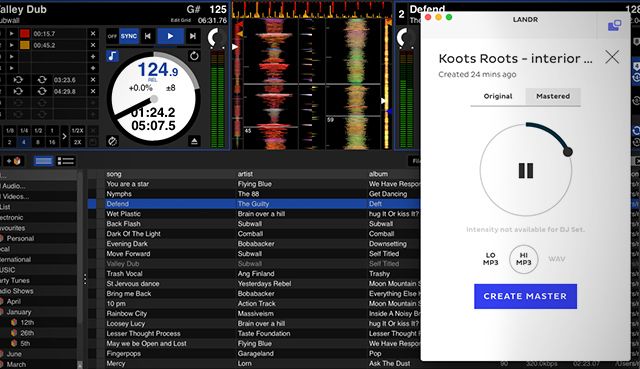
Back in December 2014, a new automated mastering service, LANDR, launched – allowing producers to submit unmastered WAVs and MP3s to an online algorithm that quickly processes the track and produces a basic mastering of their song. Now the company has launched a new service, in partnership with Native Instruments and Serato, that masters full DJ sets. Read on for the details, a listen-for-yourself comparison, and a quick Q+A with the LANDR team.

How Does This All Work?
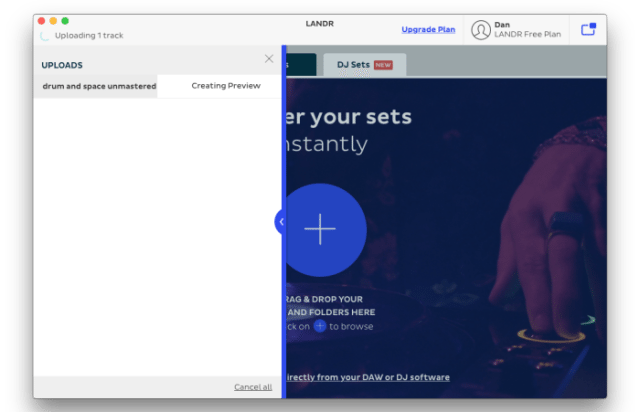
Waiting for a preview in the LANDR app

To get started mastering a DJ set with LANDR, you have to first download their desktop companion app – it’s a small download and is primarily an uploading tool. Something cool that the app enables are Bounce Folders – folders on your computer where the app is watching for new files to appear, and it will automatically upload those files to LANDR when they appear.

  • When you’ve finished a DJ mix, simply upload the audio file with the app
  • LANDR will create a 30 second preview so you can “try before you buy” (DJ sets are free to master as a temporary promotion for the new service) – this takes a few minutes.
  • You choose a final format for your mastered set (WAV, MP3, etc)
  • The file processes with their service and creates a final mastered file to download to your computer.

Before And After: LANDR DJ Mix Mastering Compared

I decided that the best way to get a good idea of how well LANDR’s DJ mix mastering algorithms work would be to run one of my own mixes through it and hear the results firsthand. So here’s the before and after comparison with a drum and bass mix that I recorded last year. Worth noting that on the original, below, I only did some basic mixing adjustments after recording it – primarily to compensate for turning up the gain at one point. Other than that, no mastering was applied to the mix.

Before / No Mastering: 

After (LANDR DJ Set Mastering):

You can also take a look at the two files compared side-by-side in Audacity below – (mastered version on top) and it’s clear that LANDR has done a significant amount of work to the volume and dynamics. But what do YOU notice when comparing the two mixes? Let us know your thoughts in the comments at the end of the article.
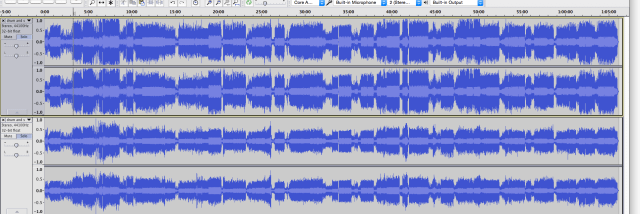
Screen Shot 2016-04-06 at Apr 6.11.40 PM
The two sets compared (LANDR’s version on top)

BONUS: Stem File Mastering

It looks like in addition to simple DJ Set mastering, LANDR is planning on adding Stem file mastering in the “near future” in a new version of the DJ Engine – details are sparse so far, but stay tuned here on DJTT and we’ll have the details as they come emerge.

Want to know how the LANDR track mastering engine stood up to a professional engineer? See our review here.
Tags: dj setLANDRmastering
Share5Tweet3Share
Previous Post

CDR: How Producers Can Test Their Tracks In A Club

Next Post

Routine: ENFERNO Takes DJing Higher with a #LiveRemix

Related Posts

How to produce a track that a mixing engineer won’t hate you for
News + Culture

How to produce a track that a mixing engineer won’t hate you for

September 14, 2022
Why I Mastered This Album With LANDR – To My Surprise
Production Tips

Why I Mastered This Album With LANDR – To My Surprise

February 24, 2019
Need Free Sample Packs? LANDR Launches Artist-Partnered Platform
Production Tips

Need Free Sample Packs? LANDR Launches Artist-Partnered Platform

May 10, 2018
Load More
Next Post
Routine: ENFERNO Takes DJing Higher with a #LiveRemix

Routine: ENFERNO Takes DJing Higher with a #LiveRemix

Want to reach DJTT's audience here?

Shoot an email to advertising@djtechtools.com

DJTT ads
DJTT newsletter
Midi Fighter
Chat with us
  • ABOUT DJTT
  • CONTACT
  • PRIVACY
  • MIDI FIGHTER HELP
  • ABOUT DJTT
  • JOBS
  • CONTACT US
  • ADVERTISE
  • PRIVACY POLICY
  • ACCESSIBILITY STATEMENT

© 2024 DJ Techtools all rights reserved by DJ TechTools on all content unless otherwise noted.

No Result
View All Result
  • Blog
    • DJ Gear
      • DIY Projects
      • Gear Reviews
      • New Products
      • Controllerism
    • Techniques + Tips
      • Beginner DJ
      • Advanced DJ
      • Producer
      • Finger Drummer
    • News + Culture
      • Editorials + Opinions
      • Artist Interviews
      • Performances + Routines
      • How I Play
    • DJ Software Tutorials
      • Serato Tips
      • CDJ Tips
      • Ableton Live Tips
  • Store
    • Run by real DJs, not a corporation
    • DJ Controllers
      • Midi Fighter Twister
      • Midi Fighter Spectra
      • Midi Fighter 64
      • View All
    • Accessories
      • Chroma USB Drive for DJs
      • Chroma Caps
      • Chroma Cables Audio
      • Chroma Cables USB-A
      • Chroma Cables: USB-C
      • DJTT Gift Card
      • Midi Fighter T-Shirt
      • Keyboard Covers
      • Earplugs by V-Moda
    • Production Gear
    • Soundcards & Mixers
  • Community
    • Popular Forums
      • General Discussion
      • Buy & Sell
      • Reviews
      • Mixes
      • Music Production
      • Show Your Setup
      • Off Topic
    • Handy Links
      • New Posts
      • Private Messages
      • Register
      • Search
    • Midi Maps
      • Traktor
      • Ableton
      • Serato DJ
      • Midi Fighter 3D
      • Midi Fighter Twister
      • Midi Fighter Spectra
  • Midi Fighter
  • Chroma

© 2024 DJ Techtools all rights reserved by DJ TechTools on all content unless otherwise noted.

This website uses cookies. By continuing to use this website you are giving consent to cookies being used. Visit our Privacy and Cookie Policy.