DJ TechTools
  • Blog
    • DJ Gear
      • DIY Projects
      • Gear Reviews
      • New Products
      • Controllerism
    • Techniques + Tips
      • Beginner DJ
      • Advanced DJ
      • Producer
      • Finger Drummer
    • News + Culture
      • Editorials + Opinions
      • Artist Interviews
      • Performances + Routines
      • How I Play
    • DJ Software Tutorials
      • Serato Tips
        • Traktor Tips
      • CDJ Tips
      • Ableton Live Tips
  • Store
    • Run by real DJs, not a corporation
    • DJ Controllers
      • Midi Fighter Twister
      • Midi Fighter Spectra
      • Midi Fighter 64
      • View All
    • Accessories
      • Chroma USB Drive for DJs
      • Chroma Caps
      • Chroma Cables Audio
      • Chroma Cables USB-A
      • Chroma Cables: USB-C
      • DJTT Gift Card
      • Midi Fighter T-Shirt
      • Keyboard Covers
      • Earplugs by V-Moda
    • Production Gear
    • Soundcards & Mixers
  • Community
    • Popular Forums
      • General Discussion
      • Buy & Sell
      • Reviews
      • Mixes
      • Music Production
      • Show Your Setup
      • Off Topic
    • Handy Links
      • New Posts
      • Private Messages
      • Register
      • Search
    • Midi Maps
      • Traktor
      • Ableton
      • Serato DJ
      • Midi Fighter 3D
      • Midi Fighter Twister
      • Midi Fighter Spectra
  • Midi Fighter
  • Chroma
No Result
View All Result
DJ TechTools
  • Blog
    • DJ Gear
      • DIY Projects
      • Gear Reviews
      • New Products
      • Controllerism
    • Techniques + Tips
      • Beginner DJ
      • Advanced DJ
      • Producer
      • Finger Drummer
    • News + Culture
      • Editorials + Opinions
      • Artist Interviews
      • Performances + Routines
      • How I Play
    • DJ Software Tutorials
      • Serato Tips
        • Traktor Tips
      • CDJ Tips
      • Ableton Live Tips
  • Store
    • Run by real DJs, not a corporation
    • DJ Controllers
      • Midi Fighter Twister
      • Midi Fighter Spectra
      • Midi Fighter 64
      • View All
    • Accessories
      • Chroma USB Drive for DJs
      • Chroma Caps
      • Chroma Cables Audio
      • Chroma Cables USB-A
      • Chroma Cables: USB-C
      • DJTT Gift Card
      • Midi Fighter T-Shirt
      • Keyboard Covers
      • Earplugs by V-Moda
    • Production Gear
    • Soundcards & Mixers
  • Community
    • Popular Forums
      • General Discussion
      • Buy & Sell
      • Reviews
      • Mixes
      • Music Production
      • Show Your Setup
      • Off Topic
    • Handy Links
      • New Posts
      • Private Messages
      • Register
      • Search
    • Midi Maps
      • Traktor
      • Ableton
      • Serato DJ
      • Midi Fighter 3D
      • Midi Fighter Twister
      • Midi Fighter Spectra
  • Midi Fighter
  • Chroma
No Result
View All Result
DJ TechTools

Decoding Pioneer Pro Link: Connect CDJs To Ableton Link

Jon Feldman by Jon Feldman
July 19, 2017
in Advanced DJ Tips, CDJ Tips
Reading Time: 3 mins read
0
Decoding Pioneer Pro Link: Connect CDJs To Ableton Link
127
SHARES
6.3k
VIEWS
Post on FacebookTweet thisUpvote on Reddit

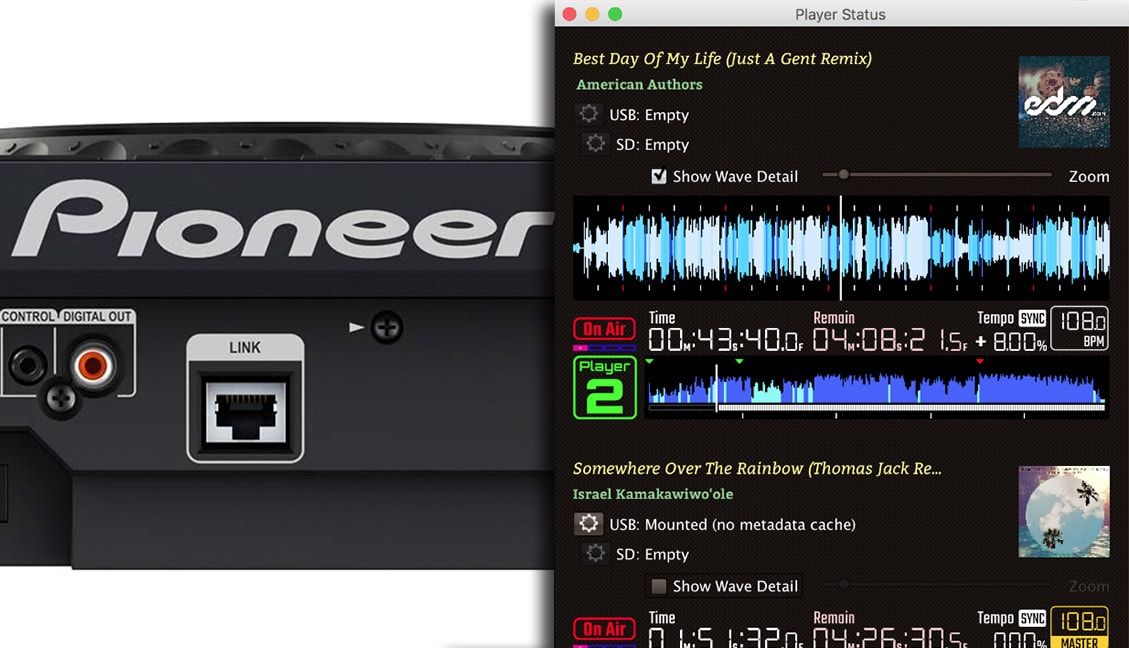
What if Pioneer DJ’s proprietary Pro Link data stream wasn’t hidden, but instead accessible to any device connected to it? In today’s article, guest contributor Jon Feldman takes a closer look at a new project that allows DJs to use the data passed between your CDJs to sync with an Ableton Link Clock or trigger MIDI/OSC messages. Keep reading to start cracking open Pro Link!

What’s The Deal With Pioneer DJ’s Pro Link?

Introduced in 2009, the ethernet-based Pioneer Pro DJ Link streams information between CDJs and Pioneer mixers. A simple ethernet connection allows tempo synchronization and USB/SD card sharing between machines.

It’s easy to share this data within the Pioneer ecosystem, it’s been nearly impossible to use it with other software. This is especially frustrating as Traktor and Serato have added native Ableton Link support, making integrating software solutions a breeze compared with the Pioneer hardware system.

beat-link-trigger: Masquerade Your Computer As A CDJ

The closed ecosystem is totally changed with beat-link-trigger, a small java program written by James Elliott of Deep Symmetry.  Beat-link-trigger registers your computer as a CDJ on the Pro Link network, getting access to all the data shared between the players.  And just like that, you have access to everything a CDJ sees:
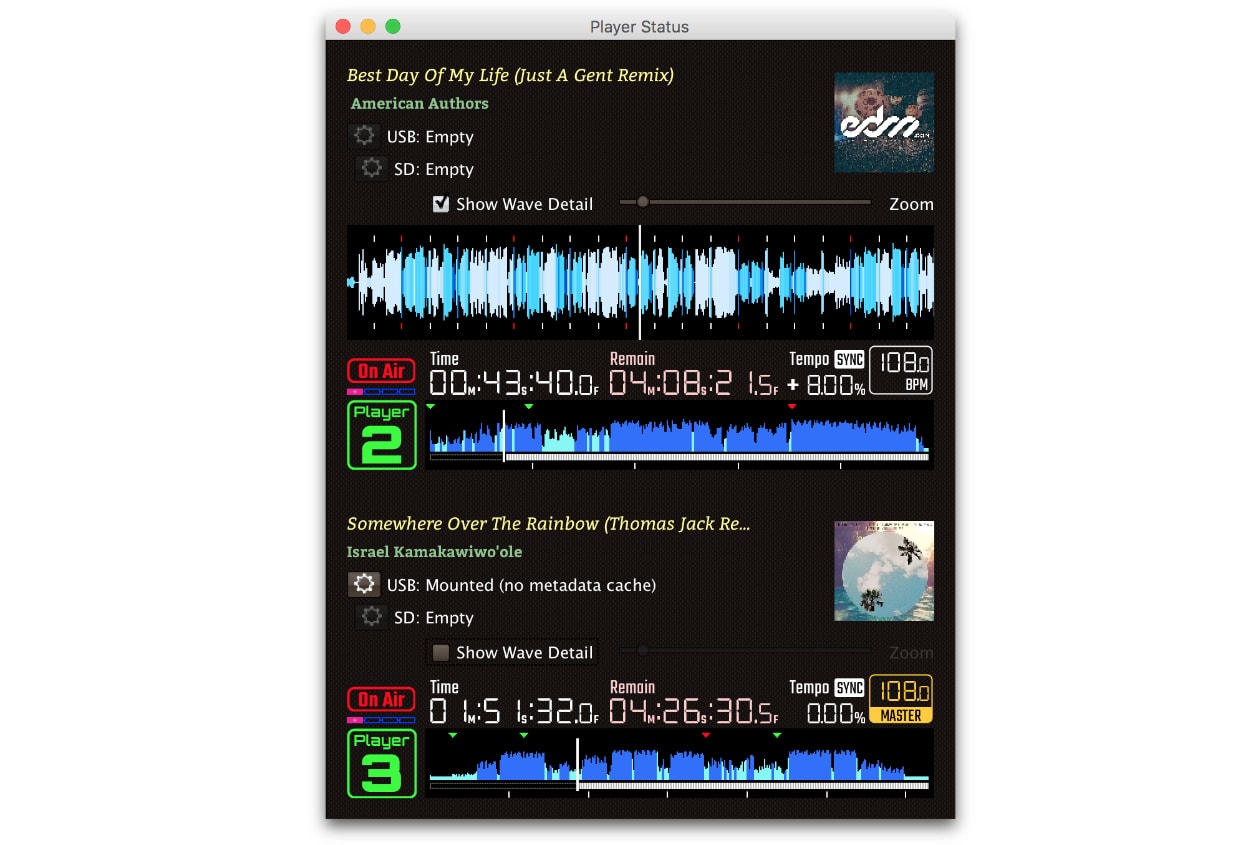
What Can You Do With beat-link-trigger?

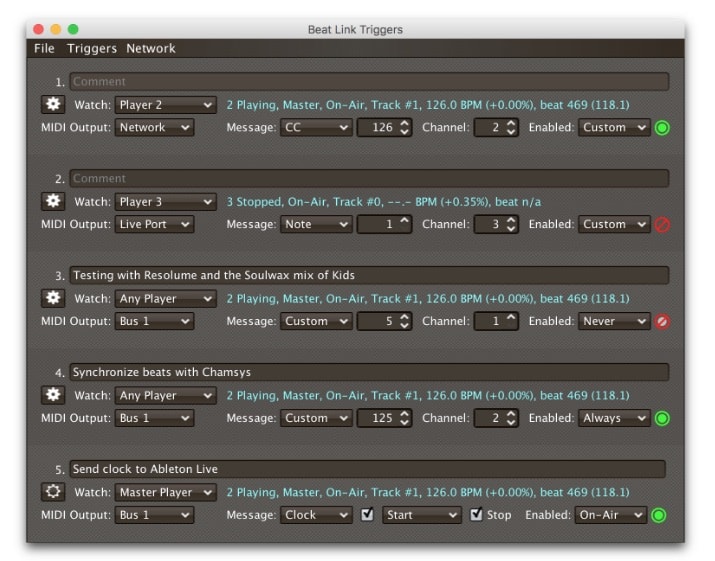
You can do all kinds of wonderful things with the data.  Beat-link-trigger watches for events happening on the network:

  • a player going ‘on air’
  • a tempo change
  • even the name of a song

The app can then trigger events to other devices via MIDI or OSC, opening up a wide range of light and environment based synchronization possibilities. Beat-link-trigger allows you to use a java-derived programming language to trigger on very specific Pro Link events. You can also use the data to synchronize an Ableton Link session (note: the ‘real’ CDJs are always the master) – and coordinate other instruments or drum machines, up to the bar.
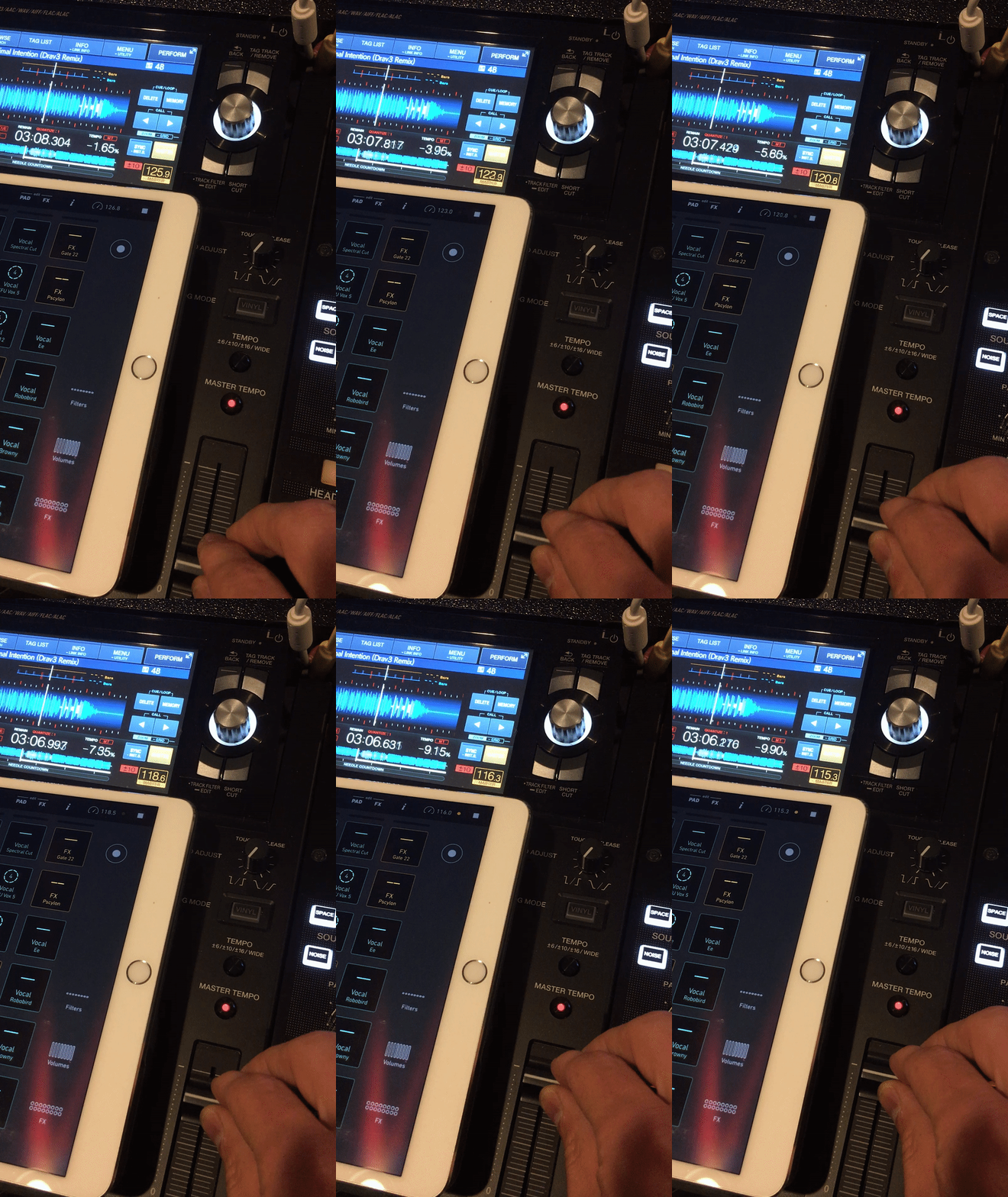
As an example, here’s a CDJ controlling the tempo of Novation Launchpad, via Ableton Link:
I’ve had success generating MIDI messages which I can translate with Lightkey Pro on my Mac, allowing me to create instant beat-synchronized lighting effects!

Requirements + Setup

Setting beat-link-trigger requires that you have Java 8 installed on your machine, and that your computer is on the same ethernet network as your CDJs. Download the latest version here and double-click it to run. The software logs onto your Pro Link network as a CDJ and starts listening for events, and triggering responses over Midi or OSC.

To send Ableton Link clock data, you’ll need a second piece of software, Carabiner, which is also available from Deep Symmetry and takes the clock output from beat-link-trigger and allows it to be set as the Link master. The software has a compiled version for MacOS, but only source code for other platforms. Once running, beat-link-trigger sends timing data to Carabiner, which shares the timing data to anything which supports Ableton Link.

Best of all, development on the project is very active, and there new features are being added all the time. It’s never been easier to add external hardware to your set!
Editor’s Warning! Using any type of under-development tool like this should be tested very throughly before relying on it for your next big DJ set. There’s also always a chance that Pioneer DJ could close the loopholes that allow this to work in a future firmware update to CDJs – so update with caution.
Tags: Ableton Linkbeat-link-triggercdjpro linksyncing
Share50Tweet32Share
Previous Post

B2B Games To Play With Your DJ Friends

Next Post

Why SoundCloud Bursting Would Be A Loss For DJs, Producers

Related Posts

MIXO wants to transform DJ Library Management with their new platform
Controllerism

MIXO wants to transform DJ Library Management with their new platform

May 2, 2023
Engine DJ 2.0 arrives with wireless Ableton LINK,  onboard lighting control, new UI + more
DJ Gear

Engine DJ 2.0 arrives with wireless Ableton LINK, onboard lighting control, new UI + more

October 5, 2021
CDJ-3000 a closer look
DJ Equipment / Accessories

CDJ-3000 vs 2020: review + analysis of Pioneer DJ’s new player

October 19, 2020
Load More
Next Post
Why SoundCloud Bursting Would Be A Loss For DJs, Producers

Why SoundCloud Bursting Would Be A Loss For DJs, Producers

Want to reach DJTT's audience here?

Shoot an email to advertising@djtechtools.com

DJTT ads
DJTT newsletter
Midi Fighter
Chat with us
  • ABOUT DJTT
  • CONTACT
  • PRIVACY
  • MIDI FIGHTER HELP
  • ABOUT DJTT
  • JOBS
  • CONTACT US
  • ADVERTISE
  • PRIVACY POLICY
  • ACCESSIBILITY STATEMENT

© 2024 DJ Techtools all rights reserved by DJ TechTools on all content unless otherwise noted.

No Result
View All Result
  • Blog
    • DJ Gear
      • DIY Projects
      • Gear Reviews
      • New Products
      • Controllerism
    • Techniques + Tips
      • Beginner DJ
      • Advanced DJ
      • Producer
      • Finger Drummer
    • News + Culture
      • Editorials + Opinions
      • Artist Interviews
      • Performances + Routines
      • How I Play
    • DJ Software Tutorials
      • Serato Tips
      • CDJ Tips
      • Ableton Live Tips
  • Store
    • Run by real DJs, not a corporation
    • DJ Controllers
      • Midi Fighter Twister
      • Midi Fighter Spectra
      • Midi Fighter 64
      • View All
    • Accessories
      • Chroma USB Drive for DJs
      • Chroma Caps
      • Chroma Cables Audio
      • Chroma Cables USB-A
      • Chroma Cables: USB-C
      • DJTT Gift Card
      • Midi Fighter T-Shirt
      • Keyboard Covers
      • Earplugs by V-Moda
    • Production Gear
    • Soundcards & Mixers
  • Community
    • Popular Forums
      • General Discussion
      • Buy & Sell
      • Reviews
      • Mixes
      • Music Production
      • Show Your Setup
      • Off Topic
    • Handy Links
      • New Posts
      • Private Messages
      • Register
      • Search
    • Midi Maps
      • Traktor
      • Ableton
      • Serato DJ
      • Midi Fighter 3D
      • Midi Fighter Twister
      • Midi Fighter Spectra
  • Midi Fighter
  • Chroma

© 2024 DJ Techtools all rights reserved by DJ TechTools on all content unless otherwise noted.

This website uses cookies. By continuing to use this website you are giving consent to cookies being used. Visit our Privacy and Cookie Policy.